Best CAPTCHA Solver APIs for Automation in 2026
Choosing the right CAPTCHA Solver API can be difficult when you are building an automated testing system, RPA workflow, browser automation application, or another authorized automation project.
There are many factors to consider beyond price.
A good CAPTCHA Solver API should provide the CAPTCHA types you need, reliable processing, clear documentation, reasonable pricing, and an API that is easy to integrate with your existing application.
In this guide, we will explain what to look for when choosing a CAPTCHA Solver API in 2026, compare the most important features, and show you how to evaluate a provider for your project.
Important: CAPTCHA-solving services should only be used on websites and systems where you have permission to automate or test. Do not use these services to bypass security controls, access accounts without authorization, or violate website terms of service.
What Is a CAPTCHA Solver API?
A CAPTCHA Solver API is a service that provides programmatic CAPTCHA-solving capabilities through an API.
Instead of manually handling a supported CAPTCHA challenge, an authorized application can submit a task to the API and retrieve the result.
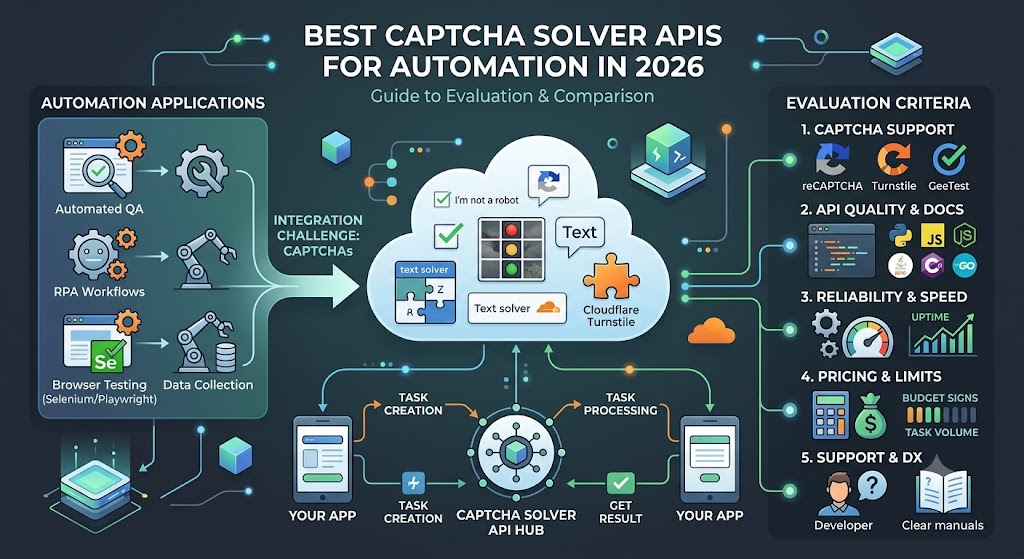
A typical workflow looks like this:
Your Application
      ↓
Create Task
      ↓
CAPTCHA Solver API
      ↓
Task Processing
      ↓
Get Result
      ↓
Your Application
This architecture can be integrated into applications built with:
- Python
- JavaScript
- Node.js
- PHP
- Java
- C#
- Go
The exact API structure depends on the provider and CAPTCHA type.
Why Use a CAPTCHA Solver API?
CAPTCHA challenges can interrupt automated workflows.
For authorized testing and automation, an API can provide a programmatic interface that fits into an existing application.
Common use cases include:
- Automated QA testing
- RPA workflows
- Internal automation
- Staging environment testing
- Browser automation
- Application integration testing
- Authorized data collection
The main advantage is that developers can integrate CAPTCHA handling into their software instead of relying entirely on manual interaction.
What Makes the Best CAPTCHA Solver API?
There is no single CAPTCHA API that is best for every project.
The right choice depends on your requirements.
However, several characteristics are important when comparing providers.
1. CAPTCHA Type Support
The first question should be:
Does the provider support the CAPTCHA technology used by my application?
Common CAPTCHA technologies include:
- reCAPTCHA v2
- reCAPTCHA v3
- Cloudflare Turnstile
- GeeTest
- DataDome
- AWS WAF
- Image CAPTCHA
- OCR-based CAPTCHA
If the API does not support the CAPTCHA type you need, its price and other features do not matter.
Always verify the provider's current supported CAPTCHA list before purchasing credits.
2. API Documentation
Good documentation can significantly reduce development time.
Look for documentation that includes:
- Authentication
- API endpoints
- Request parameters
- Response examples
- Task creation
- Task result retrieval
- Error codes
- Rate limits
- Code examples
A well-documented API is especially valuable for developers integrating the service for the first time.
3. Programming Language Support
Most CAPTCHA APIs use HTTP requests, so they can generally be integrated with many programming languages.
However, official examples can make integration much easier.
Useful examples include:
Python
Node.js
PHP
Java
C#
Go
If your development team primarily uses Python, for example, having a clear Python integration guide can save significant development time.
4. API Reliability
Price is important, but reliability is equally important.
Imagine an application processing thousands of authorized testing tasks.
If the API frequently becomes unavailable, the automation workflow may fail.
When evaluating reliability, consider:
- API uptime
- Average response time
- Error rate
- Task processing time
- Service status
- Retry behavior
- Support response
A slightly more expensive API can sometimes provide better value if it is significantly more reliable.
5. Processing Speed
Processing time can be important for automation workflows.
If your application has to wait too long for every task, the overall workflow can become inefficient.
For example:
Task 1 → 5 seconds
Task 2 → 7 seconds
Task 3 → 6 seconds
Task 4 → 4 seconds
You should consider the average processing time rather than focusing only on the fastest individual result.
6. Pricing
Pricing is one of the most important factors when comparing CAPTCHA Solver APIs.
However, the cheapest advertised price does not always mean the lowest actual cost.
You should evaluate:
- Price per task
- Price by CAPTCHA type
- Minimum deposit
- Credit expiration
- Failed-task policy
- Volume discounts
- Payment options
A useful calculation is:
Effective Cost
=
Total Spending ÷ Successful Results
This provides a more realistic comparison between providers.
7. Rate Limits
API rate limits determine how many requests your application can send within a certain period.
For small projects, rate limits may not be a major concern.
For high-volume automation, they can become critical.
Before choosing a provider, estimate:
Tasks per minute
Tasks per hour
Tasks per day
Tasks per month
Then compare these requirements with the provider's API limits.
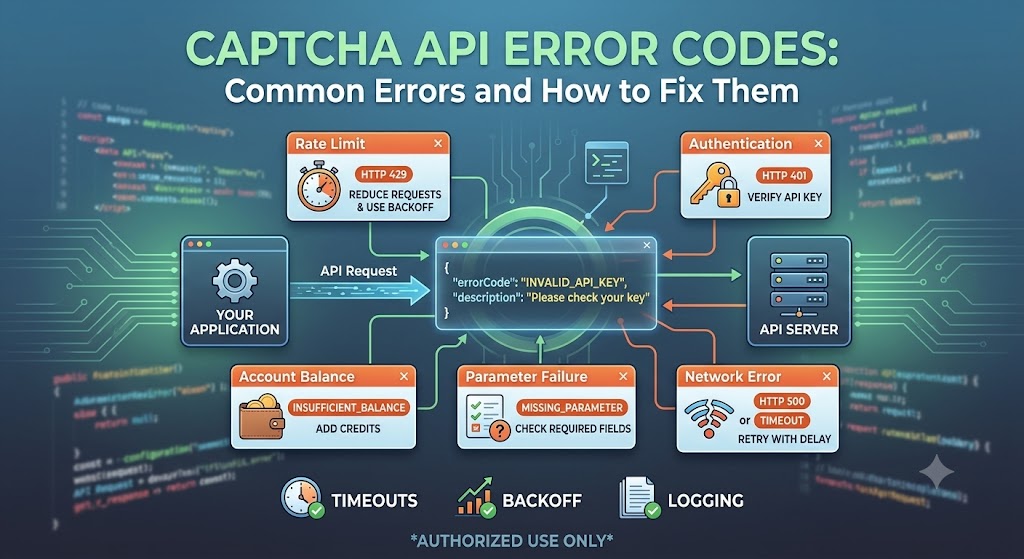
8. Error Handling
Reliable error handling is essential for production applications.
A good API should provide useful error information when something goes wrong.
Common issues can include:
- Invalid API key
- Invalid parameters
- Insufficient balance
- Unsupported CAPTCHA type
- Timeout
- Rate limit
- Temporary service error
Clear error codes make it easier to diagnose problems.
9. Developer Experience
The overall developer experience can have a major impact on the cost of integration.
A provider with:
- Clear documentation
- Simple API structure
- Code examples
- Good error messages
- Fast support
may be easier to work with than a provider with a slightly lower price but poor documentation.
CAPTCHA Solver API Comparison
When comparing providers, create a feature matrix based on your actual requirements.
| Feature | Provider A | Provider B | Provider C |
|---|---|---|---|
| reCAPTCHA v2 | ✓ | ✓ | ✓ |
| reCAPTCHA v3 | ✓ | ✓ | — |
| Cloudflare Turnstile | ✓ | ✓ | ✓ |
| GeeTest | ✓ | — | ✓ |
| API access | ✓ | ✓ | ✓ |
| Python examples | ✓ | ✓ | ✓ |
| Node.js examples | ✓ | ✓ | ✓ |
| Pay-as-you-go | ✓ | ✓ | — |
| Volume pricing | ✓ | ✓ | ✓ |
| Error documentation | ✓ | ✓ | ✓ |
| Support | Check | Check | Check |
The exact availability of each feature can change, so always verify the current provider documentation.
Best CAPTCHA Solver API for Python
Python is one of the most popular languages for automation and API integration.
A typical Python workflow looks like this:
import requests

payload = {
    "clientKey": "YOUR_API_KEY",
    "task": {
        # CAPTCHA-specific parameters
    }
}

response = requests.post(
    "YOUR_API_ENDPOINT",
    json=payload,
    timeout=30
)

response.raise_for_status()

data = response.json()

print(data)
The exact endpoint and task parameters depend on the CAPTCHA type and API provider.
When evaluating a CAPTCHA API for Python, look for:
- Python examples
- REST API documentation
- JSON responses
- Clear authentication instructions
- Error codes
- Task status documentation
A provider that makes these details easy to understand can reduce development time considerably.
Best CAPTCHA Solver API for Node.js
Node.js is another common choice for web automation and backend applications.
A basic API request can be structured like this:
const response = await fetch(
    "YOUR_API_ENDPOINT",
    {
        method: "POST",
        headers: {
            "Content-Type": "application/json"
        },
        body: JSON.stringify({
            clientKey: process.env.ALLCAPTCHA_API_KEY,
            task: {
                // CAPTCHA-specific parameters
            }
        })
    }
);

const data = await response.json();

console.log(data);
When choosing a provider for Node.js, documentation and API consistency are particularly important.
Best CAPTCHA Solver API for Selenium
Selenium is widely used for browser testing and automation.
A CAPTCHA service can potentially become one component of an authorized Selenium workflow.
A simplified architecture could look like:
Selenium
   ↓
Open Test Website
   ↓
CAPTCHA Detected
   ↓
CAPTCHA API
   ↓
Task Result
   ↓
Continue Authorized Test
However, production testing should preferably use dedicated test configurations whenever possible.
For websites you own, a staging environment with test CAPTCHA behavior can be safer and more reliable than interacting with production security systems.
Best CAPTCHA Solver API for Playwright
Playwright is another popular browser automation framework.
It supports:
- Chromium
- Firefox
- WebKit
Developers can use Playwright for automated browser testing and application workflows.
When evaluating a CAPTCHA API for Playwright-based projects, look for:
- Fast task processing
- Stable API responses
- Clear documentation
- Easy HTTP integration
- Reliable error handling
The API itself generally does not need to be tied to a specific browser automation framework because most services communicate through HTTP.
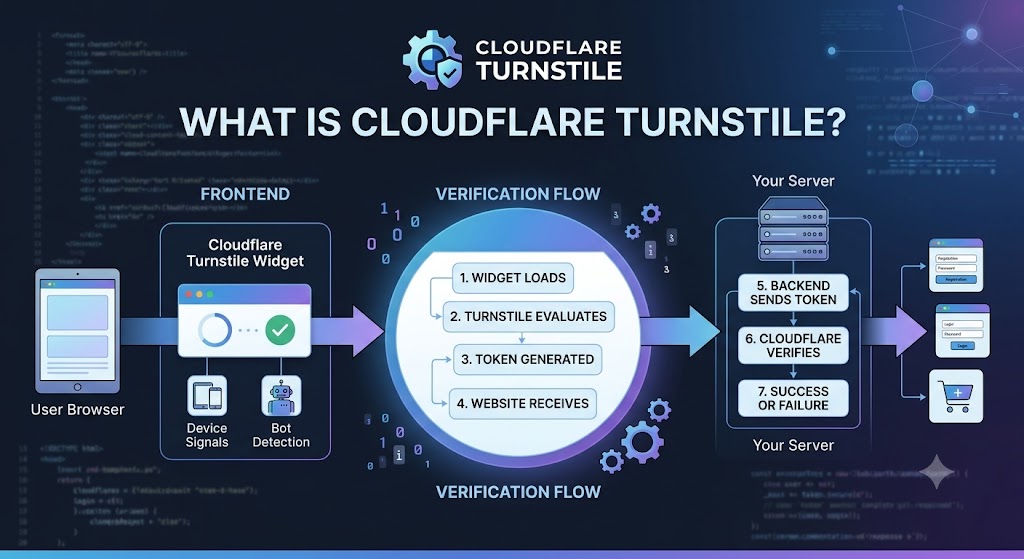
Best CAPTCHA Solver API for Cloudflare Turnstile
Cloudflare Turnstile is a CAPTCHA alternative designed to provide verification while reducing friction for legitimate users.
If your authorized testing environment uses Turnstile, verify that your selected provider explicitly supports the required Turnstile workflow.
Important factors include:
- Supported Turnstile configuration
- API documentation
- Processing time
- Pricing
- Reliability
- Error handling
Do not assume that an API supporting reCAPTCHA automatically supports every other CAPTCHA technology.
Best CAPTCHA Solver API for reCAPTCHA v2
reCAPTCHA v2 is one of the most widely recognized CAPTCHA implementations.
When comparing providers for reCAPTCHA v2, check whether they support the specific type used by your authorized testing environment.
You should also compare:
- Cost
- Processing time
- Success rate
- API limits
- Documentation
- Support
If you are new to reCAPTCHA, understanding the difference between reCAPTCHA v2 and v3 can also help you select the right integration strategy.
Best CAPTCHA Solver API for reCAPTCHA v3
reCAPTCHA v3 works differently from reCAPTCHA v2 because it uses risk scoring rather than a traditional visible CAPTCHA challenge.
Therefore, developers should pay close attention to the exact API workflow required for their testing environment.
Before choosing a service, verify:
- Supported reCAPTCHA v3 workflow
- Required parameters
- Result format
- API limits
- Pricing
- Documentation
Do not select a provider based solely on the phrase "supports reCAPTCHA."
The specific version and implementation matter.
AllCaptcha as a CAPTCHA API Option
AllCaptcha provides API-based CAPTCHA-solving services for developers working with supported CAPTCHA technologies.
The platform is designed around programmatic integration, making it suitable for developers who want to connect CAPTCHA processing with their existing applications.
Depending on your project requirements, you can evaluate AllCaptcha based on:
- Supported CAPTCHA types
- API architecture
- Pricing
- Documentation
- Processing speed
- API reliability
- Programming language integration
- Usage limits
Before starting a production integration, review the current AllCaptcha documentation and pricing information to confirm the services and conditions available for your project.
How to Compare AllCaptcha With Other Providers
A fair comparison should use the same criteria for every provider.
For example:
| Category | Weight |
|---|---|
| CAPTCHA support | 25% |
| Price | 20% |
| Reliability | 20% |
| Processing speed | 15% |
| Documentation | 10% |
| API limits | 5% |
| Customer support | 5% |
You can then score each provider.
For example:
Provider A
CAPTCHA support: 9/10
Price: 8/10
Reliability: 9/10
Speed: 8/10
Documentation: 9/10
This approach provides a more useful comparison than simply choosing the provider with the lowest price.
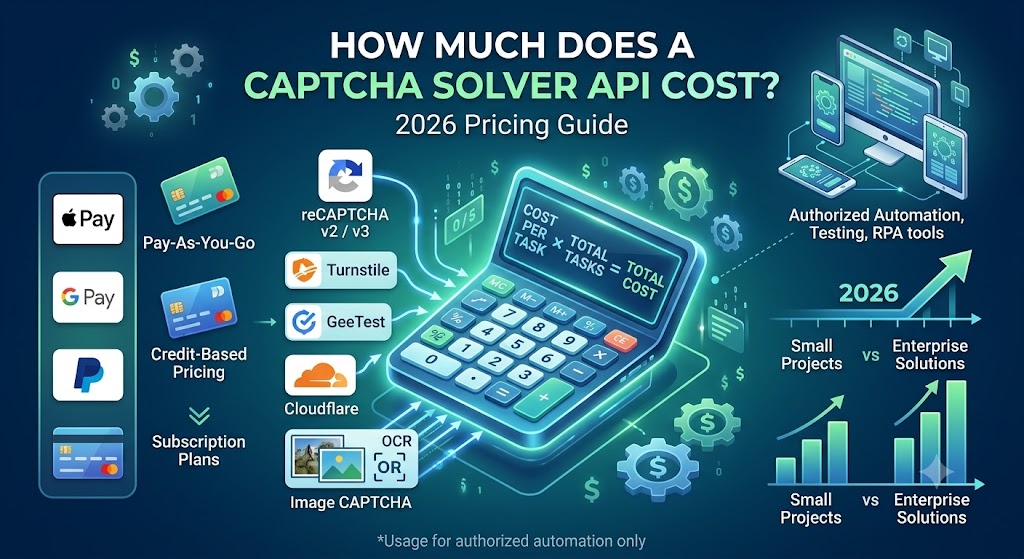
How Much Does a CAPTCHA Solver API Cost?
CAPTCHA API pricing varies by provider and CAPTCHA type.
Several factors influence the final cost:
CAPTCHA Type
+
Task Volume
+
Success Rate
+
Retries
+
Volume Discounts
=
Effective Cost
For a small project, pay-as-you-go pricing may be attractive.
For a large project, volume-based pricing may provide better value.
Before purchasing credits, estimate your expected monthly usage.
How to Choose the Best CAPTCHA Solver API
Use the following checklist before making a decision.
Step 1: Identify Your CAPTCHA Type
Determine exactly which CAPTCHA your application needs to handle.
Step 2: Estimate Usage
Calculate expected:
- Daily tasks
- Monthly tasks
- Peak traffic
- Average requests per minute
Step 3: Compare Pricing
Look beyond the advertised price.
Calculate the estimated monthly cost.
Step 4: Check API Documentation
Make sure your developers can understand the integration process.
Step 5: Test Reliability
If possible, test the API before committing to a large purchase.
Step 6: Check Limits
Verify:
- Rate limits
- Concurrent tasks
- API request limits
- Account limits
Step 7: Review Support
For production applications, responsive technical support can be valuable.
Common Mistakes When Choosing a CAPTCHA API
Choosing Based Only on Price
The cheapest provider may not provide the best overall value.
Ignoring CAPTCHA Type
A provider may support reCAPTCHA but not the specific CAPTCHA technology your application requires.
Not Testing the API
Before building a large integration, test the API with a small authorized workload.
Ignoring Rate Limits
High-volume applications can quickly encounter rate limits.
Not Monitoring Usage
Unexpected retries or automation loops can increase API consumption.
Frequently Asked Questions
What is the best CAPTCHA Solver API in 2026?
There is no single best API for every project. The best option depends on supported CAPTCHA types, pricing, reliability, processing speed, API limits, and your specific automation requirements.
What should I look for in a CAPTCHA Solver API?
Look for broad CAPTCHA support, reliable processing, clear documentation, reasonable pricing, appropriate rate limits, useful error messages, and good developer support.
Which CAPTCHA API is best for Python?
The best option depends on your requirements. Choose a provider with clear REST API documentation, Python examples, reliable responses, and support for the CAPTCHA types used in your authorized project.
Which CAPTCHA API is best for Selenium?
Choose a provider that supports the CAPTCHA type used by your authorized test environment and provides reliable API integration. For websites you control, dedicated CAPTCHA test configurations are generally preferable.
Is the cheapest CAPTCHA Solver API the best?
Not necessarily. Success rate, reliability, retries, processing time, and support can have a significant impact on the actual cost of your project.
Can CAPTCHA APIs be used with Playwright?
Most HTTP-based CAPTCHA APIs can be integrated with applications using Playwright because the API communication is separate from the browser automation framework.
How do I compare CAPTCHA Solver APIs?
Compare providers using the same criteria: CAPTCHA support, price, success rate, speed, reliability, documentation, rate limits, and customer support.
Final Thoughts
Choosing the best CAPTCHA Solver API in 2026 is not simply a matter of finding the lowest price.
A reliable evaluation should consider the complete picture:
- CAPTCHA compatibility
- API quality
- Processing speed
- Reliability
- Pricing
- Success rate
- Rate limits
- Documentation
- Developer experience
- Technical support
For small projects, simplicity and pay-as-you-go pricing may be the most important factors.
For high-volume applications, reliability, performance, limits, and volume pricing can become much more important.
If you are evaluating AllCaptcha or another CAPTCHA API provider, start by identifying your exact CAPTCHA type and expected task volume. Then compare providers using the same criteria and test the API with an authorized workload before moving to production.
A well-chosen API can make your testing and automation architecture easier to maintain, more predictable, and more scalable.