CAPTCHA API Error Codes: Common Errors and How to Fix Them
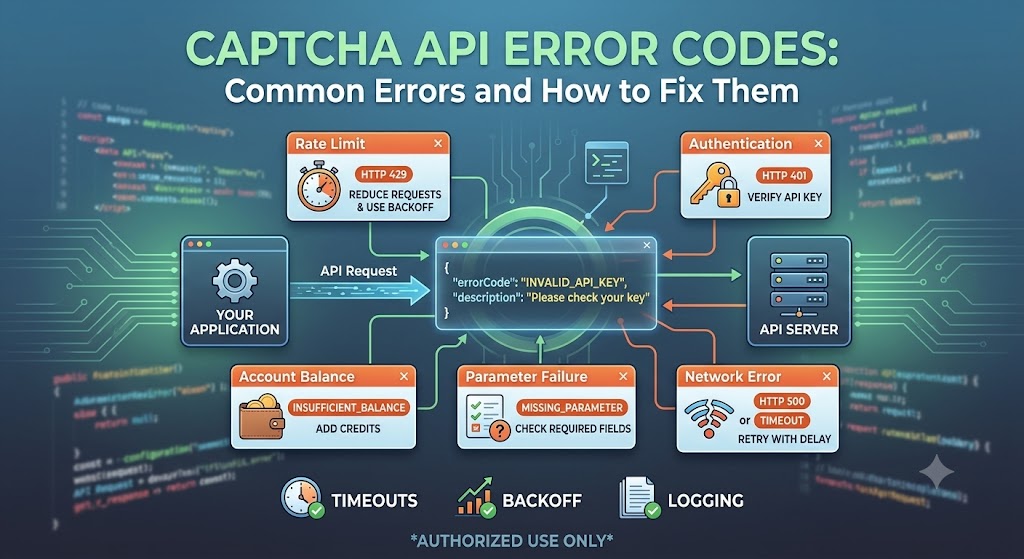
When integrating a CAPTCHA Solver API into an application, developers may encounter different types of errors.
An API request can fail because of an invalid API key, incorrect parameters, an unsupported CAPTCHA type, insufficient balance, rate limits, network problems, or an expired task.
Understanding CAPTCHA API error codes can make troubleshooting much easier and help developers build more reliable automation and testing workflows.
In this guide, we will explain the most common CAPTCHA API errors, what they mean, how to troubleshoot them, and how to design better error handling for your application.
Important: CAPTCHA-solving services should only be used with websites, applications, and systems that you own or are explicitly authorized to test or automate.
What Is a CAPTCHA API Error?
A CAPTCHA API error occurs when an API request cannot be processed successfully.
For example, your application may send a request like:
Create CAPTCHA Task
        ↓
API Server
        ↓
Validation
        ↓
Error
The API may return information such as:
{
  "errorId": 1,
  "errorCode": "INVALID_API_KEY",
  "errorDescription": "API key is invalid"
}
The exact response format and error codes depend on the API provider.
A good integration should never assume that every request will succeed.
Instead, your application should detect errors, log useful information, and respond appropriately.
Why CAPTCHA API Error Handling Matters
A basic integration may work correctly during initial testing.
However, production applications can encounter many unexpected situations.
For example:
- API credentials may expire or change
- Account balance may become insufficient
- A CAPTCHA type may not be supported
- A task may take longer than expected
- The target website may change
- API requests may exceed rate limits
- Network connections may fail
- Invalid parameters may be submitted
Without proper error handling, your application may:
- Stop unexpectedly
- Retry requests indefinitely
- Waste API credits
- Create duplicate tasks
- Return confusing errors to users
- Make debugging difficult
Good error handling makes the integration more stable and easier to maintain.
Common CAPTCHA API Error Categories
Although different providers use different error codes, most CAPTCHA API errors can be grouped into several categories.
| Error Category | Typical Cause | Recommended Action |
|---|---|---|
| Authentication | Invalid API key | Check credentials |
| Account | Insufficient balance | Add credits or review account |
| Validation | Missing or invalid parameter | Check request data |
| CAPTCHA Type | Unsupported task type | Check API documentation |
| Rate Limit | Too many requests | Slow down requests |
| Task | Task failed or expired | Handle task state |
| Network | Connection failure | Retry with backoff |
| Server | API provider issue | Retry later |
| Configuration | Incorrect site data | Verify configuration |
The exact error names and codes depend on the API provider.
1. Invalid API Key
One of the most common CAPTCHA API errors is an invalid API key.
A typical response might look like:
{
  "errorId": 1,
  "errorCode": "INVALID_API_KEY",
  "errorDescription": "API key is invalid"
}
Possible Causes
Your API key may be:
- Incorrect
- Expired
- Revoked
- Copied incorrectly
- Missing
- Associated with the wrong environment
How to Fix It
First, verify that your application is loading the correct API key.
For example:
import os

API_KEY = os.getenv("CAPTCHA_API_KEY")

if not API_KEY:
    raise RuntimeError("CAPTCHA API key is missing")
Avoid placing the API key directly inside source code when possible.
Use environment variables or a secure secrets manager.
2. Missing API Key
Another common problem occurs when the request does not contain an API key.
For example:
{
  "errorCode": "MISSING_API_KEY"
}
How to Fix It
Check the request payload or authentication header required by your API provider.
For example, an API may require:
{
  "clientKey": "YOUR_API_KEY"
}
Or it may use an HTTP header such as:
Authorization: Bearer YOUR_API_KEY
The correct format depends on the API documentation.
Always verify the authentication method before changing your implementation.
3. Insufficient Balance
A CAPTCHA-solving API usually requires credits or account balance to process tasks.
If your account does not have enough balance, a request may fail.
A response could look conceptually like:
{
  "errorCode": "INSUFFICIENT_BALANCE",
  "errorDescription": "Not enough balance"
}
How to Fix It
Check:
- Current account balance
- Task cost
- CAPTCHA type
- Account billing status
- Minimum required balance
If your application processes a large number of tasks, monitor your balance programmatically when the provider supports it.
4. Invalid CAPTCHA Type
Different CAPTCHA systems require different API task types.
For example, an API may support some of the following:
- reCAPTCHA
- hCaptcha
- Cloudflare Turnstile
- Image CAPTCHA
- Other supported CAPTCHA types
If your application submits an unsupported task type, the API may reject the request.
Example
{
  "errorCode": "UNSUPPORTED_TASK",
  "errorDescription": "Unsupported CAPTCHA task"
}
How to Fix It
Check the API documentation and confirm:
- The CAPTCHA type
- The task type
- Required parameters
- Supported domains or configurations
Do not assume that every CAPTCHA provider supports every CAPTCHA type.
5. Missing Required Parameter
An API request can fail when a required field is missing.
For example:
{
  "clientKey": "YOUR_API_KEY",
  "task": {
    "type": "SomeCaptchaTask"
  }
}
If the API requires another field, such as a site key or page URL, the request may fail validation.
A response could look like:
{
  "errorCode": "MISSING_PARAMETER"
}
How to Fix It
Compare your request against the current API documentation.
Create a checklist of required parameters:
API Key
Task Type
Site Key
Page URL
Additional Parameters
Then validate the data before sending the request.
6. Invalid Site Key
Some CAPTCHA integrations require a site key.
If the site key is incorrect, the CAPTCHA task may fail.
Common causes include:
- Typo in the site key
- Wrong website
- Wrong CAPTCHA type
- Test key used in production
- Production key used for another domain
How to Fix It
Verify the site key directly from the authorized application's CAPTCHA configuration.
Do not copy a site key from a different environment.
For example:
Development
    ↓
Development Site Key

Staging
    ↓
Staging Site Key

Production
    ↓
Production Site Key
7. Invalid Page URL
Some CAPTCHA API requests require the URL of the page where the CAPTCHA is located.
An incorrect URL can cause task validation to fail.
Possible problems include:
- Incorrect protocol
- Wrong domain
- Incorrect path
- URL typo
- Unsupported page configuration
For example:
https://example.com/login
is different from:
https://example.com/register
The correct page URL should be provided according to the API's requirements.
8. Task Creation Failed
Many CAPTCHA APIs use an asynchronous task model.
The typical workflow looks like:
Create Task
    ↓
Task ID
    ↓
Wait
    ↓
Get Result
    ↓
Solution / Error
The task creation request may fail before a task ID is generated.
For example:
{
  "errorCode": "TASK_CREATION_FAILED"
}
How to Troubleshoot
Check:
- API authentication
- Request format
- CAPTCHA type
- Required parameters
- Account balance
- API availability
Do not immediately retry the request many times.
If the error is caused by invalid parameters, repeated requests will not solve the problem.
9. Task Not Found
After creating a task, your application usually receives a task ID.
Your application may later request:
Get Task Result
If the task ID is incorrect, the API may return a task-not-found error.
Possible causes:
- Incorrect task ID
- Task ID truncated
- Wrong API environment
- Task no longer exists
- Request sent to the wrong endpoint
Example
{
  "errorCode": "TASK_NOT_FOUND"
}
How to Fix It
Store the complete task ID returned by the API.
For example:
task_id = response["taskId"]

print("Created task:", task_id)
Then use exactly that value when checking the result.
10. Task Expired
Some CAPTCHA tasks have a limited lifetime.
If your application waits too long before requesting the result, the task may expire.
For example:
Task Created
     ↓
Wait
     ↓
Too Much Time
     ↓
Task Expired
How to Fix It
Implement sensible polling intervals and stop polling when the task reaches a terminal state.
Do not continuously request the same task without a timeout.
11. CAPTCHA Solving Failed
Sometimes a task is successfully created but the CAPTCHA cannot be solved.
This is different from an API connection error.
The API itself may be working correctly while the specific task fails.
Possible reasons include:
- CAPTCHA changed
- Invalid task parameters
- Target page changed
- Temporary service issue
- Unsupported CAPTCHA configuration
Your application should distinguish between:
API Request Failed
and:
CAPTCHA Task Failed
These are two different problems and may require different actions.
12. Rate Limit Exceeded
API providers may limit the number of requests that can be sent during a specific period.
If your application sends too many requests, it may receive a rate-limit error.
For example:
{
  "errorCode": "RATE_LIMIT_EXCEEDED"
}
Why Does This Happen?
Common causes include:
- Too many concurrent tasks
- Aggressive polling
- Large automation workloads
- Multiple servers sharing one API key
- Retry loops
How to Fix It
Implement:
- Request throttling
- Exponential backoff
- Concurrency limits
- Reasonable polling intervals
For example:
Request
 ↓
Wait
 ↓
Retry
 ↓
Wait Longer
 ↓
Retry
Avoid:
Request → Retry → Retry → Retry → Retry
with no delay.
13. Network Timeout
Not every failure comes from the CAPTCHA API itself.
Your application may fail to connect because of:
- Internet problems
- DNS issues
- Firewall configuration
- Proxy problems
- Temporary network congestion
- Server timeout
A good application should distinguish network errors from API errors.
For example:
import requests

try:
    response = requests.post(
        API_URL,
        json=payload,
        timeout=30
    )

except requests.Timeout:
    print("API request timed out")

except requests.RequestException as exc:
    print("Network error:", exc)
This allows your application to handle connectivity problems separately from API validation errors.
14. HTTP 400 Errors
HTTP 400 generally indicates that the server could not process the request because the request was invalid.
Possible causes include:
- Invalid JSON
- Missing parameters
- Incorrect parameter format
- Invalid task type
For example:
HTTP 400 Bad Request
How to Fix It
Inspect:
- Request body
- Headers
- Content-Type
- Required parameters
- Parameter data types
A useful debugging technique is to log the request structure while removing sensitive credentials.
15. HTTP 401 Errors
HTTP 401 usually indicates an authentication problem.
Possible causes:
- Missing API key
- Invalid API key
- Invalid authentication header
- Expired credentials
Check the API's authentication documentation.
16. HTTP 403 Errors
HTTP 403 generally means that the server understood the request but refused to authorize it.
Possible causes include:
- Account restrictions
- Permission problems
- IP restrictions
- Invalid credentials
- Security policies
The exact meaning depends on the API provider.
17. HTTP 429 Errors
HTTP 429 commonly means:
Too Many Requests
This is often associated with rate limiting.
For example:
HTTP 429 Too Many Requests
Your application should avoid immediately sending hundreds of additional requests.
Instead, use backoff.
A simplified strategy could be:
import time

for attempt in range(3):

    response = make_request()

    if response.ok:
        break

    wait_time = 2 ** attempt
    time.sleep(wait_time)
The exact retry strategy should be adapted to the API provider's documented limits.
18. HTTP 500 Errors
HTTP 500 indicates an internal server error.
This may be caused by a temporary issue on the API provider's side.
If the request itself is valid, retrying after a delay may be appropriate.
However, avoid unlimited retries.
A reasonable strategy is:
Attempt 1
   ↓
Wait
   ↓
Attempt 2
   ↓
Wait Longer
   ↓
Attempt 3
   ↓
Stop and Log
CAPTCHA API Error Handling Best Practices
A reliable CAPTCHA API integration should treat errors as expected events rather than exceptional situations.
1. Validate Before Sending
Check required fields before making an API request.
For example:
required_fields = [
    "api_key",
    "site_key",
    "page_url"
]

for field in required_fields:
    if not config.get(field):
        raise ValueError(f"Missing configuration: {field}")
This can prevent unnecessary API calls.
2. Set Request Timeouts
Never allow an API request to wait forever.
For example:
requests.post(
    API_URL,
    json=payload,
    timeout=30
)
The appropriate timeout depends on your application and API provider.
3. Use Exponential Backoff
For temporary failures, gradually increase the delay between retries.
Example:
Retry 1 → 1 second
Retry 2 → 2 seconds
Retry 3 → 4 seconds
Retry 4 → 8 seconds
This reduces pressure on the API and can improve reliability.
4. Limit Retries
Never create an infinite retry loop.
Bad:
while True:
    retry_request()
Better:
for attempt in range(3):
    try:
        result = make_request()
        break
    except Exception:
        if attempt == 2:
            raise
5. Log Error Information
Good logs make troubleshooting much easier.
A useful log might include:
Timestamp
Request type
Task ID
HTTP status
API error code
Error description
Retry count
Do not log:
- API secrets
- Passwords
- Private tokens
- Sensitive user information
Building a Reusable CAPTCHA API Error Handler
Instead of handling errors differently throughout your application, create a centralized function.
For example:
def handle_api_error(error_code, description):

    if error_code == "INVALID_API_KEY":
        return "Check your API credentials."

    if error_code == "INSUFFICIENT_BALANCE":
        return "Check your account balance."

    if error_code == "RATE_LIMIT_EXCEEDED":
        return "Slow down API requests."

    if error_code == "TASK_NOT_FOUND":
        return "Check the task ID."

    return f"API error: {description}"
This approach makes your code easier to maintain.
CAPTCHA API Retry Strategy
Not every error should be retried.
This is an important distinction.
Usually Retryable
Some temporary errors may be retryable:
- Network timeout
- Temporary server error
- Temporary service unavailable
- Rate-limit response after the required delay
Usually Not Retryable
Other errors require fixing the request:
- Invalid API key
- Missing parameter
- Invalid CAPTCHA type
- Invalid site key
- Invalid configuration
A useful decision tree is:
API Error
   ↓
Is it temporary?
   ├── Yes → Wait → Retry
   │
   └── No → Fix configuration/request
This prevents your application from wasting requests and credits.
How to Debug CAPTCHA API Errors
When an API request fails, follow a systematic process.
Step 1: Check the HTTP Status
Determine whether the problem is:
- 400
- 401
- 403
- 429
- 500
- Network timeout
Step 2: Check the API Error Code
Read the provider's error code.
Step 3: Check the Error Description
The description may provide additional context.
Step 4: Validate Your Request
Check:
- API key
- Task type
- Site key
- Page URL
- Required parameters
Step 5: Check Account Status
Review:
- Balance
- Account status
- API permissions
- Rate limits
Step 6: Check the API Documentation
API behavior and error codes can change.
Always use the provider's current documentation as the final reference.
Example: Robust CAPTCHA API Request in Python
The following example demonstrates a generic error-handling pattern.
import os
import time
import requests


API_URL = "YOUR_API_ENDPOINT"
API_KEY = os.getenv("CAPTCHA_API_KEY")


def create_task(payload):

    if not API_KEY:
        raise RuntimeError("CAPTCHA_API_KEY is not configured")

    payload["clientKey"] = API_KEY

    try:
        response = requests.post(
            API_URL,
            json=payload,
            timeout=30
        )

        response.raise_for_status()

        data = response.json()

    except requests.Timeout:
        raise RuntimeError("CAPTCHA API request timed out")

    except requests.RequestException as exc:
        raise RuntimeError(
            f"CAPTCHA API network error: {exc}"
        )

    except ValueError:
        raise RuntimeError(
            "CAPTCHA API returned invalid JSON"
        )

    if data.get("errorId"):
        raise RuntimeError(
            f"CAPTCHA API error: "
            f"{data.get('errorCode')} - "
            f"{data.get('errorDescription')}"
        )

    return data
This example is intentionally generic because the exact endpoint, authentication format, request fields, and error codes depend on the CAPTCHA API provider.
How to Prevent CAPTCHA API Errors
Prevention is usually better than repeatedly fixing errors after they occur.
Here are some practical recommendations.
Keep API Documentation Up to Date
Do not build your integration from an old code example.
API providers can change:
- Endpoints
- Parameters
- CAPTCHA support
- Authentication methods
- Response formats
- Rate limits
Validate Configuration
Keep configuration in one place.
For example:
API_KEY
API_URL
TIMEOUT
MAX_RETRIES
POLL_INTERVAL
Monitor Your Application
Track:
- Successful tasks
- Failed tasks
- Error codes
- Average response time
- Retry count
- API balance when available
Avoid Aggressive Polling
If the API uses asynchronous tasks, do not continuously request the result.
Use reasonable polling intervals based on the provider's documentation.
CAPTCHA API Error Codes FAQ
What is the most common CAPTCHA API error?
Authentication errors, invalid parameters, insufficient balance, unsupported task types, and rate limits are among the most common problems developers encounter.
The exact error code depends on the API provider.
Why does my CAPTCHA API request return an invalid API key error?
Usually, the API key is missing, incorrect, expired, revoked, or sent in the wrong authentication format.
Check your credentials and compare your request with the provider's current documentation.
Why does my CAPTCHA API return a rate limit error?
Your application may be sending too many requests within a specific period.
Reduce request frequency, control concurrency, and implement backoff when appropriate.
Should I retry every CAPTCHA API error?
No.
Temporary network or server errors may be retryable, while configuration errors such as invalid API keys or missing parameters usually need to be fixed first.
How many times should I retry a CAPTCHA API request?
There is no universal number.
A small retry limit combined with exponential backoff is generally safer than unlimited retries.
Always follow the API provider's documented recommendations.
Why does my CAPTCHA task expire?
Tasks may have limited lifetimes. Excessive delays, slow polling, or application problems can cause a task to expire.
Use reasonable polling intervals and implement task timeouts.
How can I debug CAPTCHA API errors?
Start by checking the HTTP status, API error code, error description, request parameters, API credentials, account status, and current provider documentation.
Are CAPTCHA API error codes the same for every provider?
No.
Each CAPTCHA API provider can define its own error codes, response structure, authentication method, and task states.
Always use the documentation for the specific API you are integrating.
Final Thoughts
CAPTCHA API errors are a normal part of developing API-based automation and testing systems.
The most important thing is not to treat every error in the same way.
A reliable integration should distinguish between:
- Authentication errors
- Validation errors
- Account errors
- CAPTCHA task errors
- Rate limits
- Network failures
- Temporary server problems
The basic strategy is:
Validate Request
      ↓
Send API Request
      ↓
Check HTTP Status
      ↓
Check API Error Code
      ↓
Retry Temporary Errors
      ↓
Fix Permanent Errors
      ↓
Log Important Information
By implementing proper validation, timeouts, logging, retry limits, and exponential backoff, developers can build more stable CAPTCHA API integrations.
For production applications, always check the current API documentation for the exact error codes, request format, supported CAPTCHA types, rate limits, and task states provided by your CAPTCHA API provider.
For AllCaptcha integrations, use the current AllCaptcha API documentation as the authoritative reference for provider-specific endpoints and error codes.