What Is Cloudflare Turnstile and How Does It Work? A Complete Guide
Cloudflare Turnstile is a modern CAPTCHA alternative designed to protect websites from bots and automated abuse without forcing users to solve traditional visual puzzles.
Unlike traditional CAPTCHA systems that often ask users to identify images, type distorted text, or complete interactive challenges, Cloudflare Turnstile is designed to provide security with minimal user interaction.
For developers, understanding how Cloudflare Turnstile works is important when building websites, APIs, authentication systems, forms, and automated testing environments.
In this guide, we will explain what Cloudflare Turnstile is, how it works, how to integrate it into a website, how it compares with traditional CAPTCHAs, and what developers should know when working with Turnstile-protected applications.
What Is Cloudflare Turnstile?
Cloudflare Turnstile is a CAPTCHA alternative developed by Cloudflare.
It is designed to detect automated traffic and malicious bots while providing a smoother experience for legitimate users.
Traditional CAPTCHA systems often require users to complete a visible challenge. Turnstile takes a different approach by using signals from the user's browser and environment to determine whether a request is likely to be legitimate.
In many cases, users can pass the verification without clicking on image puzzles or entering text.
This makes Turnstile particularly useful for:
- Login forms
- Registration pages
- Contact forms
- Password reset forms
- Checkout pages
- API endpoints
- Comment forms
- Online applications
- Account creation
- Other public-facing web forms
For website owners, the main goal is simple:
Stop automated abuse while creating as little friction as possible for real users.
How Does Cloudflare Turnstile Work?
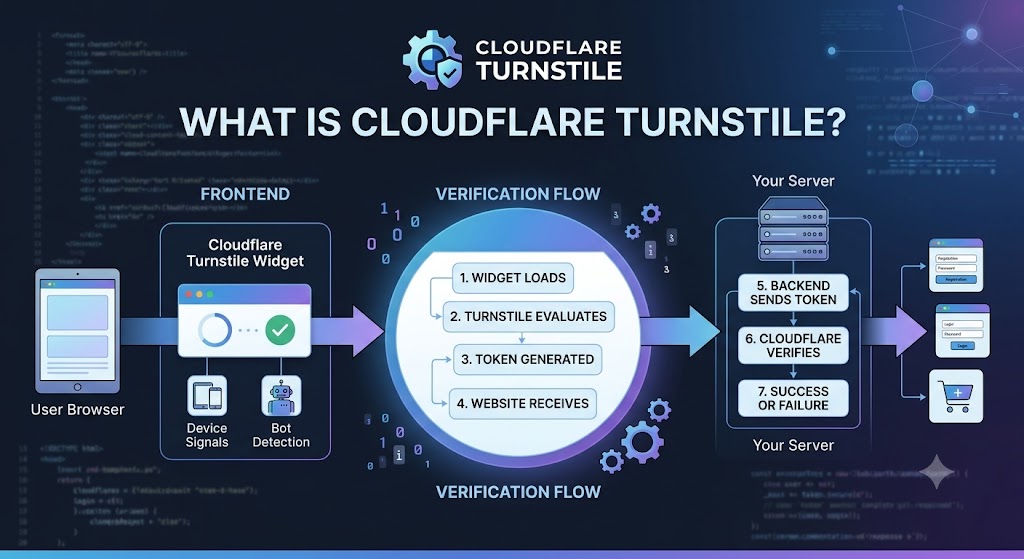
Cloudflare Turnstile generally works through a client-side widget combined with server-side verification.
A simplified flow looks like this:
User opens website
        ↓
Turnstile widget loads
        ↓
Browser and request signals are evaluated
        ↓
Turnstile generates a verification token
        ↓
Website sends token to its server
        ↓
Server verifies token with Cloudflare
        ↓
Request is accepted or rejected
The important concept is that the website should not simply trust the browser-side result.
The verification token should be validated by the website's backend before the protected action is completed.
Step 1: The Turnstile Widget Loads
A website includes the Turnstile JavaScript library and places a Turnstile widget on the page.
For example:
<div class="cf-turnstile"
     data-sitekey="YOUR_SITE_KEY">
</div>
The exact implementation depends on the Turnstile configuration and integration method being used.
Step 2: Turnstile Evaluates the Request
Turnstile evaluates signals associated with the browser and request.
The goal is to distinguish normal human activity from automated or suspicious behavior.
Importantly, Turnstile is designed to minimize unnecessary user interaction.
Step 3: A Verification Token Is Generated
After the verification process, Turnstile provides a token to the website.
The website can then send this token to its backend.
Step 4: The Server Verifies the Token
The backend sends the token to Cloudflare's verification endpoint.
Conceptually:
Browser
   ↓
Turnstile
   ↓
Verification Token
   ↓
Your Backend
   ↓
Cloudflare Verification
   ↓
Success / Failure
The backend should only continue with the protected operation after successful verification.
Why Was Cloudflare Turnstile Created?
Traditional CAPTCHA systems can create friction for users.
A visitor may be asked to:
- Select traffic lights
- Identify bicycles
- Select buses
- Type distorted characters
- Complete multiple image challenges
- Repeat the challenge after an incorrect answer
These interactions can be frustrating, especially on mobile devices.
Cloudflare Turnstile aims to reduce this friction while still providing protection against automated abuse.
This can be especially valuable for websites where conversion rate and user experience are important.
For example, a registration page that forces every visitor through a difficult CAPTCHA may lose potential users.
A low-friction verification system can help reduce that problem.
Cloudflare Turnstile vs Traditional CAPTCHA
One of the most important differences is the user experience.
| Feature | Traditional CAPTCHA | Cloudflare Turnstile |
|---|---|---|
| Image challenges | Common | Usually not required |
| Text challenges | Common in some systems | No traditional text puzzle |
| User interaction | Often required | Designed to minimize interaction |
| Bot protection | Yes | Yes |
| Developer integration | Available | Available |
| Server-side verification | Yes | Yes |
| Mobile experience | Can be inconvenient | Designed for low friction |
| Cloudflare ecosystem | No | Yes |
The exact behavior depends on the implementation and risk conditions.
Turnstile should not simply be thought of as a different-looking CAPTCHA. It is better understood as a bot-detection and verification system designed around low user friction.
Cloudflare Turnstile vs reCAPTCHA
Cloudflare Turnstile and Google reCAPTCHA solve a similar problem: protecting websites from automated abuse.
However, their approaches and ecosystems are different.
Cloudflare Turnstile
Turnstile is developed by Cloudflare and is designed to integrate naturally with Cloudflare's security ecosystem.
Its key selling point is a low-friction user experience.
Google reCAPTCHA
reCAPTCHA is Google's CAPTCHA and bot-detection solution.
It has several versions and implementations, including reCAPTCHA v2 and reCAPTCHA v3.
reCAPTCHA v2 may present an interactive challenge, while reCAPTCHA v3 works primarily through a scoring mechanism.
Which One Should You Use?
There is no universal answer.
Cloudflare Turnstile can be attractive when:
- User experience is a priority
- You want a low-interaction verification system
- Your infrastructure already uses Cloudflare
- You want an alternative to traditional CAPTCHA challenges
reCAPTCHA may be appropriate when:
- Your existing application already depends on Google's ecosystem
- Your team has experience with reCAPTCHA
- Your application is already configured around reCAPTCHA
The best choice depends on your application's security requirements, traffic, architecture, and development environment.
How to Add Cloudflare Turnstile to a Website
A basic Turnstile integration generally involves three major components:
- Create a Turnstile widget.
- Add the widget to your frontend.
- Verify the token on your backend.
1. Create a Turnstile Widget
The first step is to configure Turnstile for your website.
You will generally receive:
- A site key
- A secret key
The site key is used by the frontend.
The secret key must remain private and should only be used by your server.
Never expose your secret key in frontend JavaScript.
2. Add Turnstile to Your HTML
A basic example looks like:
<form method="POST" action="/submit">

    <input
        type="email"
        name="email"
        placeholder="Email"
        required
    >

    <div class="cf-turnstile"
         data-sitekey="YOUR_SITE_KEY">
    </div>

    <button type="submit">
        Submit
    </button>

</form>
The Turnstile JavaScript library must also be loaded according to Cloudflare's integration documentation.
3. Send the Token to Your Backend
When the user submits the form, the Turnstile response is sent to your backend.
Your backend should retrieve the token and verify it with Cloudflare.
Conceptually:
POST /submit
       ↓
Receive form data
       ↓
Receive Turnstile token
       ↓
Send token to Cloudflare
       ↓
Check verification response
       ↓
Continue or reject request
Why Server-Side Verification Is Important
One of the most common mistakes developers make is relying only on frontend verification.
Client-side JavaScript runs inside the user's browser.
Therefore, it should not be treated as a trusted security boundary.
A more secure architecture is:
Frontend
   ↓
Turnstile token
   ↓
Backend
   ↓
Cloudflare verification
   ↓
Application logic
Your backend should validate the Turnstile token before performing sensitive operations.
For example:
def submit_form(request):

    token = request.form.get("cf-turnstile-response")

    if not token:
        return "Verification required", 400

    verification = verify_with_cloudflare(token)

    if not verification:
        return "Verification failed", 403

    # Continue with the protected operation
    return process_form(request)
This is a simplified example. Production implementations should also handle timeouts, invalid responses, logging, rate limits, and other application-specific security requirements.
Cloudflare Turnstile for Developers
Turnstile can be integrated into many development stacks.
Common environments include:
- PHP
- Python
- Node.js
- JavaScript
- Java
- C#
- Laravel
- Django
- Express.js
- WordPress
- Custom REST APIs
The basic architecture remains similar regardless of programming language.
Frontend
The frontend displays or loads Turnstile.
Backend
The backend receives the token and verifies it.
Application
The application continues only when verification succeeds.
This separation makes it easier to maintain the security boundary.
Cloudflare Turnstile and APIs
Turnstile is not only relevant to HTML forms.
Developers may also encounter bot protection when interacting with web applications and APIs.
For example, a website may have:
Browser
   ↓
Web Application
   ↓
API
   ↓
Database
Turnstile can be placed around important user-facing actions to reduce automated abuse.
Examples include:
- Creating accounts
- Sending messages
- Requesting password resets
- Submitting forms
- Starting expensive operations
- Requesting sensitive resources
However, API authentication, authorization, rate limiting, and CAPTCHA verification solve different security problems.
Turnstile should not be treated as a replacement for proper API authentication.
Cloudflare Turnstile and Web Scraping
Developers working with web scraping may encounter Turnstile when accessing websites that use Cloudflare protection.
A Turnstile challenge can indicate that the website is attempting to distinguish automated traffic from legitimate browser activity.
If you are building a scraper, crawler, or automation system, you should first check the website's terms, robots policy, API availability, and authorization requirements.
For authorized testing environments, developers can design their automation workflow around the site's intended access methods rather than attempting to bypass security controls.
This is especially important for production systems.
Cloudflare Turnstile and Selenium
Selenium is commonly used for browser automation and testing.
A test environment may contain a Turnstile-protected page.
For legitimate testing, developers should consider creating a dedicated test configuration that avoids unnecessary production security barriers.
For example:
Development environment
        ↓
Test account
        ↓
Test configuration
        ↓
Automated Selenium tests
This is generally more reliable than building tests around production anti-bot behavior.
If you are testing a system you own, consider using test keys, staging environments, mocks, or controlled verification flows whenever possible.
Cloudflare Turnstile and Playwright
Playwright is another popular browser automation framework.
It can be used for:
- End-to-end testing
- UI testing
- Regression testing
- Browser automation
- Development workflows
When testing Turnstile-protected applications, a staging environment is often the best approach.
Instead of making automated tests depend on real anti-bot detection, you can design the application so that testing remains predictable.
This can reduce flaky tests and improve CI/CD reliability.
Common Cloudflare Turnstile Integration Problems
Developers may encounter several common issues when implementing Turnstile.
1. Invalid Site Key
If the site key is incorrect or configured for the wrong domain, the widget may not work as expected.
Check:
- Site key
- Domain configuration
- Environment variables
- Development vs production settings
2. Secret Key Exposed
The secret key should never be placed in frontend code.
Avoid:
const secretKey = "YOUR_SECRET_KEY";
Instead, store sensitive credentials on the server.
For example:
Environment Variables
        ↓
Backend Application
        ↓
Cloudflare Verification
3. Token Verification Fails
A token may fail verification for several reasons.
Possible causes include:
- Missing token
- Expired token
- Invalid secret key
- Incorrect site configuration
- Incorrect backend request
- Token already used
- Domain mismatch
Your backend should log useful diagnostic information without exposing sensitive credentials.
4. Verification Works Locally but Not in Production
This is a common deployment issue.
Your local environment may use:
localhost
while production uses:
example.com
The Turnstile configuration needs to match the environment in which it is being used.
Always test both staging and production configurations.
Best Practices for Cloudflare Turnstile
Follow these practices when implementing Turnstile.
1. Keep Secret Keys Private
Never expose secret credentials in:
- HTML
- Client-side JavaScript
- GitHub repositories
- Public configuration files
- Browser storage
2. Always Verify Tokens Server-Side
Do not trust only the frontend.
3. Use Environment Variables
For example:
TURNSTILE_SITE_KEY=your_site_key
TURNSTILE_SECRET_KEY=your_secret_key
4. Handle Verification Failures
Your application should gracefully handle failed verification.
5. Combine Turnstile With Other Security Controls
Turnstile is only one layer of security.
A robust application may also use:
- Rate limiting
- Authentication
- Authorization
- CSRF protection
- Input validation
- IP reputation
- Logging
- Monitoring
6. Use Staging Environments for Automation Testing
Avoid making automated tests dependent on unpredictable production anti-bot systems whenever possible.
Is Cloudflare Turnstile Free?
Cloudflare offers Turnstile as a CAPTCHA alternative, but developers should always check the current Cloudflare documentation and product terms for the latest availability, limits, and commercial conditions.
Pricing and product policies can change over time.
If you are evaluating Turnstile for a production application, review the current official documentation before making an architectural decision.
Is Cloudflare Turnstile Better Than CAPTCHA?
"Better" depends on the use case.
Turnstile can provide an excellent user experience because it is designed to minimize traditional CAPTCHA interaction.
However, security requirements vary between applications.
A simple public contact form may have very different requirements from:
- A financial application
- An authentication system
- A large e-commerce website
- A public API
- An enterprise application
The right solution should balance:
Security + User Experience + Cost + Developer Experience
Frequently Asked Questions
What is Cloudflare Turnstile?
Cloudflare Turnstile is a bot-detection and verification service designed to protect websites from automated abuse while minimizing user interaction.
Does Cloudflare Turnstile replace CAPTCHA?
Turnstile is designed as an alternative to traditional CAPTCHA systems. It aims to provide bot protection without requiring users to complete conventional visual CAPTCHA puzzles.
Does Turnstile require users to click anything?
Not necessarily. One of Turnstile's goals is to minimize user interaction. The exact behavior can depend on the configuration and circumstances.
Is Cloudflare Turnstile secure?
Turnstile is designed to help detect automated abuse, but no single security mechanism should be considered sufficient by itself. Websites should combine bot protection with authentication, authorization, rate limiting, input validation, and other security controls.
Can I use Cloudflare Turnstile with WordPress?
Yes. Turnstile can be integrated into WordPress websites through compatible plugins or custom development.
Can I use Turnstile with PHP?
Yes. The frontend widget can be integrated into a PHP application, while the backend can verify the Turnstile token.
Can I use Turnstile with Python?
Yes. Python applications can receive the Turnstile token and perform server-side verification.
Can I use Turnstile with Node.js?
Yes. Node.js applications can integrate Turnstile using the frontend widget and a backend verification request.
Can Turnstile stop every bot?
No security solution can guarantee that every automated request will be blocked.
Turnstile should be considered one component of a broader security strategy.
Should I use Turnstile for automated testing?
For systems you own or are authorized to test, a dedicated staging environment, test configuration, or mock verification flow is usually preferable to making automated tests depend on real production anti-bot challenges.
Final Thoughts
Cloudflare Turnstile represents a different approach to website bot protection.
Instead of relying primarily on traditional image or text puzzles, it is designed to evaluate requests while keeping the user experience as simple as possible.
For developers, the most important architecture is straightforward:
User
 ↓
Turnstile
 ↓
Verification Token
 ↓
Backend
 ↓
Cloudflare Verification
 ↓
Protected Application
The key implementation principle is to verify the token on the server before allowing the protected action to continue.
For websites, SaaS applications, forms, and APIs, Turnstile can be an effective part of a layered security strategy.
If you are building authorized automation or testing workflows, make sure your implementation respects the website's terms, access policies, and security boundaries.