CAPTCHA API Integration Architecture: Best Practices for Modern Applications
Integrating a CAPTCHA API into an application involves more than sending an HTTP request and receiving a response. A reliable implementation requires a well-designed architecture that handles authentication, request processing, asynchronous operations, error handling, security, monitoring, and scalability.
Without a clear architecture, CAPTCHA API integrations can become difficult to maintain. Applications may experience unnecessary API requests, slow response times, duplicated tasks, exposed credentials, or unexpected failures when traffic increases.
In this guide, you will learn how to design a reliable CAPTCHA API integration architecture, understand the responsibilities of each component, and apply practical development patterns for modern applications.
Whether you are building a web application, backend service, automation platform, or distributed system, these principles can help make your integration easier to maintain and operate.
1. What Is CAPTCHA API Integration Architecture?
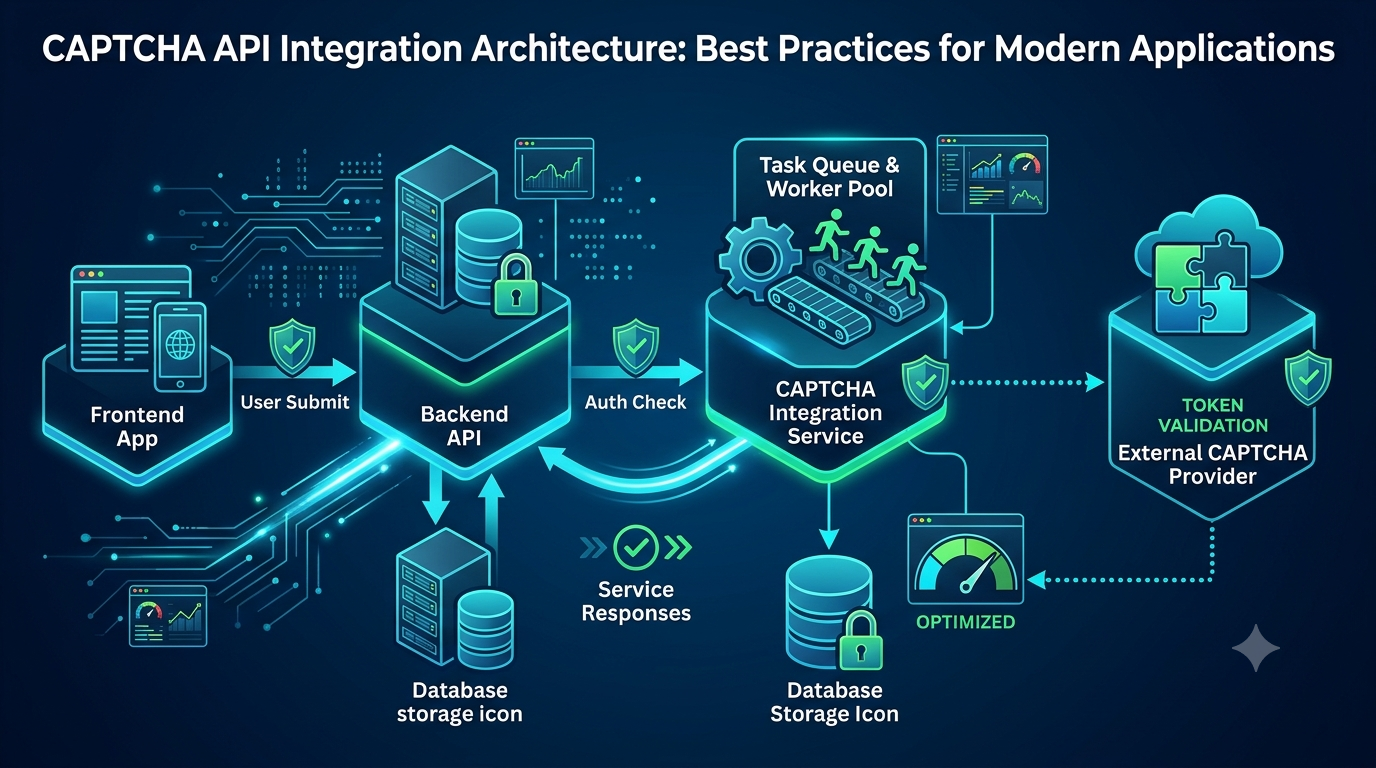
CAPTCHA API integration architecture describes how an application communicates with a CAPTCHA-related API and how different components work together to process requests.
A typical architecture may include:
- Frontend application
- Backend application
- CAPTCHA integration service
- External CAPTCHA API provider
- Task or job queue
- Database or cache
- Monitoring and logging system
Each component has a specific responsibility.
For example, the frontend collects user input, the backend validates incoming requests, and a dedicated integration service manages communication with the external API.
Separating these responsibilities helps prevent CAPTCHA-related logic from spreading throughout the application.
Why Does Architecture Matter?
A poorly structured integration may work during development but become unreliable in production.
Common problems include:
- API credentials stored in frontend code
- Repeated API calls caused by duplicated requests
- Long-running operations blocking application threads
- Inconsistent error handling across services
- Difficulty tracking API performance
- Tight coupling between business logic and provider-specific request formats
A well-designed architecture addresses these problems before they become difficult to resolve.
2. Understand the Main Components
Before implementing an integration, identify the main components and define their responsibilities.
2.1 Frontend Application
The frontend is responsible for collecting user input and communicating with your backend.
It may be built using:
- React
- Vue
- Angular
- Next.js
- Plain JavaScript
- Mobile application frameworks
The frontend should not contain private API credentials.
Instead, it should send requests to your own backend, which controls communication with external services.
2.2 Backend Application
The backend acts as the central control layer.
Its responsibilities may include:
- Validating incoming requests
- Checking user permissions
- Applying business rules
- Managing CAPTCHA-related workflows
- Communicating with external APIs
- Handling errors and timeouts
- Recording relevant operational information
The backend can be implemented with Node.js, Python, PHP, Java, C#, or another server-side technology.
2.3 CAPTCHA Integration Service
A dedicated integration service manages provider-specific communication.
Rather than allowing every application module to make external API requests directly, centralize that logic in one service.
For example, the service may expose methods such as:
class CaptchaIntegrationService {
    async submitTask(payload) {
        // Build and send a provider-specific request.
    }

    async getTaskResult(taskId) {
        // Retrieve the result of an existing task.
    }

    async processTask(payload) {
        // Coordinate the task lifecycle.
    }
}
This is an architectural illustration, not an actual AllCaptcha SDK or API specification. Replace the method names, request fields, authentication mechanism, and response handling with the provider's documented interface.
Centralizing integration logic makes it easier to update providers, improve error handling, and write automated tests.
2.4 External CAPTCHA API Provider
The external provider processes requests according to its documented API contract.
Your integration should treat the provider as an external dependency that may experience:
- Network delays
- Temporary service interruptions
- Rate limits
- Invalid requests
- Authentication failures
- Unexpected response formats
Never assume that an external service will always respond successfully.
2.5 Database and Cache
Depending on the application, a database or cache may store:
- Internal task identifiers
- External task identifiers
- Task status
- Creation and completion timestamps
- Retry counts
- Relevant error categories
- Application-level audit records
Avoid storing sensitive credentials or unnecessary user data in task records.
3. Recommended CAPTCHA API Architecture
For many modern applications, a layered architecture is a practical starting point.
The following diagram illustrates a generic integration pattern:
                 USER
                   |
                   v
            FRONTEND APP
                   |
                   v
             BACKEND API
                   |
          +--------+--------+
          |                 |
          v                 v
     VALIDATION        BUSINESS LOGIC
          |                 |
          +--------+--------+
                   |
                   v
         CAPTCHA INTEGRATION
                SERVICE
                   |
          +--------+--------+
          |                 |
          v                 v
     REQUEST CLIENT     TASK MANAGER
          |                 |
          v                 v
    EXTERNAL API       QUEUE / WORKER
          |                 |
          +--------+--------+
                   |
                   v
             RESULT HANDLER
                   |
          +--------+--------+
          |                 |
          v                 v
       DATABASE          LOGGING
This architecture separates application logic from external API communication.
However, not every application needs every component. A small application may only need a backend, an integration service, and basic logging.
As the application grows, queues, workers, databases, and monitoring systems can be introduced when they provide measurable benefits.
4. Choose Between Synchronous and Asynchronous Processing
One of the most important architectural decisions is how to handle API operations.
4.1 Synchronous Processing
In synchronous processing, the application waits for the external operation to finish before continuing.
A simplified workflow looks like this:
- The frontend sends a request to the backend.
- The backend validates the request.
- The integration service sends a request to the external API.
- The application waits for the response.
- The backend processes the response.
- The frontend receives the result.
Advantages:
- Simple implementation
- Easier request tracing
- Suitable for short operations
- Fewer infrastructure components
Disadvantages:
- Longer request durations
- Increased risk of timeouts
- Application resources remain occupied while waiting
- Less suitable for long-running tasks
Synchronous processing is appropriate when the external operation has a predictable and sufficiently short response time.
4.2 Asynchronous Processing
In asynchronous processing, the application creates a task and handles its completion separately.
A typical workflow is:
- The frontend sends a request to the backend.
- The backend validates the request.
- The backend creates an internal task record.
- The task is placed in a queue.
- A worker processes the task.
- The worker communicates with the external API.
- The task manager updates the task status.
- The application makes the result available through an appropriate mechanism.
Possible completion mechanisms include polling, a documented callback or webhook feature, or another provider-supported approach.
Do not assume that every CAPTCHA API supports webhooks. Check the provider's official documentation before designing around callback delivery.
Advantages:
- Better handling of long-running operations
- Improved workload control
- Easier horizontal scaling
- Reduced pressure on frontend requests
Disadvantages:
- More infrastructure
- Additional task-state management
- More complex error handling
- Potential consistency challenges
When Should You Use Each Approach?
| Requirement | Recommended approach |
|---|---|
| Short operation | Synchronous |
| Long-running operation | Asynchronous |
| High request volume | Asynchronous with controlled workers |
| Simple application | Start with a lightweight service |
| Distributed application | Queue-based processing may be appropriate |
Choose the simplest architecture that satisfies your actual requirements.
5. Build a Reusable CAPTCHA API Client
A reusable API client is one of the most important parts of a maintainable integration.
Instead of writing HTTP requests throughout the application, create a single client responsible for:
- Configuring the base URL
- Adding authentication according to provider documentation
- Sending HTTP requests
- Applying timeouts
- Parsing responses
- Classifying errors
- Handling documented retry rules
For example, a generic Node.js client might look like this:
class CaptchaApiClient {
    constructor({ baseUrl, apiKey, timeout = 10000 }) {
        this.baseUrl = baseUrl;
        this.apiKey = apiKey;
        this.timeout = timeout;
    }

    async request(path, payload) {
        const controller = new AbortController();

        const timeoutId = setTimeout(
            () => controller.abort(),
            this.timeout
        );

        try {
            const response = await fetch(
                `${this.baseUrl}${path}`,
                {
                    method: "POST",
                    headers: {
                        "Content-Type": "application/json",
                        // Replace with the authentication method
                        // required by your provider.
                        "Authorization": `Bearer ${this.apiKey}`
                    },
                    body: JSON.stringify(payload),
                    signal: controller.signal
                }
            );

            const responseBody = await response.json()
                .catch(() => null);

            if (!response.ok) {
                throw new Error(
                    `External API request failed: ${response.status}`
                );
            }

            return responseBody;

        } finally {
            clearTimeout(timeoutId);
        }
    }
}
The base URL, authentication header, endpoint, and payload above are illustrative placeholders. They are not confirmed AllCaptcha API specifications.
Use the actual endpoint and authentication format documented by your provider.
Benefits of a Reusable Client
A centralized client provides several advantages:
- Consistent HTTP configuration
- Easier credential management
- Standardized timeout behavior
- Centralized error handling
- Simpler testing
- Easier provider migration
It also reduces duplicated code across application modules.
For additional implementation guidance, see our article about building a reliable CAPTCHA API client with retries, timeouts, and error handling.
6. Use a Queue and Worker Architecture for Larger Applications
When an application processes many independent tasks, a queue can help control workloads.
A queue separates task creation from task execution.
Instead of processing every operation immediately inside the incoming HTTP request, the backend places work into a queue.
Workers then retrieve and process tasks according to available capacity.
Example Architecture
CLIENT REQUEST
      |
      v
BACKEND API
      |
      v
TASK DATABASE
      |
      v
MESSAGE QUEUE
      |
      +------------------+
      |         |        |
      v         v        v
   WORKER 1  WORKER 2  WORKER 3
      |         |        |
      +---------+--------+
                |
                v
       CAPTCHA API CLIENT
                |
                v
        EXTERNAL PROVIDER
Popular queue technologies include:
- Redis-based queues
- RabbitMQ
- Apache Kafka
- Amazon SQS
- Google Cloud Pub/Sub
These technologies have different delivery guarantees, ordering behavior, operational requirements, and scaling characteristics.
Choose a queue based on the actual needs of your application.
Important Queue Design Principles
Control worker concurrency
Do not allow an unlimited number of workers to send requests simultaneously.
Set concurrency according to provider limits, application capacity, and measured performance.
Track task status
A task may move through states such as:
- Pending
- Processing
- Completed
- Failed
- Retry scheduled
- Cancelled
These are suggested internal application states, not universal provider response values.
Make task processing idempotent
A queue may deliver a message more than once, depending on its delivery model.
Your worker should avoid creating duplicate business operations when the same internal task is processed again.
Handle failed tasks
Define a clear strategy for temporary failures, permanent failures, and tasks that exceed their retry limit.
7. Design Error Handling at Every Layer
A reliable CAPTCHA API architecture must expect failures.
Error handling should exist at multiple levels rather than relying on a single global exception handler.
7.1 Frontend Error Handling
The frontend should display useful messages without exposing internal implementation details.
For example:
- Request could not be completed.
- Please try again later.
- The operation is still processing.
- Your session has expired.
Avoid showing raw API responses, private credentials, or internal stack traces.
7.2 Backend Error Handling
The backend should classify errors into meaningful categories:
| Error category | Possible response |
|---|---|
| Authentication failure | Check configured credentials |
| Invalid request | Validate parameters |
| Rate limit | Apply controlled backoff |
| Network timeout | Retry only when safe |
| Temporary server error | Consider a limited retry |
| Unsupported operation | Check provider documentation |
| Invalid response | Record and investigate the response format |
The exact error codes and retry rules depend on the external provider.
7.3 Retry Strategy
A retry mechanism can help recover from temporary failures.
However, retries should be limited and controlled.
A common approach is exponential backoff with jitter:
function calculateRetryDelay(attempt) {
    const baseDelay = 1000;
    const maxDelay = 30000;

    const exponentialDelay = Math.min(
        baseDelay * (2 ** attempt),
        maxDelay
    );

    const jitter = Math.random() * 500;

    return exponentialDelay + jitter;
}
This is a generic delay calculation, not a complete retry implementation.
Before retrying, determine whether the operation is safe to repeat. A timeout does not always mean the external service failed to process the original request.
Use documented idempotency mechanisms where available. Otherwise, maintain internal task identifiers and reconcile uncertain outcomes before creating duplicate work.
For more details, read our guide to CAPTCHA API rate limits and best practices.
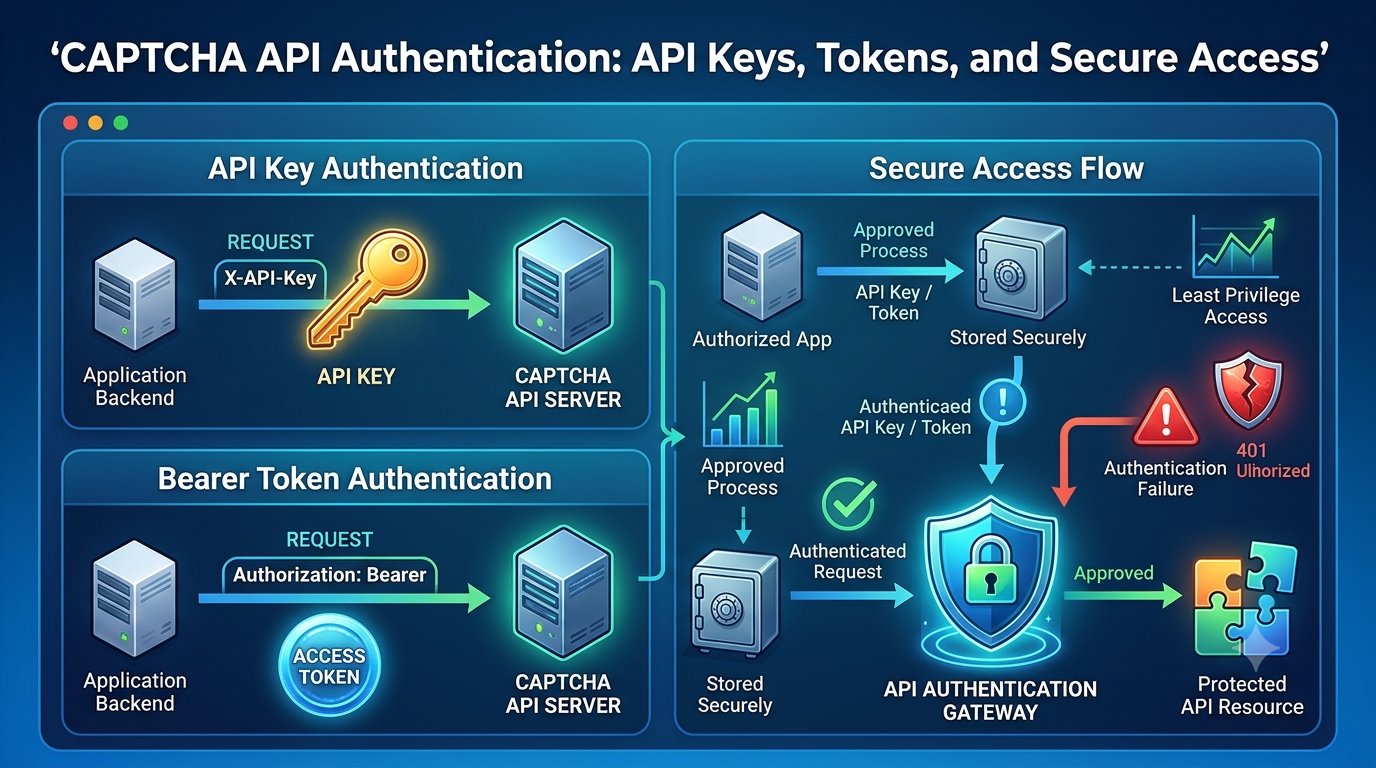
8. Secure Your CAPTCHA API Integration
Security should be part of the architecture from the beginning.
An integration that works correctly but exposes API credentials or sensitive request data is not production-ready.
8.1 Protect API Credentials
Never place private API keys in:
- Frontend JavaScript
- Public repositories
- Mobile application source code
- Public configuration files
- Browser-accessible environment variables
Store credentials in backend environment variables or a dedicated secrets management service.
Example:
const apiKey = process.env.CAPTCHA_API_KEY;

if (!apiKey) {
    throw new Error("Missing CAPTCHA API credentials");
}
8.2 Use HTTPS
Use HTTPS when communicating with external APIs and between application components where appropriate.
This helps protect data while it travels across networks.
8.3 Apply Access Controls
Only authorized backend services should be able to use the integration.
Depending on your infrastructure, consider:
- Service-level authentication
- Least-privilege access
- Network restrictions
- Secret rotation
- Request validation
- Rate limiting
Only implement provider-specific security features when they are documented and supported.
8.4 Protect Logs
Logs should help developers investigate failures without exposing sensitive information.
Avoid recording:
- API keys
- Authorization headers
- Passwords
- Unnecessary personal information
- Sensitive tokens
Use redaction and structured logging to keep operational records useful and safe.
For a deeper discussion, read CAPTCHA API Security Best Practices.
9. Improve Performance and Scalability
A good integration architecture should support increasing workloads without creating unnecessary costs or instability.
9.1 Set Appropriate Timeouts
Every external request should have a reasonable timeout.
Without timeouts, a slow dependency may occupy application resources for too long.
Choose timeout values based on observed latency, provider documentation, and the application's response-time requirements.
9.2 Reuse HTTP Connections
Where supported by your HTTP client, reuse connections instead of creating a new client for every request.
Connection reuse can reduce repeated connection setup overhead.
9.3 Control Concurrency
Increasing concurrency can improve throughput, but unlimited concurrency can create problems.
Excessive parallel requests may cause:
- Rate-limit responses
- Resource exhaustion
- Queue backlogs
- Increased timeout frequency
- Higher infrastructure costs
Start with a conservative limit, monitor actual performance, and adjust gradually.
9.4 Avoid Excessive Polling
For asynchronous operations that require polling, do not check task status continuously at very short intervals.
Instead:
- Follow the provider's recommended polling interval.
- Increase the delay between repeated checks when appropriate.
- Stop polling after completion or a defined timeout.
- Avoid checking tasks that have already reached a terminal state.
This reduces unnecessary requests and improves overall efficiency.
9.5 Scale Workers Horizontally
If task volume increases, you may be able to add more workers.
However, horizontal scaling should respect external provider limits and your own infrastructure capacity.
More workers do not automatically mean better performance.
For a detailed discussion, read How to Scale CAPTCHA API Integrations for High-Traffic Applications.
10. Monitor the Entire Integration
Monitoring should cover both your application and the external dependency.
Useful metrics include:
| Metric | What it tells you |
|---|---|
| Request count | Overall API usage |
| Success rate | Percentage of successful operations |
| Error rate | Frequency of failures |
| Average latency | Typical response time |
| p95 latency | Performance for slower requests |
| Timeout count | Frequency of requests exceeding deadlines |
| Queue depth | Number of pending tasks |
| Task completion time | Time from creation to completion |
| Retry count | Frequency of repeated attempts |
Do not rely on average latency alone. A service can have a good average while a significant number of users experience very slow responses.
Structured Logging
Use consistent log fields to make troubleshooting easier.
For example:
{
  "event": "captcha_task_completed",
  "internal_task_id": "task_12345",
  "provider": "example-provider",
  "duration_ms": 1450,
  "status": "completed",
  "retry_count": 0
}
This is an illustrative log format. Do not copy real API credentials or sensitive tokens into logs.
Set Useful Alerts
Consider alerts for:
- Sudden increases in error rates
- Repeated authentication failures
- Unexpected latency increases
- Queue backlog growth
- Excessive retries
- External service availability problems
Monitoring helps detect issues before they significantly affect application users.
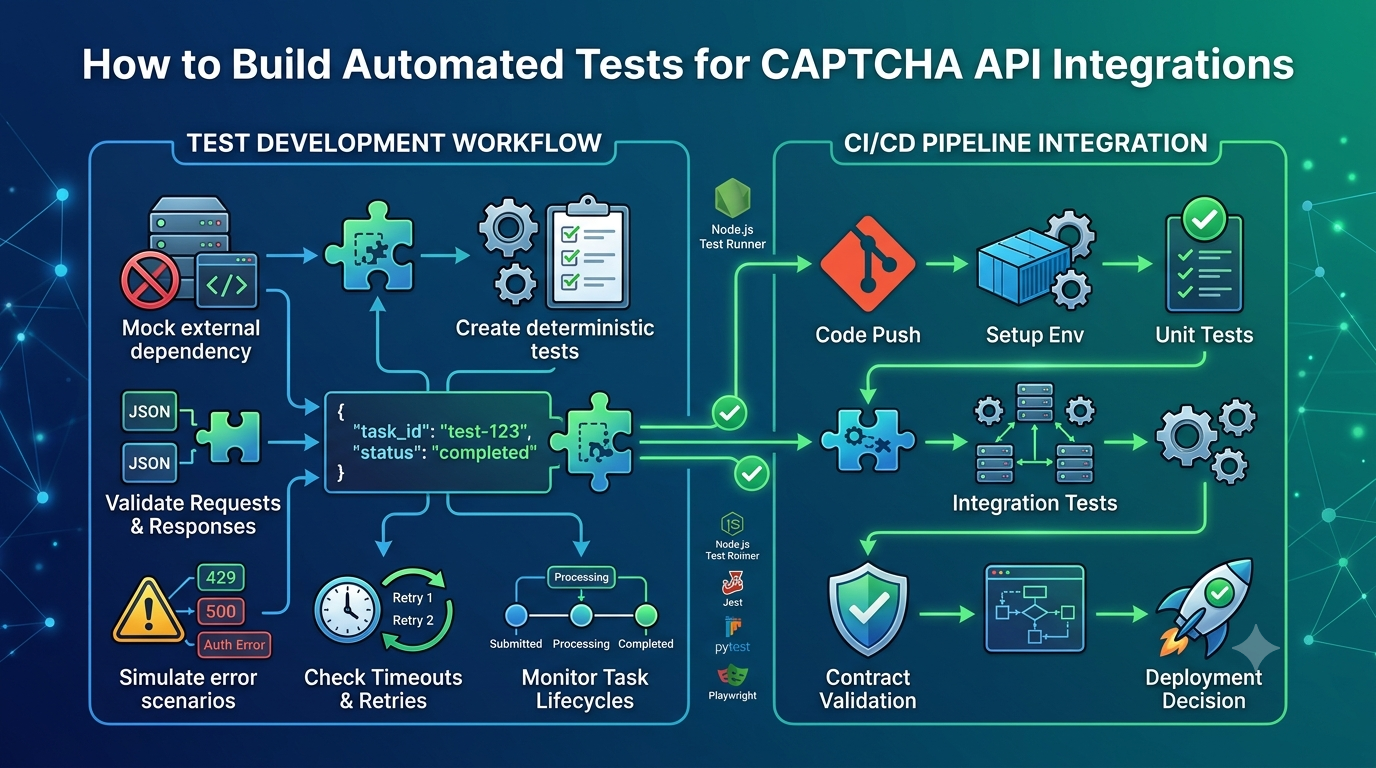
11. Test the Architecture Before Production
Testing should cover more than a successful API request.
A complete testing strategy should include several layers.
Unit Tests
Test individual components independently.
Examples:
- Request validation
- Authentication configuration
- Response parsing
- Error classification
- Retry delay calculation
- Task state transitions
Integration Tests
Test communication between your application components.
For example, verify that the backend correctly communicates with the integration service and that the task manager updates the expected internal status.
Mock External Services
Mocks are useful for testing conditions that are difficult to reproduce with a live provider.
You can simulate:
- Successful responses
- Authentication failures
- Rate limits
- Network timeouts
- Invalid response formats
- Temporary server errors
Mocks should remain separate from production verification logic.
Staging Tests
Use an authorized staging environment and follow the provider's documented testing procedures.
Do not assume that a provider offers a sandbox or special test endpoint unless its official documentation confirms that capability.
For more guidance, read CAPTCHA API Integration Testing: A Complete Guide.
12. Common Architecture Mistakes to Avoid
Even experienced developers can introduce problems when designing external API integrations.
Here are some mistakes to avoid.
Mistake 1: Calling the External API Directly from the Frontend
This can expose private credentials and make request control difficult.
Better approach: Route private API communication through your backend.
Mistake 2: Mixing Business Logic with API Communication
When provider-specific code is spread throughout the application, future changes become expensive.
Better approach: Use a dedicated integration service.
Mistake 3: Ignoring Asynchronous Task States
An application may lose track of operations if it does not maintain internal task records.
Better approach: Define clear task states and persist important transitions.
Mistake 4: Retrying Every Failed Request
Some failures are permanent, and some operations may already have been processed.
Better approach: Classify errors and retry only when appropriate.
Mistake 5: Using Unlimited Concurrency
Sending too many requests simultaneously can overwhelm your system or exceed provider limits.
Better approach: Apply controlled worker concurrency and backpressure.
Mistake 6: Skipping Monitoring
Without useful metrics, it becomes difficult to understand why an integration is slow or unreliable.
Better approach: Monitor latency, errors, task completion, retries, and queue depth.
Mistake 7: Depending on Undocumented Provider Features
Assuming that a provider supports a specific authentication method, webhook, endpoint, or response field can lead to broken integrations.
Better approach: Follow the official API documentation and isolate provider-specific behavior inside the integration service.
13. CAPTCHA API Integration Architecture Checklist
Before deploying your integration, review this checklist:
- API credentials are stored securely on the backend.
- Frontend and backend responsibilities are clearly separated.
- Provider-specific logic is centralized.
- HTTP requests have appropriate timeouts.
- Errors are classified and handled consistently.
- Retries are limited and safe.
- Rate limits are respected.
- Asynchronous tasks have clear internal states.
- Duplicate task processing is handled.
- Worker concurrency is controlled.
- Sensitive information is excluded from logs.
- Monitoring tracks latency and failures.
- Unit and integration tests are available.
- Staging procedures follow provider documentation.
- Deployment and secret-management procedures are documented.
A small application may not need every infrastructure component immediately. Start with the essential controls and introduce additional components as your workload and operational requirements grow.
14. Frequently Asked Questions
What is CAPTCHA API integration architecture?
It is the design of the components and workflows that allow an application to communicate with a CAPTCHA-related API. It defines how requests are validated, processed, authenticated, monitored, and handled when errors occur.
Should CAPTCHA API requests be handled by the frontend or backend?
Private API communication should generally be handled by the backend. This protects credentials and allows the application to enforce access controls, validation, rate limits, and consistent error handling.
Should I use synchronous or asynchronous CAPTCHA API processing?
Synchronous processing is suitable for short operations with predictable response times. Asynchronous processing is generally more appropriate for long-running tasks or workloads that benefit from queues and background workers.
Do I need a message queue for CAPTCHA API integration?
Not always. A small application may work well with a simple backend integration service. A message queue becomes useful when you need background processing, controlled concurrency, workload buffering, or horizontal worker scaling.
How can I prevent duplicate CAPTCHA API requests?
Use internal task identifiers, idempotent application logic, and documented provider-side idempotency mechanisms where available. Also, avoid blindly retrying requests after uncertain network failures.
How do I improve CAPTCHA API integration performance?
Use appropriate timeouts, reuse HTTP connections, control concurrency, avoid unnecessary polling, and monitor latency. Performance improvements should be based on measured bottlenecks rather than assumptions.
How should I secure CAPTCHA API credentials?
Store private credentials on the backend using environment variables or a secrets management system. Restrict access, rotate credentials when appropriate, use HTTPS, and never expose private keys in frontend code or public repositories.
Can I use webhooks for asynchronous CAPTCHA API tasks?
Only if the provider explicitly supports them and documents the required configuration and verification process. Otherwise, use the documented polling or task-result mechanism.
How do I choose the right CAPTCHA API architecture?
Start by evaluating application traffic, operation duration, provider limits, reliability requirements, infrastructure complexity, and security needs. Choose the simplest design that satisfies those requirements and can evolve as the application grows.
Conclusion
A reliable CAPTCHA API integration architecture requires more than a working HTTP request. It needs clear component boundaries, secure credential management, appropriate request processing, consistent error handling, controlled concurrency, and effective monitoring.
For smaller applications, a backend integration service may be enough. As workloads grow, queues, background workers, persistent task tracking, and additional monitoring can provide better control and scalability.
The most important principle is to keep your integration modular and follow the external provider's documented API contract. This makes the system easier to test, troubleshoot, maintain, and adapt as your application evolves.