CAPTCHA API Versioning: How to Manage API Updates and Breaking Changes
APIs are constantly evolving. As applications grow, developers may need new features, improved performance, additional parameters, or changes to existing response structures.
However, updating an API can introduce compatibility problems for applications that already depend on its current behavior.
This is why API versioning is important.
CAPTCHA API versioning helps developers manage changes without unexpectedly breaking existing integrations. It provides a structured way to introduce new functionality, maintain older implementations, and migrate applications safely.
Whether you are integrating a CAPTCHA API into a Python application, a Node.js backend, a PHP website, or a larger enterprise system, understanding API versioning can help prevent unexpected errors and reduce maintenance costs.
In this guide, you will learn what CAPTCHA API versioning is, why it matters, how common versioning strategies work, and how to prepare your application for API updates.
What Is CAPTCHA API Versioning?
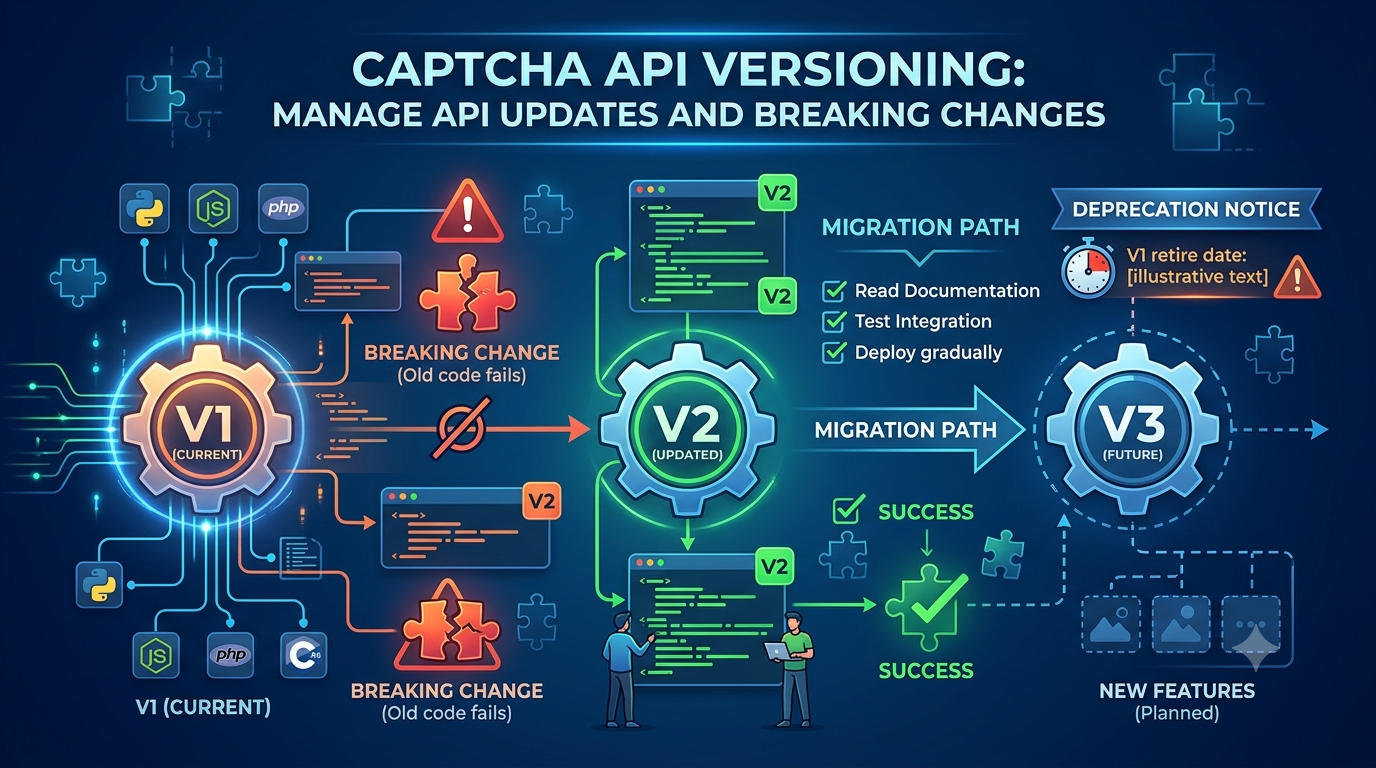
API versioning is the practice of maintaining different versions of an API so that changes can be introduced in a controlled and predictable way.
An API provider may update its service for several reasons:
- Adding new features.
- Improving response formats.
- Changing authentication requirements.
- Updating supported parameters.
- Improving security.
- Removing outdated functionality.
- Fixing inconsistencies in existing behavior.
Some updates are backward-compatible, meaning existing applications can continue working without modification.
Other updates may introduce breaking changes that require developers to update their integrations.
For example, imagine an API initially returns:
{
  "task_id": "12345",
  "status": "completed"
}
A newer version might return:
{
  "data": {
    "id": "12345",
    "state": "completed"
  }
}
Although both responses contain similar information, an application expecting task_id and status will not automatically understand the new structure.
Versioning allows the provider to introduce such changes without unexpectedly disrupting every existing integration.
Important: The examples in this article are illustrative API designs, not actual AllCaptcha endpoints, response schemas, version identifiers, or migration requirements. Always follow the official documentation for the provider you use.
Why Is API Versioning Important?
Without a clear versioning strategy, API changes can create serious problems for developers and businesses.
1. Prevent Unexpected Integration Failures
Applications often depend on specific API request and response structures.
Changing a required parameter or renaming a response field may cause an existing integration to stop working.
Versioning gives developers a way to identify and control which API contract their application uses.
2. Maintain Backward Compatibility
Backward compatibility means that an updated service continues to support existing clients under the conditions promised by its API contract.
For example, an API provider might introduce a new optional parameter without changing the behavior of existing requests.
Older integrations can continue operating while newer applications use the additional functionality.
3. Introduce New Features Safely
A new API version can introduce improvements without forcing every developer to migrate immediately.
This is especially useful when an application has multiple environments, services, or development teams.
4. Improve Security and Reliability
API providers sometimes need to update authentication mechanisms, validation rules, or security-related behavior.
Versioning can help organize these changes and provide developers with a clear migration path.
However, security updates may sometimes require urgent action rather than waiting for a normal version migration.
5. Simplify Long-Term Maintenance
A defined versioning strategy makes it easier to:
- Track API changes.
- Document compatibility requirements.
- Test application behavior.
- Plan migrations.
- Identify deprecated features.
- Coordinate development releases.
For applications that depend on external services, these practices can significantly reduce maintenance risks.
Common API Versioning Strategies
There are several ways API providers can identify and manage API versions.
Understanding these approaches helps developers recognize version information in API documentation.
1. URL Path Versioning
URL path versioning places the version identifier directly in the API endpoint.
For example:
https://api.example.com/v1/tasks
https://api.example.com/v2/tasks
In this illustrative design:
v1identifies the first API version.v2identifies a newer API version.- Both versions may operate independently during a migration period.
Advantages:
- Easy to understand.
- Visible in API documentation.
- Simple to configure in application code.
- Convenient for testing different versions.
Disadvantages:
- Different versions may require separate routes.
- Maintaining multiple versions can increase infrastructure complexity.
- Developers must update endpoint configuration when migrating.
URL path versioning is one of the easiest strategies for developers to recognize.
2. Header Versioning
Header versioning identifies the API version through an HTTP request header.
For example:
GET /tasks HTTP/1.1
Host: api.example.com
Accept: application/vnd.example.v2+json
The API provider uses the header to determine which version of the API contract should be applied.
Advantages:
- Keeps the URL structure stable.
- Separates version information from resource paths.
- Can support different representations of the same resource.
Disadvantages:
- Version information is less visible in ordinary URLs.
- Developers must configure the correct headers.
- Debugging may require inspecting complete HTTP requests.
3. Query Parameter Versioning
Some APIs use a query parameter to identify the requested version.
Example:
https://api.example.com/tasks?version=2
This method is straightforward, but version information can become mixed with other query parameters.
It may also be less convenient when applications use caching or request routing systems that handle query strings differently.
4. Content Negotiation Versioning
Content negotiation allows an API client to request a particular representation using HTTP headers.
For example, a client might use an Accept header to request a specific media type.
This approach can be useful when the same resource supports different representations.
However, developers need to understand the provider's exact media-type and compatibility rules.
API Versioning Strategy Comparison
| Strategy | Version Location | Main Advantage | Potential Limitation |
|---|---|---|---|
| URL path | Endpoint URL | Easy to identify | URL changes between versions |
| Header | HTTP headers | Keeps URLs stable | Less visible |
| Query parameter | URL query string | Simple configuration | Can complicate caching |
| Content negotiation | Accept header | Flexible representations | Requires clear documentation |
There is no universally best versioning strategy.
The correct choice depends on the API provider's architecture and documentation.
What Are Breaking Changes in a CAPTCHA API?
A breaking change is an API modification that can cause an existing integration to stop working or behave differently without corresponding code changes.
Developers should pay particular attention to breaking changes because they may affect production systems.
Common Examples of Breaking Changes
1. Removing a Parameter
An application may depend on a parameter that is removed in a newer API version.
2. Renaming a Response Field
For example:
Old response:
{
  "task_id": "12345"
}
New response:
{
  "id": "12345"
}
An application that reads task_id may fail when it receives the new response.
3. Changing Data Types
An API may previously return a numeric value but later return a string.
For example:
{
  "balance": 100
}
Compared with:
{
  "balance": "100"
}
This may affect calculations, validation, and serialization.
4. Changing Authentication Requirements
A provider may introduce a different authentication mechanism or remove support for an older method.
Applications using the previous authentication approach may need updates.
5. Changing Endpoint Behavior
An endpoint may be removed, moved, or given a different request structure.
6. Changing Error Responses
Applications may depend on specific error codes or response fields.
If these change, existing error-handling logic may become unreliable.
7. Changing Task Status Behavior
A change to status values, task lifecycle rules, or completion conditions can affect asynchronous integrations.
Breaking Changes vs. Non-Breaking Changes
| Change | Usually Breaking? |
|---|---|
| Adding an optional response field | No |
| Adding a new independent endpoint | No |
| Removing a required parameter | Yes |
| Renaming an existing field | Yes |
| Changing a field's data type | Often |
| Removing an endpoint | Yes |
| Changing authentication requirements | Often |
| Adding an optional request parameter | Usually no |
| Changing existing status values | Often |
Whether a change is breaking ultimately depends on the documented API contract and the behavior your application relies on.
What Is Backward Compatibility?
Backward compatibility means that newer API implementations continue to support existing clients according to the documented compatibility guarantees.
For example, imagine that your application uses API version 1.
The provider introduces a new optional feature in a compatible update.
If the existing request format continues to work, your application may not need any changes.
However, backward compatibility should not be assumed.
Developers should review:
- Required parameters.
- Optional parameters.
- Response fields.
- Authentication rules.
- Error handling.
- Rate limits.
- Task lifecycle behavior.
- Supported API versions.
A version update may preserve the endpoint URL while still changing behavior in ways that affect your integration.
How to Check Your Current CAPTCHA API Version
Before upgrading an API integration, identify the version currently used by your application.
Here are several places to check.
1. Review the API Base URL
Some providers include the version directly in the endpoint.
For example:
https://api.example.com/v1/
2. Inspect HTTP Request Headers
Some providers identify the version through custom headers or content negotiation.
Review your API client's request configuration.
3. Check API Documentation
The official documentation may specify:
- Current API version.
- Supported versions.
- Deprecated versions.
- Version-specific endpoints.
- Migration instructions.
4. Review SDK Dependencies
If your application uses an official SDK, check its version and compatibility documentation.
An SDK update does not necessarily mean the underlying API version has changed.
5. Review Application Configuration
Some applications store endpoint URLs or version identifiers in environment variables.
For example:
CAPTCHA_API_BASE_URL=https://api.example.com/v1
This is an illustrative configuration value, not a real AllCaptcha endpoint.
Centralizing configuration makes future migrations easier.
How to Upgrade a CAPTCHA API Integration Safely
Upgrading an API should be treated as a controlled development process.
Instead of changing production code immediately, follow a structured migration strategy.
Step 1: Read the Release Notes
Start by reviewing the provider's official release notes and migration documentation.
Identify:
- New features.
- Removed parameters.
- Changed response structures.
- Authentication updates.
- Deprecated endpoints.
- Changes to error handling.
- Changes to task processing.
Do not rely only on a short announcement or an SDK changelog.
Step 2: Identify Dependencies in Your Application
Search your codebase for all API-related components.
For example:
- API endpoint configuration.
- Authentication headers.
- Request builders.
- Response models.
- Error handlers.
- Task status processing.
- Background workers.
- Logging and monitoring.
An API may be used in more than one service or module.
Updating only one component can create inconsistent behavior.
Step 3: Create a Compatibility Assessment
Compare the old and new API contracts.
A simple migration table can help:
| Component | Current Version | New Version | Required Action |
|---|---|---|---|
| Base URL | /v1/tasks |
/v2/tasks |
Update configuration |
| Authentication | Old documented method | New documented method | Review credentials |
| Request fields | Existing schema | Updated schema | Modify request builder |
| Response fields | Existing names | New names | Update parser |
| Error handling | Existing codes | Updated codes | Update error mapping |
The actual changes must come from the provider's migration documentation.
Step 4: Update the Integration in a Separate Branch
Create a separate development branch for the migration.
This allows you to:
- Compare old and new implementations.
- Review changes before merging.
- Run automated tests.
- Roll back if necessary.
Avoid combining an API migration with unrelated application changes.
Step 5: Update Request and Response Handling
Update your API client to match the new documented contract.
For example, an illustrative response model might look like this:
function normalizeTaskResponse(response) {
    return {
        id: response.id,
        status: response.status
    };
}
If an older version uses different field names, you can create separate parsers:
function parseV1Response(response) {
    return {
        id: response.task_id,
        status: response.status
    };
}

function parseV2Response(response) {
    return {
        id: response.id,
        status: response.state
    };
}
These examples demonstrate a general compatibility pattern. They do not represent actual AllCaptcha response schemas.
The key idea is to keep version-specific parsing separate from the rest of your application.
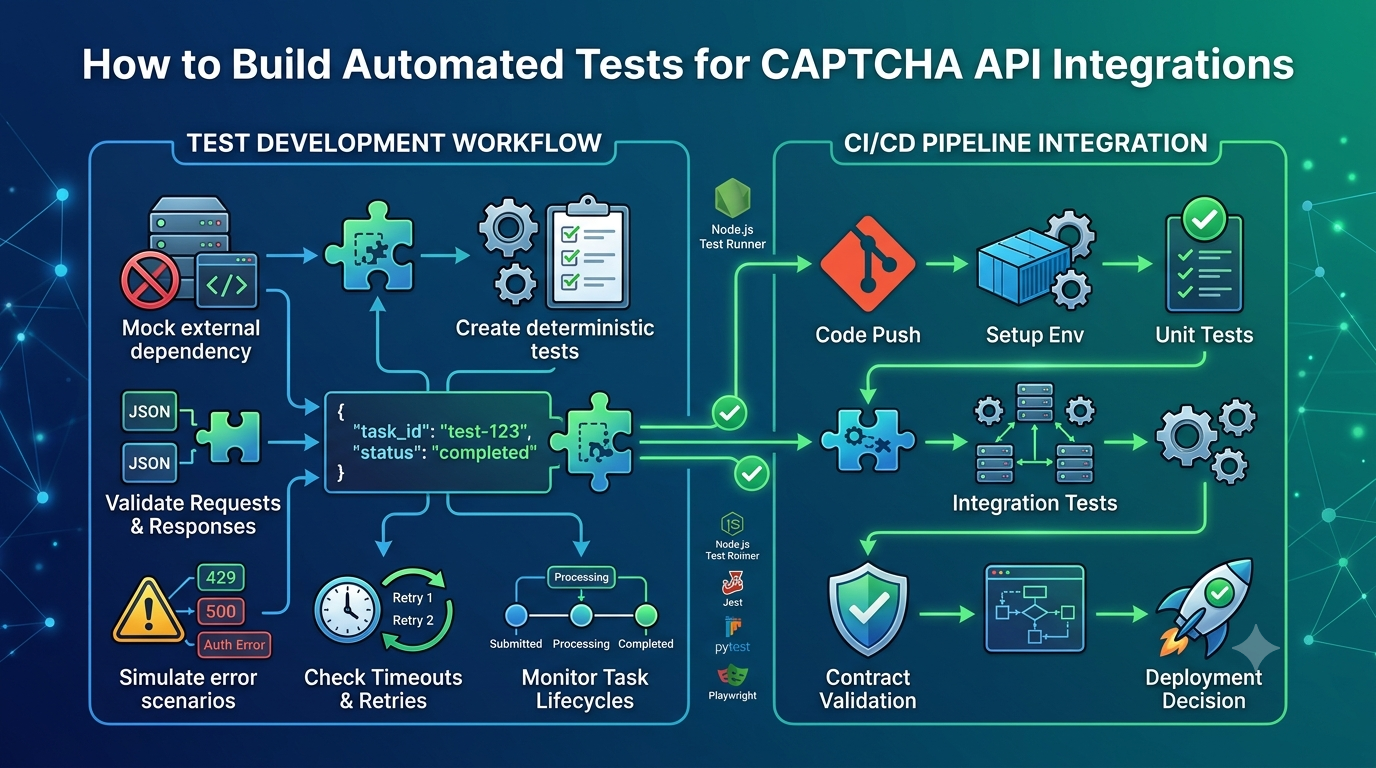
Step 6: Run Automated Tests
Test both successful and unsuccessful API scenarios.
Important test cases include:
- Valid authentication.
- Invalid credentials.
- Valid task submission.
- Missing required parameters.
- Invalid request formats.
- Unexpected response fields.
- Network timeouts.
- Rate-limit responses.
- Failed asynchronous tasks.
- Expired tasks.
- Changes in status values.
For more information, see our related guide: CAPTCHA API Integration Testing: A Complete Guide.
Step 7: Test in a Staging Environment
Do not make an untested API migration directly in production.
Use a staging environment with synthetic data, mocks, or provider-approved testing facilities.
Check that the new integration behaves as expected before releasing it.
Step 8: Deploy Gradually
If your architecture allows it, deploy the new integration to a limited portion of your application first.
Monitor:
- API error rates.
- Request latency.
- Task completion rates.
- Authentication failures.
- Unexpected response structures.
- Application exceptions.
Gradual deployment can reduce the impact of unexpected problems.
Step 9: Prepare a Rollback Plan
Before deployment, decide how to recover if the new integration fails.
Your rollback plan may include:
- Restoring the previous application version.
- Switching back to the previous documented endpoint, if it remains supported.
- Reverting configuration changes.
- Disabling the new integration feature.
- Restoring compatible request and response handling.
Do not assume that an old API version will remain available indefinitely.
Check the provider's version support and deprecation policy before relying on rollback.
How to Design a Version-Aware CAPTCHA API Client
A version-aware API client keeps version-specific configuration and request handling in one place.
This can make future upgrades easier.
For example, a Node.js application might centralize its API configuration:
const config = {
    apiVersion: process.env.CAPTCHA_API_VERSION,
    baseUrl: process.env.CAPTCHA_API_BASE_URL,
    apiKey: process.env.CAPTCHA_API_KEY
};

if (!config.baseUrl || !config.apiKey) {
    throw new Error("Missing API configuration");
}
Then the application can use a dedicated API client:
class CaptchaApiClient {
    constructor(config) {
        this.baseUrl = config.baseUrl;
        this.apiKey = config.apiKey;
        this.apiVersion = config.apiVersion;
    }

    async request(path, payload) {
        const response = await fetch(
            `${this.baseUrl}${path}`,
            {
                method: "POST",
                headers: {
                    "Content-Type": "application/json",
                    "Authorization": `Bearer ${this.apiKey}`
                },
                body: JSON.stringify(payload)
            }
        );

        if (!response.ok) {
            throw new Error(
                `API request failed: ${response.status}`
            );
        }

        return response.json();
    }
}
This is a generic example.
The endpoint, authorization header, API version configuration, and request payload must be adapted to the provider's official specifications.
Why Centralize API Configuration?
Centralized configuration provides several benefits:
- Easier endpoint changes.
- Simpler version migration.
- Consistent authentication handling.
- Reduced code duplication.
- Easier automated testing.
- Better separation between application logic and API communication.
For larger applications, consider separate adapters for each supported API version.
How to Handle Deprecated API Versions
Deprecation means that a feature, endpoint, or API version is no longer recommended for new development.
A deprecated version may continue working temporarily, but it may eventually be removed.
Developers should treat deprecation notices as migration warnings.
What Should You Do When an API Version Is Deprecated?
1. Review the Deprecation Notice
Find out which version or feature is affected and when support is expected to end.
2. Identify Affected Applications
Search for every service, script, and integration that depends on the deprecated functionality.
3. Review the Replacement
Understand the new endpoint, authentication rules, request format, and response structure.
4. Create a Migration Timeline
Do not wait until the final support date.
Allow enough time for development, testing, deployment, and troubleshooting.
5. Monitor the Migration
Confirm that all production applications have moved to the supported version.
6. Remove Old Code Carefully
Only remove legacy compatibility logic after verifying that no active application still depends on it.
What Is the Difference Between Deprecation and Removal?
| Term | Meaning |
|---|---|
| Active | Currently supported |
| Deprecated | Still potentially available but no longer recommended |
| Sunset | Scheduled for retirement or end of support |
| Removed | No longer available |
Specific meanings and timelines may differ between providers.
Always follow the provider's official lifecycle policy.
Best Practices for Managing CAPTCHA API Versions
A reliable API integration should include a clear version management strategy.
Here are important practices for developers.
1. Pin the API Version
When the provider supports explicit version selection, use a documented version rather than relying on an unspecified default.
This makes application behavior more predictable.
2. Keep API Configuration Centralized
Store base URLs, version identifiers, and credentials in configuration rather than scattering them throughout the codebase.
3. Read Release Notes Regularly
Monitor official API documentation and update announcements.
This helps you identify upcoming changes before they affect production.
4. Use Automated Contract Tests
Test that requests and responses continue to match the expected API contract.
Contract tests are especially valuable when integrating third-party services.
5. Separate Version-Specific Logic
Use adapters or separate response parsers when multiple versions must be supported.
Avoid mixing incompatible response structures throughout your application.
6. Monitor API Errors
Track changes in:
- HTTP error rates.
- Authentication failures.
- Validation errors.
- Unexpected response formats.
- Task processing failures.
- Request latency.
A sudden increase in errors after deployment may indicate a compatibility issue.
7. Protect API Credentials During Migration
API upgrades may involve credential changes.
Store secrets securely, avoid logging credentials, and use a controlled process for rotating keys when required.
8. Document Every Migration
Record:
- Previous API version.
- New API version.
- Changed request fields.
- Changed response fields.
- Authentication updates.
- Test results.
- Deployment date.
- Rollback procedure.
Good documentation makes future migrations easier.
Common API Versioning Mistakes
Mistake 1: Updating Without Reading Migration Documentation
Developers sometimes assume that a newer API version is compatible with their existing integration.
Better approach: Review official release notes, migration guides, and version-specific documentation first.
Mistake 2: Hardcoding API Endpoints
Hardcoded endpoints make future upgrades more difficult.
Better approach: Centralize endpoint configuration and use environment-specific settings.
Mistake 3: Ignoring Deprecated Versions
A deprecated API may continue working for months, creating a false sense of security.
Better approach: Establish a migration plan as soon as a deprecation notice is published.
Mistake 4: Testing Only Successful Requests
An API migration may work for successful requests but fail when authentication, validation, or network errors occur.
Better approach: Test both successful and unsuccessful scenarios.
Mistake 5: Changing Too Many Components at Once
Combining API migration with unrelated code changes makes problems harder to identify.
Better approach: Keep migrations isolated and review them independently.
Mistake 6: Assuming SDK Updates Automatically Fix Everything
An updated SDK may still require application-level changes.
Better approach: Review SDK compatibility notes and test the complete integration.
Mistake 7: Removing the Previous Version Too Early
Deleting compatibility code before the new implementation is stable can make rollback difficult.
Better approach: Maintain a documented recovery path until the migration is verified.
CAPTCHA API Versioning Checklist
Use this checklist before upgrading an API integration:
- Identify the API version currently in use.
- Read the official release notes.
- Review the migration documentation.
- Identify breaking and non-breaking changes.
- Check deprecated endpoints and features.
- Review authentication requirements.
- Compare request and response structures.
- Update the API client.
- Centralize version configuration.
- Update automated tests.
- Run contract tests.
- Test in a staging environment.
- Review error handling and retry behavior.
- Prepare a rollback plan.
- Deploy gradually where possible.
- Monitor production performance.
- Document the completed migration.
Frequently Asked Questions
1. What is CAPTCHA API versioning?
CAPTCHA API versioning is the process of managing different API releases so developers can adopt new functionality while maintaining compatibility with existing applications.
2. Why do CAPTCHA APIs need versioning?
Versioning helps API providers introduce changes in a controlled way. It reduces the risk of breaking existing integrations and makes migrations easier to plan.
3. What is a breaking change in an API?
A breaking change is a modification that can cause existing clients to stop working or behave differently without code changes.
Examples include removing required parameters, changing response fields, or modifying authentication requirements.
4. What is backward compatibility?
Backward compatibility means that an updated API continues to support existing clients according to its documented compatibility guarantees.
5. Which API versioning strategy is best?
URL path versioning is easy to understand and configure. Header versioning keeps URLs stable, while query parameters and content negotiation offer other design options.
The best strategy depends on the API provider's architecture and requirements.
6. How do I know when to upgrade a CAPTCHA API?
Check the provider's official release notes, documentation, deprecation announcements, and security notices.
Upgrade when necessary to maintain support, adopt required changes, or benefit from new functionality.
7. Should I use the latest API version immediately?
Not necessarily.
Review compatibility, migration requirements, testing results, and production readiness before upgrading.
For security-related changes, follow the provider's recommended timeline and urgency.
8. Can an application support multiple API versions?
Yes. An application can use separate API clients, adapters, or version-specific parsers to support multiple versions when the provider permits it.
However, maintaining multiple versions increases development and testing complexity.
9. What happens when an API version is deprecated?
The deprecated version may continue working for a limited period, but the provider may eventually retire it.
Developers should review the announced timeline and migrate to a supported version.
10. How can I test an API version migration safely?
Use a staging environment, synthetic data, API mocks, automated tests, and contract validation.
Test successful requests, invalid parameters, authentication errors, timeouts, rate limits, and unexpected responses before deploying to production.
Conclusion
CAPTCHA API versioning is essential for maintaining reliable integrations as external services evolve.
By understanding versioning strategies, backward compatibility, breaking changes, and deprecation policies, developers can reduce unexpected failures and make API upgrades more predictable.
A strong migration process should include reviewing official documentation, identifying dependencies, updating request and response handling, running automated tests, deploying carefully, and monitoring production behavior.
For long-term reliability, centralize API configuration, separate version-specific logic, document migrations, and maintain a practical rollback strategy.
Before changing any AllCaptcha integration, always consult the official documentation for the currently supported API version, request format, authentication method, and migration requirements.
A well-managed API versioning strategy helps keep applications maintainable, secure, and ready for future improvements.
SEO Information
SEO Title: CAPTCHA API Versioning: Manage Updates and Breaking Changes
Meta Description: Learn how CAPTCHA API versioning works, manage breaking changes, maintain backward compatibility, and upgrade API integrations safely.
Focus Keyword: CAPTCHA API versioning
Secondary Keywords:
- CAPTCHA API updates
- API version management
- API backward compatibility
- API breaking changes
- API migration strategy
- API deprecation
- API version upgrade
- CAPTCHA API integration
URL Slug: captcha-api-versioning-guide
Suggested Featured Image: A software development illustration showing API versions V1, V2, and V3 connected to different application integrations, with a migration arrow and compatibility symbols.
Suggested Image Alt Text: CAPTCHA API versioning diagram showing API updates, backward compatibility, and migration between versions.
Suggested Internal Links
Add contextual links to these related articles on AllCaptcha:
- CAPTCHA API Documentation: How to Read Endpoints, Parameters, and Responses – Link from the section about checking API versions and reading documentation.
- CAPTCHA API Integration Testing: A Complete Guide – Link from the migration testing section.
- How to Build a Reliable CAPTCHA API Client with Retries, Timeouts, and Error Handling – Link from the version-aware API client section.
- CAPTCHA API Security Best Practices: How to Protect API Keys and Requests – Link from the authentication and credential management sections.
- How to Debug CAPTCHA API Integration Issues: A Step-by-Step Guide – Link from the troubleshooting and monitoring sections.
Suggested Schema Markup
Article– Describe the main educational content.BreadcrumbList– Define the page's position within the website structure.FAQPage– Consider only when appropriate under Google's current structured-data guidelines. Structured data does not guarantee enhanced search visibility.