CAPTCHA API Webhooks: How to Handle Asynchronous Tasks Efficiently
When integrating a CAPTCHA API into an application, developers often need to handle operations that take time to complete. Instead of returning a final result immediately, an API may accept a request, process it in the background, and make the result available later.
This approach is known as asynchronous processing.
One common way to handle asynchronous operations is through webhooks. Webhooks allow an external service to send an HTTP request to your application when a particular event occurs.
For developers, webhooks can reduce unnecessary polling, improve application responsiveness, and simplify communication between different systems.
In this guide, you will learn what CAPTCHA API webhooks are, how they work, how to build a webhook receiver, and how to handle asynchronous events securely and reliably.
Whether you use Node.js, Python, PHP, Java, or another programming language, understanding webhook architecture can help you build more efficient API integrations.
What Is a CAPTCHA API Webhook?
A CAPTCHA API webhook is an HTTP callback mechanism that allows an API provider to notify your application when a specific event occurs.
Instead of repeatedly requesting information from an API, your application provides a callback URL that the external service can contact when an event is ready to be delivered.
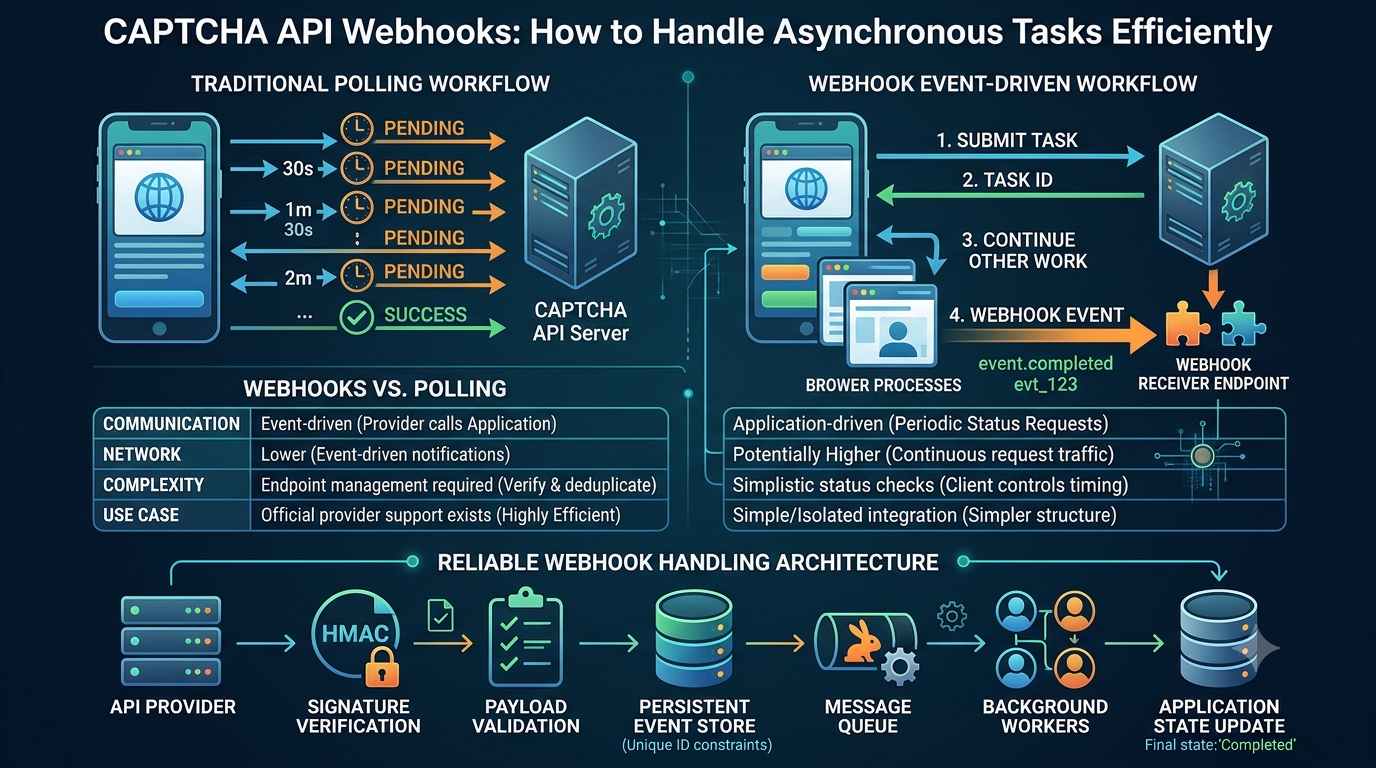
For example, an asynchronous workflow might look like this:
- Your application submits a task to an API.
- The API accepts the request.
- Your application receives a task identifier.
- The API processes the task in the background.
- When the task reaches a relevant state, the provider sends an HTTP request to your webhook URL.
- Your application validates the notification and processes the event.
The exact workflow depends on the API provider.
Important: Webhooks are not automatically supported by every CAPTCHA API. Before implementing this architecture, verify that your provider officially supports callbacks, notification URLs, or webhook delivery.
The examples in this article demonstrate generic webhook architecture. They are not confirmed AllCaptcha endpoints, parameters, authentication methods, or features.
How Do CAPTCHA API Webhooks Work?
A webhook system typically consists of three main components:
- API provider: The external service that generates events.
- Webhook endpoint: A URL controlled by your application that receives event notifications.
- Event handler: The application logic that validates and processes incoming notifications.
Example of a Webhook Workflow
Imagine an application that submits an asynchronous task.
<escape> Application | | 1. Submit task v External API | | 2. Accept task v Application | | 3. Continue other work | v External API processes task | | 4. Send webhook event v Webhook Endpoint | | 5. Validate notification v Event Handler | | 6. Update application state v Database / Application </escape>The main advantage is that your application does not need to continuously ask whether the task has completed.
However, webhook delivery is usually an HTTP-based notification mechanism, not a guarantee that every event will be delivered exactly once or in the correct order.
Reliable implementations must account for duplicate deliveries, delayed events, temporary failures, and potentially missing notifications.
Webhooks vs. Polling: What Is the Difference?
Polling and webhooks are two common approaches to handling asynchronous operations.
What Is Polling?
Polling occurs when an application periodically sends requests to check whether an operation has completed.
For example:
- Submit a task.
- Receive a task ID.
- Wait for a specified interval.
- Request the task status.
- Repeat until a terminal state is reached.
Polling is relatively simple to implement, but frequent status requests can create unnecessary network traffic.
What Are Webhooks?
With webhooks, the external service sends an event notification to your application when a relevant event occurs.
Your application waits for incoming notifications rather than repeatedly requesting status updates.
Webhooks vs. Polling Comparison
| Feature | Webhooks | Polling |
|---|---|---|
| Communication | Provider sends events | Application requests updates |
| Request frequency | Event-driven | Periodic |
| Network overhead | Can be lower | Depends on polling interval |
| Implementation | Requires a reachable endpoint | Usually simpler |
| Delivery handling | Must handle retries and duplicates | Client controls request timing |
| Real-time updates | Depends on delivery speed | Depends on polling interval |
| Infrastructure | Requires webhook receiver | Requires scheduled status checks |
| Provider support | Must be explicitly supported | Requires a status-check operation |
Which Approach Should You Choose?
Choose webhooks when:
- The provider officially supports them.
- Tasks may take a variable amount of time.
- Your application can expose a secure callback endpoint.
- You want to reduce frequent status requests.
- Event-driven processing fits your architecture.
Choose polling when:
- The provider does not support webhooks.
- You are building a simple integration.
- Your application operates in an environment that cannot receive inbound HTTP requests.
- You need to control when status updates are requested.
Some applications use a hybrid approach: webhooks provide the primary notification mechanism, while occasional status checks reconcile uncertain or missing events.
Common Webhook Event Types
The events available depend entirely on the API provider.
A generic asynchronous API may define events such as:
| Example Event | Description |
|---|---|
task.created |
A task has been accepted |
task.processing |
A task is being processed |
task.completed |
A task has completed successfully |
task.failed |
A task has failed |
task.expired |
A task is no longer available |
task.cancelled |
A task has been cancelled |
These names are illustrative. They are not confirmed AllCaptcha event names.
Before implementing an event handler, check the provider's official documentation for supported event types, payload structures, and delivery behavior.
Understanding Webhook Payloads
A webhook payload is the data sent by the provider to your application.
Many webhook systems use JSON.
For example:
{
  "event_id": "evt_example_123",
  "event_type": "task.completed",
  "created_at": "2026-10-30T10:15:00Z",
  "data": {
    "task_id": "task_example_456",
    "status": "completed"
  }
}
This is a generic illustrative payload, not an actual AllCaptcha response.
Important Payload Fields
Event ID
A unique identifier that can help your application detect duplicate deliveries.
Event Type
Identifies which event occurred.
Timestamp
Indicates when the event was generated.
Task ID
Identifies the operation associated with the event.
Data
Contains the event-specific information.
Why Should You Validate Webhook Payloads?
Never assume that every incoming HTTP request is a legitimate webhook.
Your application should verify:
- The event comes from an authorized provider.
- The payload has the expected structure.
- Required fields are present.
- Data types are correct.
- The event relates to a known task.
- The event has not already been processed.
Payload validation helps prevent malformed requests from affecting application state.
How to Build a CAPTCHA API Webhook Receiver with Node.js
The webhook receiver is the endpoint responsible for accepting incoming event notifications.
The following example uses Node.js and Express.
It demonstrates basic payload validation and duplicate-event handling.
It does not implement provider-specific signature verification because the actual signature format, header name, and signing algorithm must come from the provider's official documentation.
Step 1: Install Dependencies
npm init -y
npm install express
Step 2: Create the Webhook Server
Create a file named server.js.
const express = require("express");

const app = express();

app.use(express.json({
    limit: "100kb"
}));

const processedEvents = new Set();

app.post("/webhooks/captcha", async (req, res) => {
    const event = req.body;

    if (!event || typeof event !== "object") {
        return res.status(400).json({
            error: "Invalid payload"
        });
    }

    if (
        typeof event.event_id !== "string" ||
        typeof event.event_type !== "string"
    ) {
        return res.status(400).json({
            error: "Missing required fields"
        });
    }

    if (processedEvents.has(event.event_id)) {
        return res.status(200).json({
            received: true,
            duplicate: true
        });
    }

    try {
        await processWebhookEvent(event);

        processedEvents.add(event.event_id);

        return res.status(200).json({
            received: true
        });

    } catch (error) {
        console.error("Webhook processing failed:", error.message);

        return res.status(500).json({
            error: "Event processing failed"
        });
    }
});

async function processWebhookEvent(event) {
    switch (event.event_type) {
        case "task.completed":
            console.log("Task completed");
            break;

        case "task.failed":
            console.log("Task failed");
            break;

        default:
            console.log("Unhandled event:", event.event_type);
    }
}

app.listen(3000, () => {
    console.log("Webhook server running on port 3000");
});
Important Production Considerations
This example uses an in-memory Set for simplicity.
It is not suitable for production deduplication because:
- Data disappears when the process restarts.
- Multiple application instances do not share the same set.
- Memory usage grows over time.
- Concurrent requests can create race conditions.
For production, use persistent event storage with a unique database constraint or another reliable idempotency mechanism.
Also, the example does not authenticate the sender. Add the provider's documented webhook signature verification before trusting or processing incoming events.
Step 3: Start the Server
node server.js
Your local webhook endpoint will be:
http://localhost:3000/webhooks/captcha
This endpoint is suitable for local development only.
A real external provider generally needs a publicly reachable HTTPS endpoint. Use an approved deployment or development tunneling method when testing callbacks.
How to Handle Webhook Signatures Securely
Webhook authentication is one of the most important parts of a reliable implementation.
Without proper verification, an attacker may send forged HTTP requests to your webhook endpoint.
This could cause your application to update task statuses incorrectly or execute unauthorized actions.
What Is a Webhook Signature?
Some providers sign webhook payloads using a secret key.
The receiving application uses the documented verification procedure to determine whether the request was generated by the provider.
A common design uses an HMAC-based signature.
The provider and receiver share a secret, and the receiver calculates a signature from the original request body.
However, providers differ in:
- Signature header names.
- Signing algorithms.
- Timestamp formats.
- Payload canonicalization.
- Secret management.
- Signature encoding.
- Replay-protection requirements.
Do not assume that every provider uses the same HMAC format.
Generic HMAC Verification Example
The following example demonstrates the general concept of HMAC verification in Node.js.
It is not a drop-in implementation for AllCaptcha or any other provider without matching signature documentation.
const crypto = require("crypto");

function verifyHmac(
    rawBody,
    receivedSignature,
    secret
) {
    const expectedSignature = crypto
        .createHmac("sha256", secret)
        .update(rawBody)
        .digest("hex");

    const received = Buffer.from(
        receivedSignature,
        "utf8"
    );

    const expected = Buffer.from(
        expectedSignature,
        "utf8"
    );

    if (received.length !== expected.length) {
        return false;
    }

    return crypto.timingSafeEqual(
        received,
        expected
    );
}
For a real integration, verify the provider's exact signing specification.
Additional protections may include:
- Timestamp validation.
- Replay-attack prevention.
- Secret rotation.
- HTTPS enforcement.
- Request-size limits.
- IP restrictions, if officially supported and operationally appropriate.
How to Handle Duplicate Webhook Events
Webhook providers may retry notifications when they do not receive a successful response.
As a result, the same event can arrive more than once.
This is called duplicate delivery.
If your application processes the same event repeatedly, it may:
- Update database records multiple times.
- Trigger duplicate background jobs.
- Repeat notifications.
- Perform unnecessary external API operations.
- Create inconsistent application state.
Use Idempotent Event Processing
An idempotent operation produces the same intended final state when the same event is processed multiple times.
For example, updating a task record from processing to completed should not create a second task or trigger the same business action repeatedly.
A common solution is to store processed event IDs in a database.
Illustrative SQL:
CREATE TABLE webhook_events (
    event_id VARCHAR(255) PRIMARY KEY,
    event_type VARCHAR(100) NOT NULL,
    received_at TIMESTAMP NOT NULL
);
Before processing an event:
- Start a database transaction.
- Attempt to insert the event ID.
- If the ID already exists, treat it as a duplicate.
- If the insert succeeds, update the related application state.
- Commit the transaction.
The exact implementation should account for concurrent requests and transaction failures.
For long-running operations, use a durable job queue and an appropriate event-processing state machine.
How to Handle Webhook Retries
Webhook delivery can fail because of:
- Temporary network problems.
- Server downtime.
- Database outages.
- Request timeouts.
- Deployment interruptions.
- Application errors.
Many webhook providers retry failed deliveries, but their retry policies vary.
Some use exponential backoff, while others use fixed retry intervals or configurable delivery policies.
Recommended Retry Handling Practices
- Return an appropriate HTTP response after successful receipt.
- Avoid long-running processing inside the webhook request.
- Persist valid events before acknowledging them.
- Handle duplicate deliveries safely.
- Monitor repeated delivery failures.
- Follow the provider's retry and timeout documentation.
- Provide a reconciliation strategy for events that cannot be delivered.
Do not assume that a particular HTTP status code will trigger a retry unless the provider documents that behavior.
Why Should You Avoid Long Webhook Processing?
A webhook provider may expect your endpoint to respond within a limited period.
If your application performs lengthy database operations or additional API calls before returning a response, delivery may time out.
A better architecture is to validate and persist the event, enqueue the work, and return an acknowledgement promptly.
The background worker can then process the event separately.
Using a Queue for Webhook Processing
For applications with higher traffic, a message queue can make webhook handling more reliable.
A simplified architecture looks like this:
External API
     |
     v
Webhook Endpoint
     |
     v
Signature Verification
     |
     v
Payload Validation
     |
     v
Persistent Event Store
     |
     v
Message Queue
     |
     v
Background Worker
     |
     v
Application Database
Benefits of Queue-Based Processing
Faster acknowledgements
The webhook endpoint does not need to complete all business operations before responding.
Better workload management
Workers can process events at a controlled rate.
Improved resilience
Persisted events can be processed after temporary application failures.
Easier scaling
Additional workers can be added when event volume increases.
Better observability
Queue depth, processing time, and failure rates can be monitored independently.
Important Design Considerations
A queue does not automatically guarantee exactly-once processing.
Messages may be delivered more than once, and workers may fail after performing an operation but before acknowledging the message.
Use idempotent handlers and durable event records to protect application state.
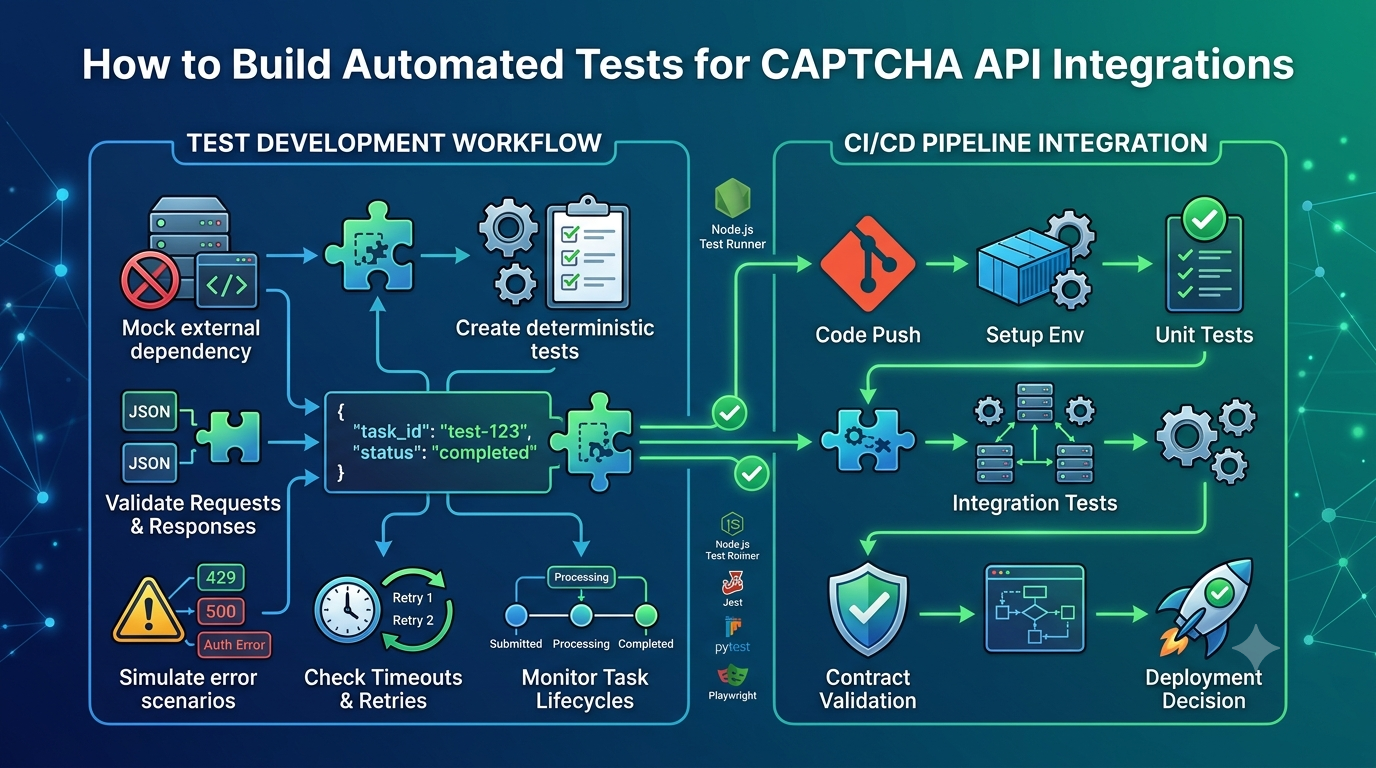
How to Test CAPTCHA API Webhooks
Testing should cover more than simply checking whether your server receives an HTTP request.
A complete test strategy should verify authentication, payload validation, duplicate handling, retry behavior, and application state changes.
1. Test a Valid Event
Send a representative test payload to your local endpoint.
Confirm that:
- The request is accepted.
- The payload is validated.
- The event is stored.
- The expected business logic runs.
- The application state is updated correctly.
Use synthetic test data, not real credentials or sensitive CAPTCHA tokens.
2. Test Invalid Payloads
Test cases should include:
- Empty request bodies.
- Missing event IDs.
- Missing event types.
- Invalid JSON.
- Unexpected field types.
- Oversized payloads.
Your application should reject invalid requests safely.
3. Test Duplicate Events
Send the same event ID twice.
The second delivery should not repeat the original business operation.
4. Test Invalid Signatures
If your provider supports signed webhooks, test:
- Missing signatures.
- Incorrect signatures.
- Modified request bodies.
- Expired timestamps.
- Replayed events.
5. Test Temporary Failures
Simulate a database outage or worker failure.
Confirm that events are not silently lost and can be retried or reconciled.
6. Test Event Ordering
Send events in different orders.
For example, a delayed task.processing event might arrive after a task.completed event.
Your application should prevent an older event from incorrectly reverting a completed task to a previous state.
Use documented event timestamps, sequence numbers, or authoritative task status information when available.
Common Webhook Security Best Practices
Webhook endpoints are externally accessible entry points and should be treated as security-sensitive components.
Follow these practices:
Use HTTPS
Accept webhook requests through HTTPS to protect data during transmission.
Verify Sender Authenticity
Use the signature verification mechanism officially documented by the provider.
Do not trust a request simply because it contains an expected JSON structure.
Validate Every Payload
Check required fields, data types, allowed values, and payload size.
Prevent Replay Attacks
When supported by the provider's signing mechanism, validate timestamps and reject requests outside the accepted time window.
Also track previously processed event IDs.
Protect Secrets
Store webhook secrets in environment variables or a secure secrets manager.
Never commit signing secrets to public repositories.
Avoid Logging Sensitive Data
Do not log full API keys, authentication credentials, CAPTCHA tokens, or other sensitive request contents.
Log event identifiers and safe diagnostic metadata instead.
Restrict Access Carefully
If a provider documents stable webhook source IP addresses, network restrictions may provide an additional security layer.
Do not rely on IP filtering as a replacement for cryptographic signature verification.
Common Mistakes When Implementing Webhooks
Mistake 1: Assuming Every API Supports Webhooks
Some APIs only provide status-check endpoints.
Better approach: Confirm webhook support in official provider documentation before designing the integration.
Mistake 2: Trusting Incoming Requests Without Verification
A public webhook endpoint can receive requests from unauthorized sources.
Better approach: Verify signatures using the provider's documented method.
Mistake 3: Processing the Same Event Multiple Times
Duplicate deliveries can cause repeated business operations.
Better approach: Store event IDs and use idempotent processing.
Mistake 4: Performing Long Operations Before Responding
Slow webhook handlers may exceed the provider's delivery timeout.
Better approach: Persist the event, enqueue processing, and acknowledge it promptly.
Mistake 5: Assuming Events Arrive in Order
Network delays and retries can cause events to arrive out of sequence.
Better approach: Validate state transitions and use authoritative timestamps or version information when available.
Mistake 6: Ignoring Failed Deliveries
An event may never reach your application because of prolonged downtime or exhausted retries.
Better approach: Monitor delivery failures and implement reconciliation where possible.
Mistake 7: Relying Only on In-Memory Event Storage
In-memory data disappears after a restart and is not shared between application instances.
Better approach: Use persistent storage and reliable deduplication.
CAPTCHA API Webhook Implementation Checklist
Before deploying a webhook integration, review this checklist:
- Confirm that the API provider officially supports webhooks.
- Review supported event types and payload structures.
- Configure a publicly reachable HTTPS endpoint.
- Verify webhook signatures using the documented method.
- Validate incoming payloads.
- Enforce request-size limits.
- Store event IDs persistently.
- Implement duplicate-event protection.
- Use idempotent event handlers.
- Handle delayed and out-of-order events.
- Return acknowledgements according to provider requirements.
- Use a durable queue for long-running operations.
- Monitor webhook delivery failures.
- Protect signing secrets and sensitive data.
- Test retries, invalid signatures, and server failures.
- Implement a reconciliation strategy when appropriate.
Frequently Asked Questions
1. What is a CAPTCHA API webhook?
A CAPTCHA API webhook is an HTTP callback mechanism that allows a provider to notify an application when a supported event occurs, such as an asynchronous task reaching a particular state.
Availability and implementation details depend on the provider.
2. Do all CAPTCHA APIs support webhooks?
No. Some providers offer webhook or callback functionality, while others require applications to poll a task-status endpoint.
Always check the provider's official documentation.
3. What is the difference between a webhook and an API request?
A traditional API request is usually initiated by your application.
A webhook notification is initiated by an external service when a particular event occurs.
Both typically use HTTP, but the direction and purpose of communication are different.
4. How do webhooks reduce API requests?
Webhooks can replace repeated status-check requests with event-driven notifications.
Instead of checking task status continuously, your application receives a notification when the provider reports an event.
The actual reduction depends on event volume and provider behavior.
5. How do I secure a webhook endpoint?
Use HTTPS, validate payloads, verify signatures according to the provider's documentation, prevent replay attacks where supported, and protect signing secrets.
6. What happens if a webhook is delivered twice?
Your application should detect duplicate events and avoid repeating the same business operation.
Persistent event IDs and idempotent processing are common solutions.
7. Should webhook processing be synchronous or asynchronous?
For simple operations, synchronous processing may be sufficient.
For production systems with longer processing requirements, it is often better to validate and persist the event, enqueue background work, and return an acknowledgement promptly.
8. Can webhooks replace polling completely?
Not always.
Webhooks can replace frequent polling when the provider supports reliable event notifications.
However, applications may still need occasional reconciliation or status checks to handle missing events and delivery failures.
9. What HTTP status code should a webhook endpoint return?
The correct acknowledgement depends on the provider's delivery contract.
Many systems expect a successful 2xx response after receiving an event, but developers should check the provider's documentation for exact retry behavior.
10. How can I test webhooks locally?
You can run a local webhook server and use synthetic HTTP requests or an approved tunneling service to make the endpoint reachable during development.
Test successful events, invalid payloads, duplicate deliveries, signature verification, and temporary server failures.
Conclusion
Webhooks are a useful architectural pattern for handling asynchronous API operations.
When supported by a CAPTCHA API provider, they can reduce unnecessary polling, improve event-driven workflows, and help applications respond more efficiently to completed operations.
However, reliable webhook integration requires more than creating a callback URL.
Developers must verify event authenticity, validate payloads, prevent duplicate processing, handle retries, account for out-of-order delivery, and monitor failed notifications.
For production applications, combining secure webhook handling with persistent event storage and background queues can provide a scalable foundation for asynchronous processing.
Always verify the provider's official webhook documentation before implementing provider-specific functionality. With a well-designed event-handling system, developers can build more reliable and maintainable API integrations.
SEO Information
SEO Title: CAPTCHA API Webhooks: How to Handle Asynchronous Tasks
Meta Description: Learn how CAPTCHA API webhooks work, handle asynchronous tasks, verify webhook signatures, prevent duplicate events, and build secure event-driven integrations.
Focus Keyword: CAPTCHA API webhooks
Secondary Keywords:
- CAPTCHA API callback
- CAPTCHA API asynchronous tasks
- Webhook integration
- API webhook handling
- Webhook signature verification
- Webhook event processing
- Webhook retry mechanism
- API polling vs webhooks
- Secure webhook endpoint
URL Slug: captcha-api-webhooks-guide
Suggested Featured Image: A developer viewing an API webhook architecture diagram showing an external API sending event notifications to a secure application endpoint and background worker queue.
Suggested Image Alt Text: CAPTCHA API webhook architecture showing asynchronous task notifications and event processing.
Suggested Internal Links
Add contextual internal links to these related AllCaptcha articles:
- CAPTCHA API Documentation: How to Read Endpoints, Parameters, and Responses – Link from the sections about webhook payloads and API documentation.
- CAPTCHA API Latency: How to Measure and Reduce Response Time – Link from the sections about polling and performance optimization.
- How to Build a Reliable CAPTCHA API Client with Retries, Timeouts, and Error Handling – Link from the retry and reliability sections.
- How to Mock a CAPTCHA API for Development and Testing – Link from the webhook testing section.
- CAPTCHA API Security Best Practices: How to Protect API Keys and Requests – Link from the webhook security section.
Suggested Schema Markup
Article– For the main educational article.BreadcrumbList– To describe the page's position within the AllCaptcha website structure.FAQPage– Consider only when appropriate under Google's current structured-data guidelines. Structured data does not guarantee enhanced search visibility.