How to Build Automated Tests for CAPTCHA API Integrations
Integrating a CAPTCHA API into an application involves more than sending HTTP requests and receiving responses. Developers also need to ensure that the integration works reliably, handles errors correctly, and remains compatible with future application updates.
Manually testing every API interaction can become time-consuming, especially when an application has multiple environments, background workers, and complex task-processing workflows.
This is where automated testing becomes important.
Automated tests allow developers to verify API integration behavior consistently without manually repeating the same checks. They can detect authentication problems, invalid request formats, unexpected responses, timeout issues, and other integration failures before they reach production.
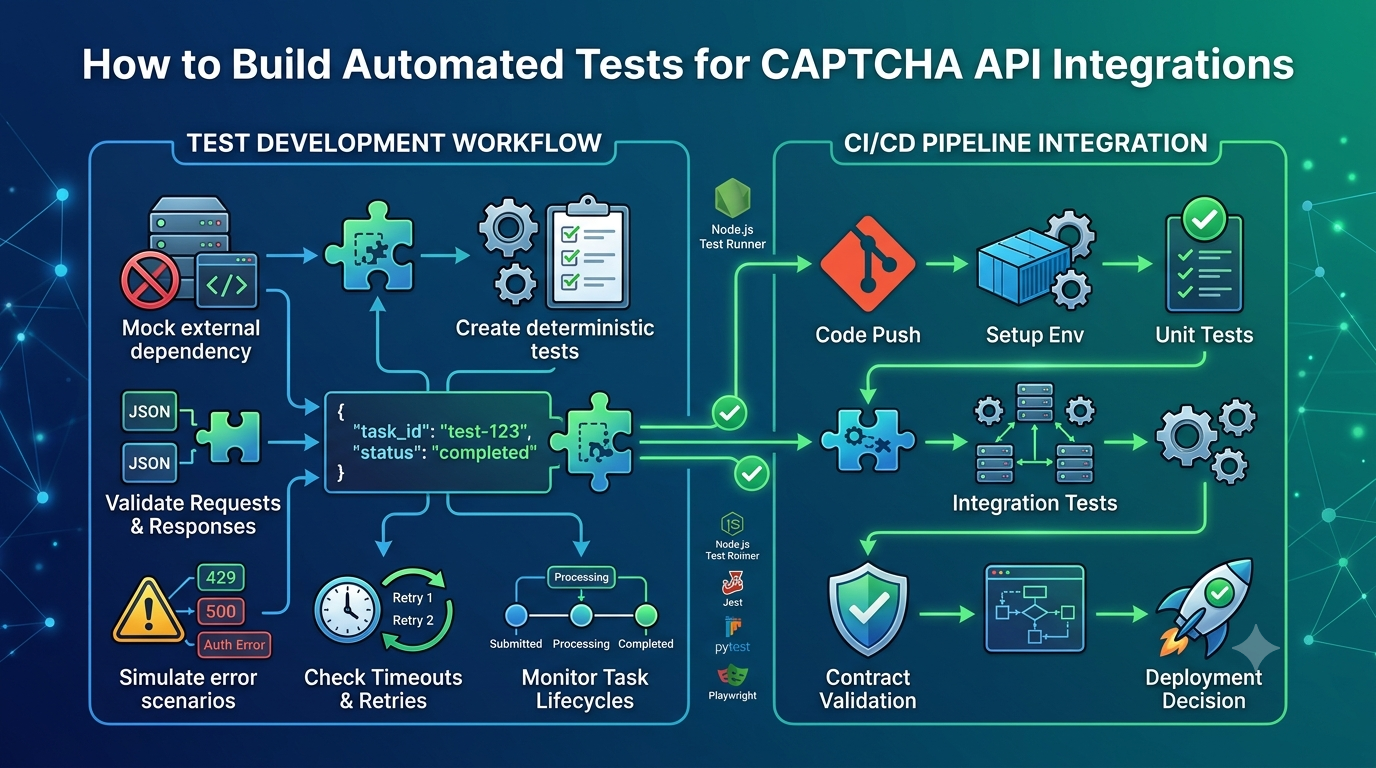
In this guide, you will learn how to build automated tests for CAPTCHA API integrations, create mock API responses, validate requests, test error scenarios, and integrate automated testing into a CI/CD pipeline.
Whether you use Python, Node.js, PHP, Java, or another programming language, these practices can help make your API integration more reliable and maintainable.
What Is Automated Testing for CAPTCHA API Integrations?
Automated testing is the process of using software tools and predefined test cases to verify that an application behaves as expected.
For a CAPTCHA API integration, automated tests can verify several parts of the communication process:
- Request construction.
- Authentication configuration.
- HTTP communication.
- Response parsing.
- Task status handling.
- Error handling.
- Timeout behavior.
- Retry logic.
- Application state updates.
For example, imagine an application that submits an asynchronous task to an external API.
An automated test could verify that:
- The application creates a correctly formatted request.
- The required authentication information is included.
- The API client handles a successful response.
- The returned task identifier is stored correctly.
- The application handles a failed task.
- Network timeouts are handled safely.
- Retry behavior follows the expected policy.
The goal is to detect problems early and ensure that the integration continues working as the application evolves.
Important: CAPTCHA API tests should use mocks, synthetic data, provider-approved testing environments, or authorized test integrations. Do not use automated tests to bypass security controls on systems you do not own or have permission to test.
Why Is Automated Testing Important for CAPTCHA APIs?
Third-party API integrations can fail for many reasons, including network problems, configuration mistakes, authentication errors, and changes in external services.
Automated testing helps developers manage these risks.
1. Detect Integration Errors Early
A small mistake in a request parameter or authentication header can prevent an API request from succeeding.
Automated tests can detect these problems before deployment.
2. Reduce Manual Testing
Without automated tests, developers may need to manually repeat the same API scenarios after every code change.
Automated test suites make repeated verification faster and more consistent.
3. Improve Application Reliability
Testing successful and unsuccessful API scenarios helps ensure that the application responds predictably when external services behave unexpectedly.
4. Prevent Regression Bugs
A code change that fixes one issue may accidentally break another part of the integration.
Regression tests help identify these problems.
5. Support Continuous Integration and Deployment
Automated tests can run whenever developers push code or create a pull request.
This provides early feedback before changes reach production.
6. Improve Long-Term Maintenance
A well-organized test suite documents the expected behavior of an API client.
New developers can understand how the integration should work by reviewing its tests.
Types of Automated Tests for CAPTCHA API Integrations
A complete testing strategy usually includes several different test types.
Each type focuses on a particular part of the integration.
1. Unit Testing
Unit tests verify individual functions or components in isolation.
For example, a developer might test:
- Request payload generation.
- Authentication header construction.
- Response parsing.
- Error classification.
- Retry-delay calculations.
- Task status mapping.
Unit tests should generally avoid making real network requests.
Instead, they use mocked dependencies or controlled test inputs.
2. Integration Testing
Integration tests verify that multiple components work together correctly.
For example, an integration test might check whether:
- The API client sends an HTTP request.
- The response is parsed correctly.
- The task identifier is saved.
- The application updates its internal task status.
Integration tests can use a local mock server or an authorized provider testing environment.
3. Contract Testing
Contract tests verify that requests and responses follow an expected API contract.
They can check:
- Required request fields.
- Data types.
- Response structures.
- Required response properties.
- Supported status values.
- Error response formats.
Contract tests are particularly useful when integrating with external services that may evolve over time.
4. End-to-End Testing
End-to-end tests verify a complete application workflow.
For example:
- A user submits a form.
- The backend creates an API request.
- The API client processes the response.
- The application updates its state.
- The user receives the expected result.
For CAPTCHA-related workflows, use synthetic tokens, mocks, or official test configurations rather than relying on real CAPTCHA challenges in every automated run.
5. Regression Testing
Regression tests verify that previously working functionality continues to work after code changes.
For example, after modifying authentication logic, developers can rerun tests covering:
- Successful requests.
- Invalid credentials.
- Missing parameters.
- Network failures.
- Response parsing.
- Task status updates.
Automated Testing Comparison
| Test Type | Main Purpose | Typical Example |
|---|---|---|
| Unit testing | Test individual components | Validate request builder |
| Integration testing | Test connected components | Test API client with mock server |
| Contract testing | Validate API structures | Check response schema |
| End-to-end testing | Test complete workflows | Submit and process a test task |
| Regression testing | Prevent old bugs from returning | Rerun previous failure scenarios |
A strong testing strategy combines these methods rather than relying on only one type.
What Should You Test in a CAPTCHA API Integration?
Before writing test code, identify the important behaviors of your API client.
The following areas are especially useful.
1. Authentication
Verify that the application handles authentication correctly.
Test cases may include:
- Valid credentials.
- Missing credentials.
- Invalid credentials.
- Expired credentials, if applicable.
- Incorrect authentication header format.
Use fake credentials in unit tests and provider-approved credentials in authorized integration tests.
2. Request Validation
Check whether the application creates requests with the expected structure.
Test:
- Required parameters.
- Optional parameters.
- Data types.
- Empty values.
- Invalid input.
- Unexpected values.
3. Successful Responses
Verify that the application can process valid API responses.
Check:
- HTTP status.
- Response format.
- Required fields.
- Task identifiers.
- Application state updates.
4. Error Responses
External APIs may return errors for many reasons.
Test:
- Authentication errors.
- Invalid requests.
- Permission errors.
- Rate-limit responses.
- Server errors.
- Unexpected response bodies.
5. Timeout Behavior
A request may take longer than expected because of network problems or external service delays.
Test whether the application:
- Stops waiting after the configured timeout.
- Releases resources correctly.
- Returns a meaningful error.
- Retries only when appropriate.
6. Retry Logic
If the API client supports retries, verify that it:
- Retries only eligible failures.
- Uses the expected delay.
- Respects retry limits.
- Avoids unnecessary repeated requests.
- Handles rate limits according to provider documentation.
7. Asynchronous Task Processing
Some APIs use asynchronous workflows.
In these cases, test:
- Task creation.
- Task identifier storage.
- Status updates.
- Completed tasks.
- Failed tasks.
- Expired tasks.
- Unexpected status values.
The exact states depend on the provider's documented API contract.
How to Mock a CAPTCHA API for Automated Testing
Mocking is one of the most useful techniques for testing external API integrations.
A mock replaces a real external service with a controlled implementation.
Instead of making an actual request to a CAPTCHA API, your application receives a predefined response.
This allows developers to test different scenarios without relying on external network availability.
Why Use API Mocks?
API mocks offer several advantages:
- Faster automated tests.
- Predictable responses.
- No dependency on external service availability.
- Easier testing of error conditions.
- Reduced use of real API resources.
- Safer testing in CI/CD environments.
For example, you can simulate:
- Successful task creation.
- Invalid authentication.
- Rate limiting.
- Server errors.
- Network timeouts.
- Failed asynchronous tasks.
Example: Mocking an API Client in Node.js
The following example uses dependency injection to separate application logic from HTTP communication.
First, create an API client:
class CaptchaApiClient {
    constructor(httpClient) {
        this.httpClient = httpClient;
    }

    async createTask(payload) {
        return this.httpClient.post(
            "/tasks",
            payload
        );
    }
}

module.exports = CaptchaApiClient;
The HTTP client is passed into the constructor rather than created inside the class.
This makes it easier to replace the real HTTP implementation during testing.
Create a Mock HTTP Client
const mockHttpClient = {
    post: async (path, payload) => {
        return {
            task_id: "test-task-123",
            status: "processing"
        };
    }
};
This mock returns a predefined response without making a network request.
Write an Automated Test
Using Node.js's built-in test runner:
const test = require("node:test");
const assert = require("node:assert/strict");

const CaptchaApiClient = require("./CaptchaApiClient");

test("creates a task successfully", async () => {
    const mockHttpClient = {
        post: async () => ({
            task_id: "test-task-123",
            status: "processing"
        })
    };

    const client = new CaptchaApiClient(
        mockHttpClient
    );

    const result = await client.createTask({
        test: true
    });

    assert.equal(
        result.task_id,
        "test-task-123"
    );

    assert.equal(
        result.status,
        "processing"
    );
});
Run the test:
node --test
The test verifies that the application can process the expected response structure.
The task fields in this example are illustrative placeholders, not confirmed AllCaptcha response fields.
How to Test API Authentication Automatically
Authentication tests help verify that the application sends credentials correctly.
You should avoid placing real API keys in unit tests.
Instead, use synthetic credentials and mock the HTTP layer.
Example:
const test = require("node:test");
const assert = require("node:assert/strict");

test("adds authentication header", async () => {
    const fakeApiKey = "test-key-only";

    const request = {
        headers: {
            "X-API-Key": fakeApiKey
        }
    };

    assert.equal(
        request.headers["X-API-Key"],
        "test-key-only"
    );
});
This example checks a hypothetical custom API key header.
A real test should use the authentication method required by the provider.
Recommended Authentication Test Cases
| Test Case | Expected Behavior |
|---|---|
| Credential is configured | Client can build an authenticated request |
| Credential is missing | Client fails safely before sending |
| Credential is invalid | Error is handled correctly |
| Header format is incorrect | Authentication failure is handled |
| Credential is expired | Renewal or failure follows provider rules |
Avoid printing real credentials in test output or CI/CD logs.
How to Test CAPTCHA API Error Handling
An API client should not only handle successful requests.
It must also respond correctly when the external service returns an error.
The following example demonstrates testing a simulated HTTP error.
const test = require("node:test");
const assert = require("node:assert/strict");

test("handles a rate limit response", async () => {
    const mockResponse = {
        ok: false,
        status: 429
    };

    async function makeRequest() {
        if (!mockResponse.ok) {
            throw new Error(
                `HTTP ${mockResponse.status}`
            );
        }
    }

    await assert.rejects(
        makeRequest(),
        /HTTP 429/
    );
});
This test verifies that the application detects a simulated rate-limit response.
Important Error Scenarios to Test
HTTP 400 – Bad Request
The request contains invalid or missing data.
HTTP 401 – Unauthorized
The request lacks valid authentication credentials.
HTTP 403 – Forbidden
The request is not permitted.
HTTP 404 – Not Found
The requested resource or endpoint cannot be found.
HTTP 429 – Too Many Requests
The request has encountered a rate limit.
HTTP 500 – Internal Server Error
The external service has encountered a server-side problem.
These descriptions are general HTTP conventions. An API provider may define additional error codes or specific response behavior.
For more troubleshooting information, see our related article: CAPTCHA API Error Codes: Common Errors and How to Fix Them.
How to Test API Timeouts and Retry Logic
Timeouts and retries are important parts of a reliable API client.
However, retrying every failed request can create additional problems.
For example, retrying an invalid request repeatedly will not fix the underlying issue.
Test Timeout Behavior
A test can simulate a request that takes longer than the allowed time.
Example:
const test = require("node:test");
const assert = require("node:assert/strict");

test("handles a simulated timeout", async () => {
    async function requestWithTimeout() {
        throw new Error("Request timed out");
    }

    await assert.rejects(
        requestWithTimeout(),
        /timed out/
    );
});
This example tests timeout error handling without making an actual network request.
Test Retry Behavior
A retry test should verify that the client:
- Detects a retryable failure.
- Waits according to the configured policy.
- Makes another attempt.
- Stops after the maximum number of attempts.
- Returns a meaningful error if all attempts fail.
For deterministic automated tests, replace real waiting with a mock delay function.
This makes tests faster and avoids unpredictable timing.
Important Retry Considerations
- Do not retry invalid authentication indefinitely.
- Do not retry malformed requests without correcting them.
- Respect documented rate limits.
- Use exponential backoff where appropriate.
- Add jitter when many clients may retry simultaneously.
- Consider whether repeating an operation could create duplicate tasks.
- Use provider-supported idempotency mechanisms when available.
A successful retry strategy should be based on the provider's documented behavior.
How to Validate CAPTCHA API Request and Response Schemas
Contract testing verifies that your application communicates using the expected API structure.
It is particularly useful when working with external APIs or maintaining integrations across multiple versions.
Request Schema Validation
A request schema may define:
- Required fields.
- Optional fields.
- Data types.
- Allowed values.
- Field length restrictions.
- Nested object structures.
An automated test can verify that your request builder produces valid data.
Response Schema Validation
A response schema can define:
- Required response fields.
- Data types.
- Status values.
- Nested data structures.
- Error response formats.
For example, a generic test might verify that a task response contains a string identifier:
const assert = require("node:assert/strict");

function validateTaskResponse(response) {
    assert.equal(
        typeof response.task_id,
        "string"
    );

    assert.equal(
        typeof response.status,
        "string"
    );
}
The field names here are illustrative.
Always use the actual response schema documented by your API provider.
Why Is Schema Validation Important?
Without schema validation, an API response can change unexpectedly and cause errors in downstream application logic.
Contract tests help detect these problems before deployment.
They are especially valuable when upgrading an API version or changing an SDK.
How to Test Asynchronous CAPTCHA API Workflows
Some CAPTCHA APIs process tasks asynchronously.
Instead of returning a completed result immediately, the service may first return a task identifier.
Your application then retrieves the result through a documented status-check mechanism or receives a notification if the provider supports webhooks.
Automated tests should cover the complete task lifecycle.
Example Task Lifecycle
Task Submitted
      |
      v
Task Accepted
      |
      v
Task Processing
      |
      +------> Task Completed
      |
      +------> Task Failed
      |
      +------> Task Expired
The states shown are illustrative. Use the actual states defined in the provider's documentation.
Recommended Test Cases
| Scenario | What to Verify |
|---|---|
| Task accepted | Task identifier is stored |
| Task processing | Application waits or continues appropriately |
| Task completed | Result is handled correctly |
| Task failed | Failure is reported safely |
| Task expired | Expiration is handled correctly |
| Unknown status | Application fails safely or handles the new state |
| Duplicate notification | Event is not processed twice |
Avoid Real CAPTCHA Challenges in Every Automated Test
Automated tests should not depend on solving real CAPTCHA challenges every time the test suite runs.
Instead, use:
- Mock API responses.
- Synthetic task identifiers.
- Provider-approved testing environments.
- Official test configurations, if available.
- Controlled integration tests.
This makes your test suite faster, more predictable, and easier to maintain.
How to Integrate Automated Tests into a CI/CD Pipeline
Continuous Integration and Continuous Deployment (CI/CD) help teams automate software testing and delivery.
For a CAPTCHA API integration, the test suite can run automatically whenever code is pushed or a pull request is created.
A typical workflow looks like this:
Developer Changes Code
         |
         v
Code Repository
         |
         v
CI/CD Pipeline Starts
         |
         v
Install Dependencies
         |
         v
Run Unit Tests
         |
         v
Run Integration Tests
         |
         v
Run Contract Tests
         |
         v
Generate Test Results
         |
         v
Review / Deployment Decision
Example: GitHub Actions Workflow
The following example runs Node.js automated tests using GitHub Actions.
Create:
.github/workflows/test.yml
name: CAPTCHA API Integration Tests

on:
  push:
    branches:
      - main
  pull_request:

jobs:
  test:
    runs-on: ubuntu-latest

    steps:
      - name: Checkout repository
        uses: actions/checkout@v4

      - name: Setup Node.js
        uses: actions/setup-node@v4
        with:
          node-version: 22

      - name: Install dependencies
        run: npm ci

      - name: Run automated tests
        run: node --test
This workflow runs the test suite when code is pushed to the main branch or a pull request is opened.
The example does not require a real CAPTCHA API credential because the unit tests use mocked responses.
When Should You Use Real API Credentials in CI/CD?
Some integration tests may need to communicate with a provider-approved testing environment.
In that case:
- Store credentials in the CI/CD platform's encrypted secrets.
- Use separate credentials for testing and production.
- Restrict access to sensitive workflows.
- Avoid printing secrets in logs.
- Run real API tests selectively.
- Monitor resource usage.
- Never expose production credentials to untrusted pull requests.
Do not assume a provider offers a sandbox or test API mode unless its documentation confirms it.
Choosing Automated Testing Tools
The best testing tools depend on your programming language and application architecture.
Here are some common options.
| Language / Platform | Testing Tools | Common Use |
|---|---|---|
| JavaScript / Node.js | Node.js Test Runner, Jest, Vitest | Unit and integration tests |
| Python | pytest, unittest | API client and application tests |
| PHP | PHPUnit, Pest | Backend integration tests |
| Java | JUnit, Mockito | Unit and service tests |
| .NET / C# | xUnit, NUnit, Moq | API client testing |
| HTTP mocking | WireMock, Mock Service Worker | Simulated HTTP responses |
| API testing | Postman, Newman | Repeatable API request tests |
| Browser testing | Playwright, Selenium | Application-level workflows |
You do not need every tool in this table.
Start with the testing framework already used by your application and add additional tools only when they provide clear value.
Best Practices for Automated CAPTCHA API Testing
A reliable testing strategy should be predictable, secure, and easy to maintain.
1. Mock External API Dependencies
Use mocks for unit tests so they do not depend on network availability.
2. Keep Unit Tests Independent
Each unit test should verify a specific behavior without relying on unrelated tests.
3. Test Both Success and Failure Scenarios
A test suite that only checks successful responses will miss many important integration problems.
4. Use Synthetic Test Data
Avoid using real customer information, sensitive credentials, or production tokens in automated tests.
5. Validate Request and Response Structures
Contract validation helps detect unexpected changes in API behavior.
6. Make Tests Deterministic
Avoid relying on unpredictable network conditions, real-time CAPTCHA challenges, or arbitrary delays.
7. Separate Unit Tests from Real API Tests
Unit tests should be fast and independent.
Provider integration tests should run in a controlled environment and use approved credentials.
8. Monitor Test Failures
A sudden increase in failed tests may indicate a code regression, configuration problem, or external API change.
9. Avoid Excessive Test Dependencies
Use the smallest practical set of testing tools.
Too many overlapping tools can increase maintenance complexity.
10. Document Expected API Behavior
Keep test cases aligned with the provider's official documentation.
When the API contract changes, review and update the corresponding tests.
Common Mistakes When Automating CAPTCHA API Tests
Mistake 1: Depending on a Real CAPTCHA Challenge for Every Test
Real CAPTCHA challenges can introduce delays and unpredictable failures.
Better approach: Use mocks, synthetic data, or provider-approved testing configurations.
Mistake 2: Testing Only Successful Responses
An integration may work normally but fail when the API returns an error.
Better approach: Test authentication errors, validation failures, rate limits, timeouts, and server errors.
Mistake 3: Using Production Credentials in Automated Tests
Production credentials can be exposed through test logs or insecure workflows.
Better approach: Use mocks for most tests and separate, restricted credentials for authorized integration tests.
Mistake 4: Ignoring Response Schema Changes
A provider may change its response structure, causing application code to fail.
Better approach: Add contract tests for important request and response fields.
Mistake 5: Using Arbitrary Sleep Delays
Tests that depend on fixed waiting periods may become slow or unreliable.
Better approach: Mock time and delay functions, or use deterministic asynchronous test utilities.
Mistake 6: Retrying Every Failed Request
Not all errors are temporary.
Better approach: Classify errors and retry only when the provider's documented behavior and operation semantics make it appropriate.
Mistake 7: Ignoring CI/CD Security
Automated workflows may expose secrets if permissions and logs are configured incorrectly.
Better approach: Use encrypted secrets, restricted workflow permissions, and careful logging practices.
Automated Testing Checklist for CAPTCHA API Integrations
Before deploying your integration, review this checklist:
- Define the expected API contract.
- Identify important integration scenarios.
- Write unit tests for request builders.
- Test authentication configuration.
- Validate successful responses.
- Test invalid request parameters.
- Test authentication failures.
- Test rate-limit responses.
- Test timeout behavior.
- Test retry logic.
- Validate response schemas.
- Test asynchronous task states.
- Test duplicate event handling where applicable.
- Use mocks for external dependencies.
- Use synthetic data.
- Separate unit and integration tests.
- Configure automated tests in CI/CD.
- Protect credentials and sensitive logs.
- Review test failures before deployment.
- Update tests when the API contract changes.
Frequently Asked Questions
1. What is automated testing for CAPTCHA API integrations?
Automated testing verifies that an application communicates with a CAPTCHA API correctly using predefined test cases.
It can validate requests, authentication, responses, error handling, timeouts, and asynchronous task processing.
2. Why should I mock a CAPTCHA API?
Mocking allows developers to simulate API responses without making real network requests.
This makes tests faster, more predictable, and easier to run in development and CI/CD environments.
3. Which testing framework should I use?
Choose a framework that matches your programming language and existing application architecture.
Examples include Jest or the Node.js Test Runner for JavaScript, pytest for Python, PHPUnit for PHP, and JUnit for Java.
4. Should automated tests call a real CAPTCHA API?
Most unit tests should use mocks.
Real provider integration tests may be useful in a controlled environment when permitted by the provider.
Avoid depending on real CAPTCHA challenges in every automated test.
5. What should I test in a CAPTCHA API integration?
Important scenarios include successful requests, invalid credentials, missing parameters, unexpected responses, rate limits, timeouts, retries, and asynchronous task states.
6. What is contract testing?
Contract testing verifies that API requests and responses follow an expected structure.
It helps detect changes in required fields, data types, and response formats.
7. Can I run CAPTCHA API tests in GitHub Actions?
Yes. GitHub Actions can run unit tests, integration tests, and contract tests whenever code is pushed or a pull request is created.
Use mocks for tests that do not require a real provider connection.
8. How do I test API authentication without exposing credentials?
Use synthetic credentials in unit tests and mock the HTTP client.
For authorized integration tests, store restricted credentials in the CI/CD platform's encrypted secret storage.
9. How can I test API timeouts?
Simulate delayed or failed network operations using a mock HTTP client or a controlled test server.
Verify that the application stops waiting after the configured timeout and handles the error correctly.
10. How often should I run automated API integration tests?
Unit tests should generally run on every relevant code change.
Integration and contract tests can run in CI/CD pipelines according to their execution cost and the importance of the integration.
Production monitoring should complement automated testing rather than replace it.
Conclusion
Automated testing is an important part of building reliable CAPTCHA API integrations.
By testing requests, authentication, responses, error handling, timeouts, retries, and asynchronous workflows, developers can identify problems before they affect production applications.
A practical strategy combines unit tests, integration tests, contract tests, and regression tests.
API mocks make most tests fast and predictable, while controlled provider integration tests help verify real communication when necessary.
Integrating these tests into a CI/CD pipeline further improves development consistency and reduces the risk of deploying broken code.
Before building your test suite, review the official documentation for your API provider and define the expected request, response, authentication, and error-handling behavior.
With a structured automated testing strategy, developers can maintain more stable, secure, and maintainable CAPTCHA API integrations.
SEO Information
SEO Title: CAPTCHA API Automated Testing: A Complete Developer Guide
Meta Description: Learn how to automate CAPTCHA API integration tests, mock API responses, validate requests, test errors, and build reliable CI/CD workflows.
Focus Keyword: CAPTCHA API automated testing
Secondary Keywords:
- CAPTCHA API testing
- API integration testing
- Automated API testing
- CAPTCHA API mock
- API response validation
- API contract testing
- API regression testing
- CAPTCHA API error handling
- API testing CI/CD
- Mock API responses
URL Slug: captcha-api-automated-testing
Suggested Featured Image: A developer workspace showing an API testing dashboard, automated test cases, mock responses, and a CI/CD pipeline connected to a CAPTCHA API.
Suggested Image Alt Text: CAPTCHA API automated testing workflow showing mock responses, API validation, and CI/CD integration.
Suggested Internal Links
Add contextual internal links to these related articles on AllCaptcha:
- CAPTCHA API Integration Testing: A Complete Guide – Link from the introduction and the section about integration testing.
- How to Mock a CAPTCHA API for Development and Testing – Link from the API mocking section.
- CAPTCHA API Testing in CI/CD Pipelines: Best Practices for Developers – Link from the CI/CD section.
- How to Debug CAPTCHA API Integration Issues: A Step-by-Step Guide – Link from the error-handling and troubleshooting sections.
- CAPTCHA API Versioning: How to Manage API Updates and Breaking Changes – Link from the contract testing and regression testing sections.
- How to Build a Reliable CAPTCHA API Client with Retries, Timeouts, and Error Handling – Link from the timeout and retry sections.
Suggested Schema Markup
Article– Describe the main educational content.BreadcrumbList– Define the page's position within the website structure.FAQPage– Consider only when appropriate under Google's current structured-data guidelines. Structured data does not guarantee enhanced search visibility.