CAPTCHA API Integration with Go: A Complete Developer Guide
Go (Golang) is a popular programming language for building backend services, APIs, automation platforms, and distributed applications. Its performance, built-in concurrency support, and standard networking libraries make it a practical choice for integrating external APIs.
If you are developing a Go application that needs to communicate with a CAPTCHA-related API, you need more than a basic HTTP request. A reliable integration should also handle authentication, JSON serialization, timeouts, asynchronous operations, error handling, and security.
In this guide, you will learn how to integrate a CAPTCHA API with Go, build a reusable HTTP client, process API responses, manage failures, and test your implementation.
The examples use Go's standard library, so you do not need a large collection of third-party dependencies.
All API endpoints, authentication headers, request fields, and response structures in this tutorial are illustrative placeholders. Replace them with the actual specifications provided by your API provider.
1. Why Use Go for CAPTCHA API Integration?
Go is designed for building efficient network applications. Its standard library includes tools for making HTTP requests, encoding JSON, managing timeouts, and handling concurrent operations.
These features make Go suitable for backend integrations involving external services.
Some advantages include:
Simple HTTP Client
Go provides the net/http package for communicating with external APIs.
You can send GET, POST, PUT, and DELETE requests without installing an additional HTTP library.
Built-in JSON Support
The encoding/json package makes it easy to convert Go structures into JSON and parse JSON responses.
Concurrency Support
Goroutines and channels allow developers to process independent tasks concurrently.
However, concurrency should always be controlled according to application capacity and the API provider's documented rate limits.
Strong Error Handling
Go encourages explicit error handling, making it easier to identify and manage failures during API communication.
Cross-Platform Deployment
Go applications can be compiled for different operating systems and deployment environments.
This makes it convenient to deploy integrations in containers, cloud services, and backend infrastructure.
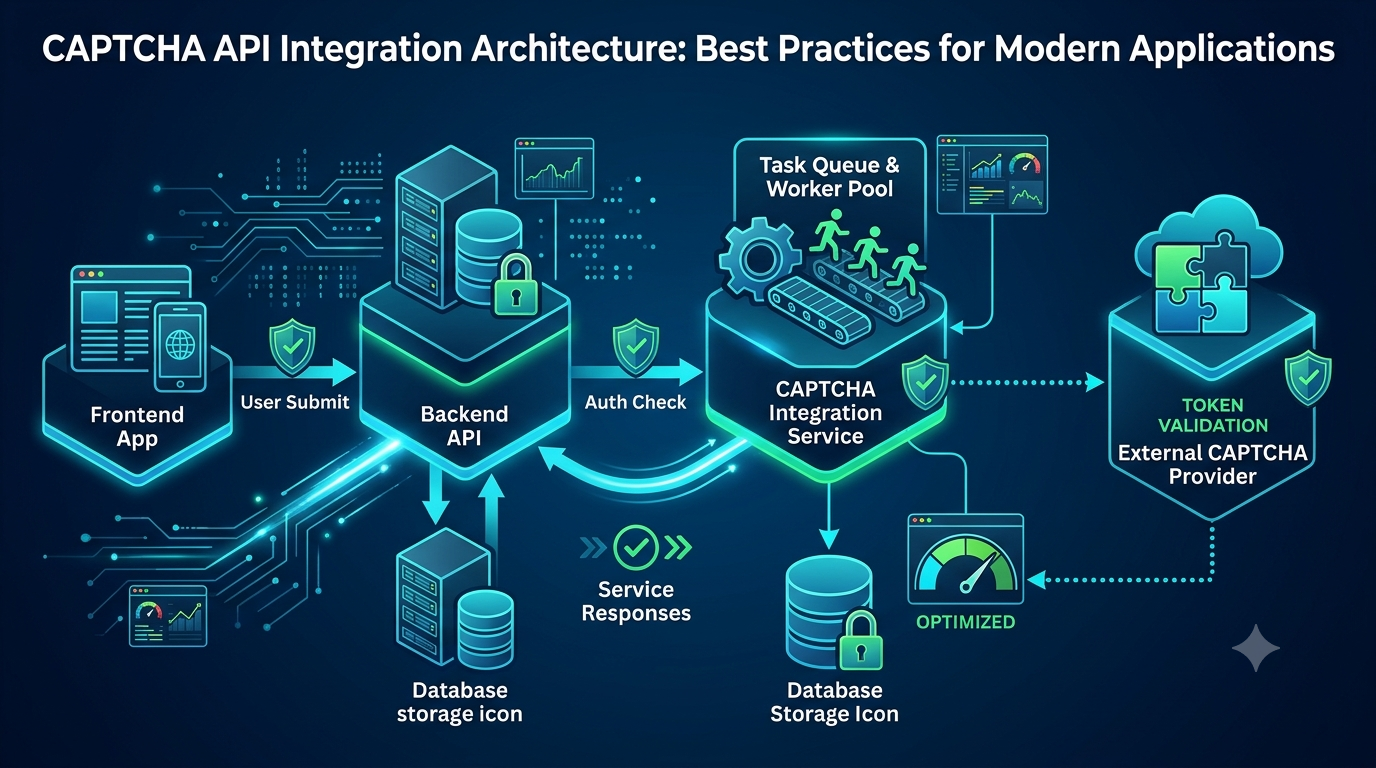
2. Understand the CAPTCHA API Workflow
Before writing code, understand how your application communicates with an external API.
A typical integration may follow this workflow:
- Your Go application receives an authorized request.
- The application validates the input.
- The API client creates an HTTP request.
- The request is sent to the external service.
- The service returns a response.
- The application parses the response.
- The application handles the result or reports an error.
Some APIs process operations synchronously, while others use an asynchronous task model.
In an asynchronous workflow, the application may need to submit a task, receive a task identifier, and retrieve its result later.
Always follow the provider's documented workflow rather than assuming that every API uses the same request format.
3. Set Up Your Go Development Environment
First, make sure Go is installed.
Check the installed version:
go version
Create a new project directory:
mkdir captcha-go-integration
cd captcha-go-integration
Initialize a Go module:
go mod init example.com/captcha-go-integration
Create the main application file:
touch main.go
On Windows PowerShell, you can create the file with:
New-Item main.go -ItemType File
Your initial project structure can look like this:
captcha-go-integration/
│
├── go.mod
├── main.go
│
├── client/
│   └── captcha.go
│
├── models/
│   └── response.go
│
└── tests/
    └── captcha_test.go
For a small application, you can start with one file and introduce separate packages as the project grows.
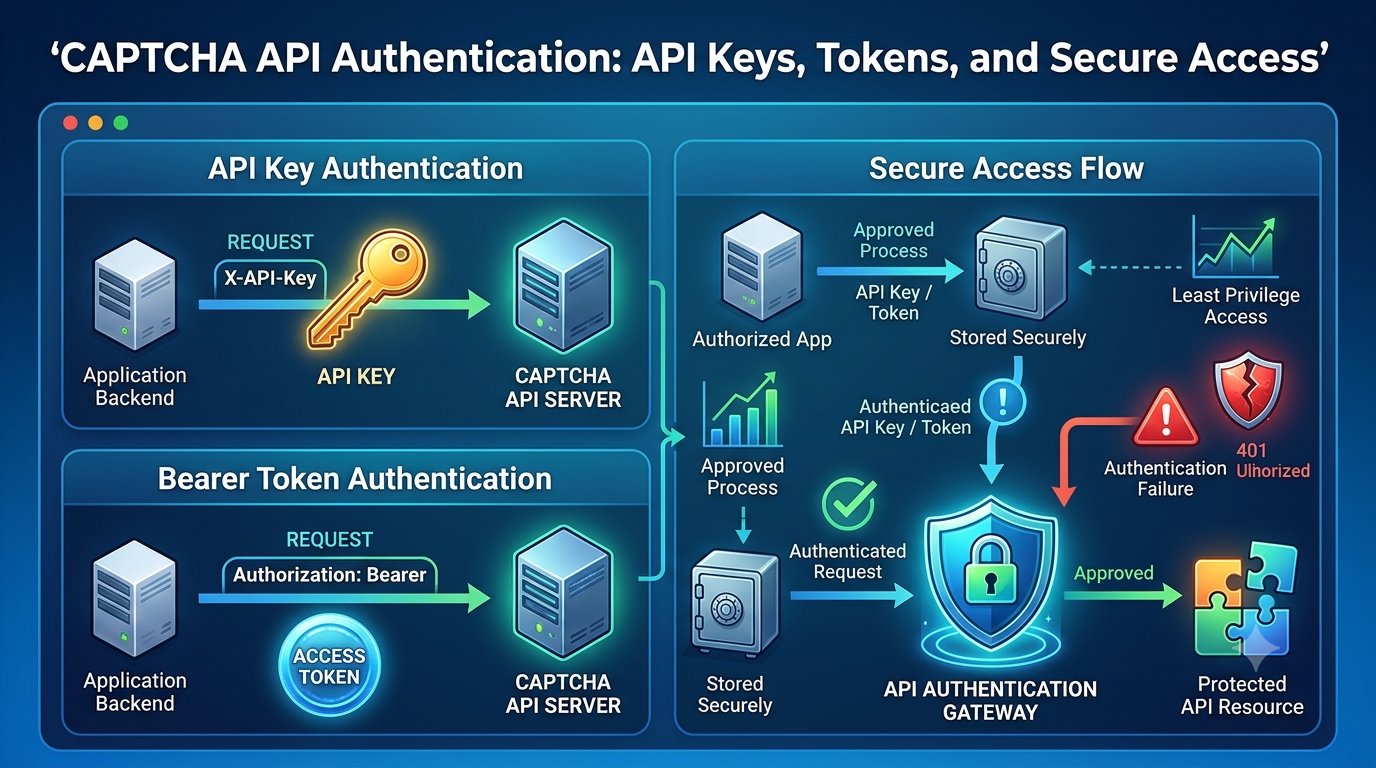
4. Configure API Credentials Securely
Most external APIs require some form of authentication.
The exact method depends on the provider. It may involve an API key, bearer token, or another documented mechanism.
Never hardcode private credentials directly into your source code.
Instead, use environment variables.
For example, on Linux or macOS:
export CAPTCHA_API_KEY="your_api_key"
On Windows PowerShell:
$env:CAPTCHA_API_KEY="your_api_key"
Read the credential in Go:
package main

import (
    "fmt"
    "os"
)

func main() {
    apiKey := os.Getenv("CAPTCHA_API_KEY")

    if apiKey == "" {
        fmt.Println("Missing CAPTCHA API credentials")
        return
    }

    fmt.Println("API credentials are configured")
}
Avoid printing the actual API key to application logs.
For production systems, consider using a secrets management service provided by your hosting platform or cloud infrastructure.
5. Send an HTTP Request Using Go
The net/http package provides everything needed to send HTTP requests.
The following example demonstrates a generic JSON POST request.
package main

import (
    "bytes"
    "context"
    "encoding/json"
    "fmt"
    "net/http"
    "os"
    "time"
)

func main() {
    apiKey := os.Getenv("CAPTCHA_API_KEY")

    if apiKey == "" {
        panic("CAPTCHA_API_KEY is required")
    }

    payload := map[string]interface{}{
        "task": "example_task",
    }

    requestBody, err := json.Marshal(payload)
    if err != nil {
        panic(err)
    }

    ctx, cancel := context.WithTimeout(
        context.Background(),
        10*time.Second,
    )
    defer cancel()

    req, err := http.NewRequestWithContext(
        ctx,
        http.MethodPost,
        "https://api.example.invalid/endpoint",
        bytes.NewBuffer(requestBody),
    )
    if err != nil {
        panic(err)
    }

    req.Header.Set("Content-Type", "application/json")

    // Illustrative authentication header.
    // Replace it with the provider's documented method.
    req.Header.Set("Authorization", "Bearer "+apiKey)

    client := &http.Client{
        Timeout: 12 * time.Second,
    }

    resp, err := client.Do(req)
    if err != nil {
        fmt.Println("Request failed:", err)
        return
    }
    defer resp.Body.Close()

    fmt.Println("HTTP status:", resp.StatusCode)
}
Understanding the Code
The example performs several important operations:
- Reads the API key from an environment variable.
- Converts a Go map into JSON.
- Creates a request with a context deadline.
- Sets the content type.
- Adds an illustrative authentication header.
- Sends the HTTP request.
- Checks the returned HTTP status.
The URL and request payload are placeholders. The .invalid domain is intentionally nonfunctional and must be replaced with the actual documented API endpoint.
6. Parse JSON API Responses
After sending a request, your application needs to process the returned data.
Go uses structures and JSON tags to map JSON fields into Go values.
For example, consider this illustrative response:
{
  "success": true,
  "task_id": "example_task_123",
  "status": "completed"
}
Define a corresponding Go structure:
type APIResponse struct {
    Success bool   `json:"success"`
    TaskID  string `json:"task_id"`
    Status  string `json:"status"`
}
Then parse the response:
var result APIResponse

err := json.NewDecoder(resp.Body).Decode(&result)
if err != nil {
    fmt.Println("Failed to decode response:", err)
    return
}

fmt.Println("Success:", result.Success)
fmt.Println("Task ID:", result.TaskID)
fmt.Println("Status:", result.Status)
The JSON fields above are examples only. Use the actual response structure documented by your provider.
Why Use Structures Instead of Generic Maps?
Go structures provide several benefits:
- Clearer data models
- Better compile-time checks
- Easier maintenance
- More readable code
- Simpler unit testing
For larger applications, define separate request and response structures for each documented API operation.
7. Build a Reusable CAPTCHA API Client
Writing HTTP requests directly inside every application function creates duplicated code.
A better approach is to build a reusable API client.
Create a file named client/captcha.go:
package client

import (
    "bytes"
    "context"
    "encoding/json"
    "fmt"
    "net/http"
    "time"
)

type CaptchaClient struct {
    BaseURL    string
    APIKey     string
    HTTPClient *http.Client
}

func NewCaptchaClient(baseURL, apiKey string) *CaptchaClient {
    return &CaptchaClient{
        BaseURL: baseURL,
        APIKey:  apiKey,
        HTTPClient: &http.Client{
            Timeout: 15 * time.Second,
        },
    }
}

func (c *CaptchaClient) Post(
    ctx context.Context,
    path string,
    payload interface{},
    result interface{},
) error {

    body, err := json.Marshal(payload)
    if err != nil {
        return fmt.Errorf("marshal request: %w", err)
    }

    req, err := http.NewRequestWithContext(
        ctx,
        http.MethodPost,
        c.BaseURL+path,
        bytes.NewReader(body),
    )
    if err != nil {
        return fmt.Errorf("create request: %w", err)
    }

    req.Header.Set("Content-Type", "application/json")

    // Replace with the provider's documented authentication method.
    req.Header.Set("Authorization", "Bearer "+c.APIKey)

    resp, err := c.HTTPClient.Do(req)
    if err != nil {
        return fmt.Errorf("send request: %w", err)
    }
    defer resp.Body.Close()

    if resp.StatusCode < 200 || resp.StatusCode >= 300 {
        return fmt.Errorf(
            "external API returned HTTP status %d",
            resp.StatusCode,
        )
    }

    if result != nil {
        if err := json.NewDecoder(resp.Body).Decode(result); err != nil {
            return fmt.Errorf("decode response: %w", err)
        }
    }

    return nil
}
Using the Client
Your application can now create and reuse the client:
package main

import (
    "context"
    "fmt"
    "os"

    "example.com/captcha-go-integration/client"
)

func main() {
    apiKey := os.Getenv("CAPTCHA_API_KEY")

    if apiKey == "" {
        panic("Missing API key")
    }

    captchaClient := client.NewCaptchaClient(
        "https://api.example.invalid",
        apiKey,
    )

    var result map[string]interface{}

    err := captchaClient.Post(
        context.Background(),
        "/example-endpoint",
        map[string]interface{}{
            "task": "example_task",
        },
        &result,
    )

    if err != nil {
        fmt.Println("API error:", err)
        return
    }

    fmt.Println("API response received")
}
This example uses a generic POST method to demonstrate client organization. It is not a confirmed AllCaptcha SDK, endpoint, or authentication format.
A production client should also validate configuration, restrict allowed request paths, limit response sizes, and implement provider-specific response handling.
8. Handle HTTP Errors Properly
An external API request can fail for many reasons.
A reliable Go integration should distinguish between HTTP errors and transport errors.
Common HTTP Status Codes
| HTTP Status | Meaning | Recommended action |
|---|---|---|
| 200 | Successful request | Process the response |
| 201 | Resource created | Process the response |
| 400 | Bad request | Validate the payload |
| 401 | Unauthorized | Check authentication |
| 403 | Forbidden | Check permissions |
| 404 | Resource not found | Verify the endpoint or resource |
| 408 | Request timeout | Investigate request duration |
| 429 | Too many requests | Follow documented rate-limit guidance |
| 500 | Internal server error | Investigate and consider a limited retry |
| 502 | Bad gateway | Check upstream availability |
| 503 | Service unavailable | Consider a controlled retry |
| 504 | Gateway timeout | Investigate upstream latency |
These are general HTTP status meanings. An API provider may define additional application-specific errors.
Read Error Responses
Do not discard the response body when an HTTP request fails.
The body may contain useful diagnostic information.
For example:
if resp.StatusCode < 200 || resp.StatusCode >= 300 {
    // Read and inspect the response body here.
    return fmt.Errorf("API request failed: %s", resp.Status)
}
In production, use a bounded response reader and avoid logging sensitive response content.
For more information, see our guide: CAPTCHA API Error Codes: Common Errors and How to Fix Them.
9. Implement Request Timeouts and Cancellation
Timeouts are important when communicating with external services.
Without appropriate limits, a slow dependency can cause requests to remain open for too long.
Go supports request cancellation through context.Context.
Example:
ctx, cancel := context.WithTimeout(
    context.Background(),
    10*time.Second,
)
defer cancel()

req, err := http.NewRequestWithContext(
    ctx,
    http.MethodPost,
    apiURL,
    requestBody,
)
if err != nil {
    return err
}
The context deadline allows the request to stop when the specified time limit is reached.
You can also use context cancellation when a user cancels an operation or when the application no longer needs the result.
Best Practices
- Set a reasonable timeout for every external request.
- Reuse HTTP clients instead of creating a new client for every operation.
- Consider connection limits for high-volume workloads.
- Propagate cancellation signals through application layers.
- Record timeout frequency for monitoring.
The correct timeout depends on measured latency and the provider's documented service behavior.
10. Handle Retries Safely
Temporary network failures may occur even when your application is correctly implemented.
A retry mechanism can help recover from certain temporary errors.
However, not every failed request should be retried.
For example:
- Invalid request data should usually not be retried.
- Authentication failures require configuration changes.
- Rate limits should follow the provider's documented instructions.
- Temporary network errors may be retryable.
- A timeout may leave the original operation's outcome uncertain.
Example Retry Delay Function
package main

import (
    "math"
    "math/rand"
    "time"
)

func retryDelay(attempt int) time.Duration {
    base := time.Second
    maxDelay := 30 * time.Second

    delay := time.Duration(
        float64(base) * math.Pow(2, float64(attempt)),
    )

    if delay > maxDelay {
        delay = maxDelay
    }

    jitter := time.Duration(
        rand.Int63n(int64(time.Second)),
    )

    return delay + jitter
}
This function demonstrates exponential backoff with jitter. It is not a complete retry policy.
A production implementation should additionally:
- Set a maximum retry count.
- Classify retryable errors.
- Respect documented
Retry-Afterinstructions. - Stop when the overall deadline is reached.
- Avoid repeating non-idempotent operations without a safe deduplication strategy.
For additional guidance, read CAPTCHA API Rate Limits: Best Practices for Developers.
11. Process Asynchronous API Tasks
Some external APIs do not complete an operation within a single HTTP request.
Instead, they may use an asynchronous task workflow.
A generic workflow could look like this:
- Submit a task.
- Receive a task identifier.
- Store the identifier in your application.
- Wait according to the documented processing rules.
- Retrieve the task result.
- Update the internal task status.
An illustrative Go model might look like this:
type TaskRecord struct {
    InternalID string
    ExternalID string
    Status     string
    CreatedAt  time.Time
    UpdatedAt  time.Time
}
Your application should maintain its own internal task identifier rather than relying exclusively on an external identifier.
Important Considerations
- Store task status consistently.
- Prevent duplicate processing.
- Apply appropriate polling intervals.
- Stop checking completed tasks.
- Handle expired or unavailable tasks.
- Avoid storing sensitive tokens unnecessarily.
If the provider supports webhooks or callbacks, you may use them according to its official documentation. Otherwise, implement the documented result-retrieval workflow.
12. Use Goroutines Carefully for Concurrent Processing
Go makes it easy to run independent operations concurrently.
However, launching an unlimited number of goroutines can overwhelm your application or exceed external API limits.
A worker pool is often a better approach.
The following example illustrates a simple concurrency-limited worker pool:
package main

import (
    "fmt"
    "sync"
)

func worker(id int, jobs <-chan int, wg *sync.WaitGroup) {
    defer wg.Done()

    for job := range jobs {
        fmt.Printf(
            "Worker %d processing job %d\n",
            id,
            job,
        )
    }
}

func main() {
    const workerCount = 3

    jobs := make(chan int, 10)

    var wg sync.WaitGroup

    for i := 1; i <= workerCount; i++ {
        wg.Add(1)
        go worker(i, jobs, &wg)
    }

    for job := 1; job <= 10; job++ {
        jobs <- job
    }

    close(jobs)
    wg.Wait()
}
This example demonstrates concurrency control only. It does not make real CAPTCHA API requests.
Why Use a Worker Pool?
A worker pool helps you:
- Limit simultaneous operations.
- Control resource consumption.
- Organize background processing.
- Reduce the risk of overwhelming an external service.
- Improve workload management.
For distributed applications, consider a persistent queue rather than relying only on in-memory channels.
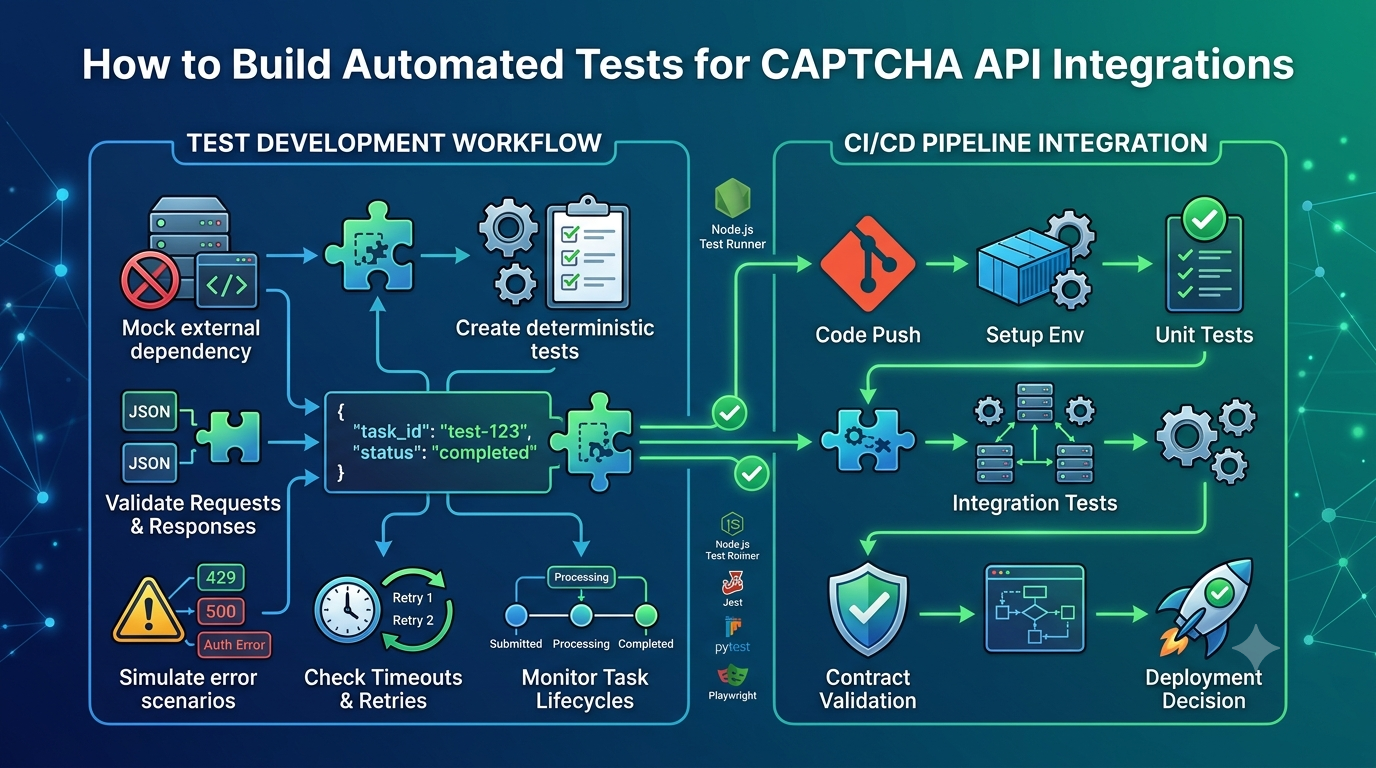
13. Write Unit Tests for Your Go API Client
Testing is essential before deploying an external API integration.
Go includes the net/http/httptest package, which allows developers to create local HTTP test servers.
This is useful for testing API clients without depending on a live external provider.
Example:
package main

import (
    "encoding/json"
    "net/http"
    "net/http/httptest"
    "testing"
)

func TestAPIResponse(t *testing.T) {
    server := httptest.NewServer(
        http.HandlerFunc(func(
            w http.ResponseWriter,
            r *http.Request,
        ) {
            w.Header().Set(
                "Content-Type",
                "application/json",
            )

            json.NewEncoder(w).Encode(map[string]interface{}{
                "success": true,
                "status":  "completed",
            })
        }),
    )

    defer server.Close()

    resp, err := http.Get(server.URL)
    if err != nil {
        t.Fatal(err)
    }
    defer resp.Body.Close()

    if resp.StatusCode != http.StatusOK {
        t.Fatalf(
            "Expected HTTP 200, received %d",
            resp.StatusCode,
        )
    }
}
Run your tests:
go test ./...
What Should You Test?
Consider testing:
- Valid request serialization
- Invalid request data
- Successful JSON responses
- Invalid JSON responses
- Authentication failures
- HTTP 429 responses
- Network timeouts
- Retry limits
- Task status transitions
- Duplicate task handling
Use mocks for routine automated tests and an authorized staging environment for provider-specific integration tests.
For more information, read How to Build Automated Tests for CAPTCHA API Integrations.
14. Deploy Your Go Application
Once the integration is tested, you can prepare it for deployment.
Build the application:
go build -o captcha-app .
Run it:
./captcha-app
For Windows:
.\captcha-app.exe
Docker Deployment
A simple multi-stage Dockerfile can reduce the size of the final application image.
FROM golang:1.25 AS builder

WORKDIR /app

COPY go.mod ./
RUN go mod download

COPY . .

RUN CGO_ENABLED=0 GOOS=linux \
    go build -o captcha-app .

FROM gcr.io/distroless/static-debian12

WORKDIR /app

COPY --from=builder /app/captcha-app .

USER nonroot:nonroot

ENTRYPOINT ["/app/captcha-app"]
This is a generic deployment example. Select a Go image version that is supported by your project and build environment.
Production Deployment Checklist
Before deploying, verify that:
- API credentials are stored securely.
- Provider endpoints match official documentation.
- HTTPS is enabled.
- Request timeouts are configured.
- Error handling is implemented.
- Retry behavior is controlled.
- Concurrent requests are limited.
- Sensitive information is not logged.
- Automated tests pass.
- Monitoring is configured.
15. Common Mistakes When Integrating CAPTCHA APIs with Go
Avoid these common implementation problems.
Mistake 1: Hardcoding API Credentials
Hardcoded credentials can accidentally be exposed through source code or version control.
Solution: Use environment variables or a secrets management service.
Mistake 2: Creating a New HTTP Client for Every Request
Repeatedly creating HTTP clients can prevent efficient connection reuse.
Solution: Reuse a configured http.Client across requests.
Mistake 3: Ignoring HTTP Status Codes
A successful network connection does not necessarily mean the API operation succeeded.
Solution: Check the HTTP status and process the response according to the provider's documentation.
Mistake 4: Ignoring Request Timeouts
Requests without appropriate deadlines may remain open longer than expected.
Solution: Use request contexts and HTTP client timeouts.
Mistake 5: Retrying Every Error
Repeatedly retrying invalid requests or authentication failures wastes resources.
Solution: Classify errors and retry only when appropriate.
Mistake 6: Using Unlimited Goroutines
Too much concurrency can increase resource consumption and trigger rate limits.
Solution: Use bounded worker pools and follow documented API limits.
Mistake 7: Depending on Assumed API Fields
Different providers use different endpoints, authentication mechanisms, and response structures.
Solution: Follow the official API documentation and define Go structures that match the actual response format.
16. Frequently Asked Questions
Can I integrate a CAPTCHA API with Go?
Yes. Go provides the net/http and encoding/json packages, which are sufficient for implementing many HTTP-based API integrations.
Do I need a third-party library?
Not necessarily. Go's standard library provides HTTP communication, JSON encoding, request cancellation, and testing utilities.
Third-party packages may be useful for logging, configuration, queue management, or other application requirements.
How do I authenticate a CAPTCHA API request in Go?
The authentication method depends on the provider. Read its official documentation to determine whether it requires an API key, bearer token, or another authentication mechanism.
Store credentials securely and attach them to requests using the documented format.
How do I handle CAPTCHA API timeouts in Go?
Use context.WithTimeout to set a request deadline and configure an appropriate timeout on your reusable http.Client.
Handle timeout errors separately from other transport and HTTP errors.
Can Go process multiple CAPTCHA API requests concurrently?
Yes. Go supports concurrent execution through goroutines.
However, use bounded concurrency and respect provider rate limits to avoid overwhelming your application or external service.
How do I test a CAPTCHA API integration without calling the real API?
Use Go's net/http/httptest package to create local mock HTTP servers. You can simulate successful responses, HTTP errors, invalid JSON, and timeouts.
Can I use Go for high-traffic API integrations?
Yes. Go is suitable for many high-throughput backend applications. Actual performance depends on application design, network conditions, provider capacity, concurrency settings, and infrastructure resources.
How do I know which API endpoint to use?
Consult the official documentation of your API provider. Do not assume that endpoint paths, request parameters, authentication headers, or response fields are universal.
Conclusion
Go provides a practical foundation for building reliable CAPTCHA API integrations. Its standard HTTP client, JSON support, context cancellation, goroutines, and testing tools make it possible to create efficient backend services without unnecessary dependencies.
To build a maintainable integration, start with a reusable HTTP client, secure credential management, explicit error handling, and appropriate timeouts. As your application grows, introduce controlled concurrency, background workers, monitoring, and persistent task management when needed.
Most importantly, follow the API provider's official documentation for endpoints, authentication, request formats, and supported operations.
With a modular architecture and a careful testing strategy, your Go application can communicate with external CAPTCHA services in a more secure, reliable, and maintainable way.