CAPTCHA API Latency: How to Measure and Reduce Response Time
CAPTCHA API latency is an important factor in the performance of applications that rely on CAPTCHA-related services. When an API takes too long to respond, users may experience delays, automated workflows can become slower, and applications may struggle to handle high request volumes.
For developers, reducing CAPTCHA API latency is not simply about making requests faster. It requires understanding where delays occur, measuring performance accurately, optimizing network communication, managing concurrency, and handling asynchronous operations efficiently.
In this guide, you will learn what CAPTCHA API latency means, how to measure it, which factors affect response time, and practical ways to improve performance in your application.
What Is CAPTCHA API Latency?
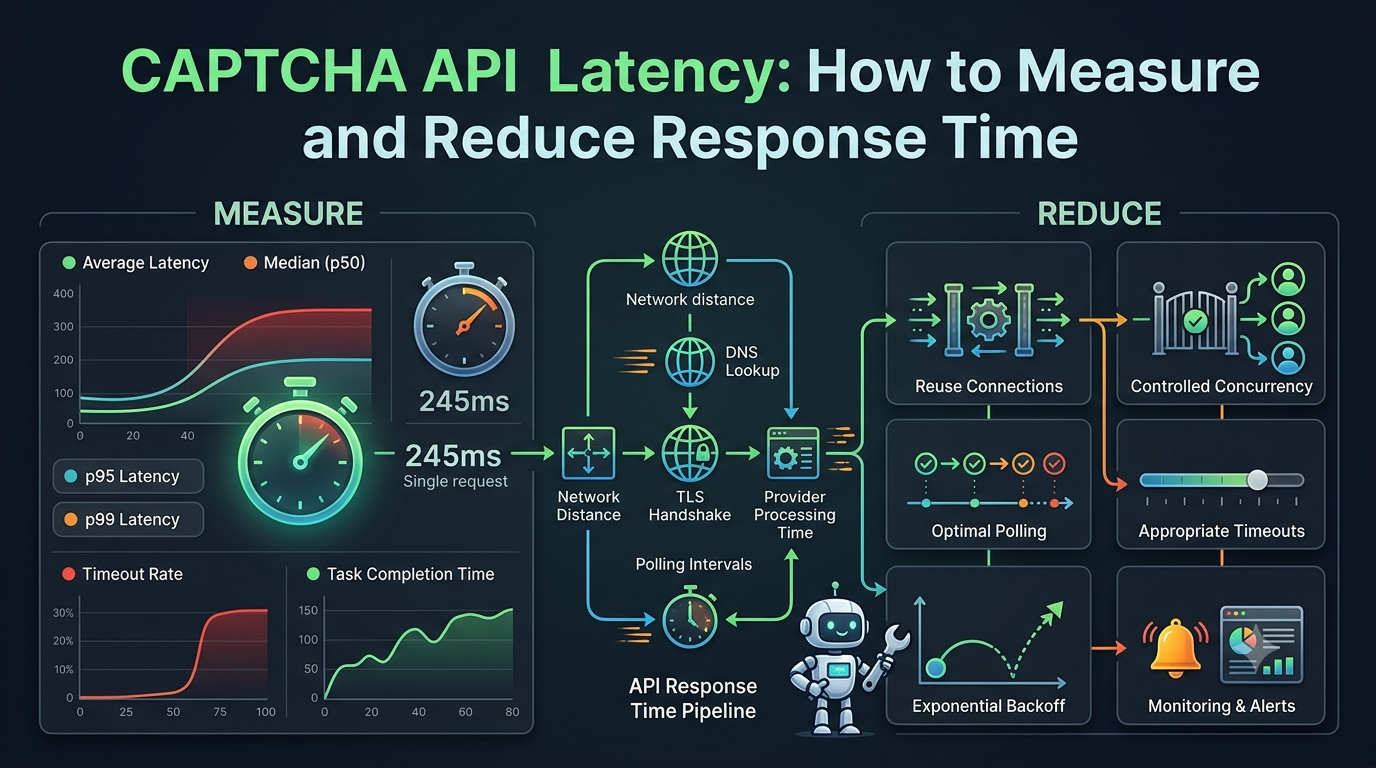
CAPTCHA API latency refers to the time between sending a request to a CAPTCHA-related API and receiving the relevant response.
Depending on the API architecture, this may include:
- Network connection time.
- DNS lookup and TLS negotiation.
- Request processing time on the provider's server.
- CAPTCHA-related processing time.
- Response transmission time.
- Additional polling time when the API uses asynchronous tasks.
It is important to distinguish between request latency and total task completion time.
Request latency measures how long one HTTP request takes. Total task completion time measures how long the entire operation takes, including task creation, processing, polling, and retrieving the final result.
For asynchronous APIs, these two measurements can be very different.
Example of CAPTCHA API Latency
Imagine an application that sends a request to an external API and receives a task identifier.
The workflow might look like this:
- The application sends a task creation request.
- The API returns a task ID.
- The application waits while the task is processed.
- The application checks the task status.
- The API returns the completed result.
The initial request might take only 200 milliseconds, while the entire task takes several seconds.
Therefore, measuring only the first HTTP response does not provide an accurate picture of the user experience.
Why Is CAPTCHA API Response Time Important?
API response time can affect several parts of an application.
1. Better User Experience
Slow external API calls can make an application feel unresponsive.
For example, if a user submits a form and the application waits for an external service before continuing, excessive latency may increase abandonment rates.
Reducing unnecessary waiting helps create a smoother experience.
2. Faster Automated Workflows
Applications that perform multiple authorized API operations may experience significant delays when each operation takes too long.
Even small improvements can become meaningful when a workflow contains many sequential requests.
3. Improved Application Throughput
Throughput describes how many operations an application can complete within a given period.
High latency can reduce throughput, particularly when requests are processed sequentially or when worker capacity is limited.
4. More Predictable Performance
Monitoring latency helps developers identify unusual delays before they become major reliability problems.
It also makes it easier to distinguish between application-side issues, network problems, and external service delays.
Key Metrics for Measuring CAPTCHA API Latency
A reliable performance measurement strategy should include several metrics rather than relying on a single average.
1. Average Response Time
Average latency is calculated by dividing the total response time by the number of requests.
Formula:
Average latency = Total response time / Number of requests
For example, if five requests take 100, 150, 200, 250, and 300 milliseconds:
Average latency = 1,000 / 5 = 200 milliseconds.
Average latency is useful for understanding general performance, but it can hide unusually slow requests.
2. Median Latency (p50)
The median represents the middle value in a sorted set of measurements.
The p50 metric tells you that approximately half of your measured requests completed within that time.
It is often more representative of typical performance than the average when occasional slow requests exist.
3. p95 Latency
The p95 metric represents the response-time threshold within which approximately 95% of measured requests complete.
This metric is especially useful for identifying delays affecting a smaller but significant portion of requests.
4. p99 Latency
The p99 metric represents the response-time threshold within which approximately 99% of measured requests complete.
It helps identify rare but potentially serious performance problems.
5. Timeout Rate
The timeout rate measures how frequently requests fail because they exceed a configured time limit.
A high timeout rate may indicate:
- Network instability.
- Overloaded application workers.
- Slow external services.
- Incorrect timeout configuration.
- Poor concurrency management.
6. Total Task Completion Time
For asynchronous workflows, measure the entire operation from task submission until the final result becomes available.
This metric is particularly important because individual HTTP requests may be fast even when the overall workflow is slow.
How to Measure CAPTCHA API Latency
The first step toward improving performance is collecting accurate measurements.
Step 1: Record Request Start and End Times
You can measure HTTP request duration using a monotonic timer.
A monotonic timer is preferable to a regular system clock because it measures elapsed time without being affected by changes to the system date or time.
Here is a simple Python example:
import time
import requests

API_URL = "https://api.example.com/endpoint"

def measure_api_latency():
    start = time.perf_counter()

    try:
        response = requests.get(
            API_URL,
            timeout=10
        )

        elapsed = time.perf_counter() - start

        print(f"HTTP status: {response.status_code}")
        print(f"Latency: {elapsed * 1000:.2f} ms")

        return elapsed

    except requests.RequestException as error:
        elapsed = time.perf_counter() - start

        print(f"Request failed: {error}")
        print(f"Elapsed time: {elapsed * 1000:.2f} ms")

        return None

measure_api_latency()
This is an illustrative example. Replace the URL, HTTP method, authentication, and request parameters with the actual requirements documented by your API provider.
The example measures the duration of one HTTP request. It does not measure the full completion time of an asynchronous task.
Step 2: Collect Multiple Measurements
One request is not enough to evaluate API performance.
Network conditions and server workloads can change over time. Collect measurements across multiple requests and different periods.
For each request, record:
- Timestamp.
- HTTP method.
- Response status.
- Request duration.
- Timeout or error information.
- Environment or application version.
Avoid recording API keys, passwords, CAPTCHA tokens, or other sensitive information.
Step 3: Calculate Latency Percentiles
A simple Python example using collected measurements:
import statistics

latencies_ms = [
    120, 135, 150, 160, 175,
    180, 190, 210, 250, 500
]

average = statistics.mean(latencies_ms)
median = statistics.median(latencies_ms)

print(f"Average: {average:.2f} ms")
print(f"Median: {median:.2f} ms")
For p95 and p99 measurements, use a consistent percentile calculation method or a monitoring platform that supports histogram-based latency metrics.
For production systems, collect enough observations to make high-percentile measurements meaningful.
What Factors Affect CAPTCHA API Latency?
Several factors can influence how quickly an API responds.
1. Network Distance
The physical distance between your application server and the API provider can affect network latency.
Requests traveling across multiple regions or networks may take longer than requests handled within nearby infrastructure.
How to improve it:
- Deploy application servers in suitable regions.
- Measure latency from the actual production environment.
- Use provider-supported regional endpoints if available.
- Avoid unnecessary network routing.
Do not assume that a geographically closer server will always be faster. Actual network measurements are more reliable than geographic distance alone.
2. DNS Resolution
Before connecting to a domain, an application may need to resolve its hostname into an IP address.
Repeated DNS lookups can introduce unnecessary overhead.
How to improve it:
- Use reliable DNS infrastructure.
- Avoid repeatedly creating new HTTP clients.
- Use connection reuse where supported.
- Monitor DNS resolution failures and delays.
3. TLS Handshake and Connection Setup
Establishing a secure HTTPS connection requires connection setup and TLS negotiation.
When an application creates a new connection for every request, this overhead can accumulate.
How to improve it:
- Reuse HTTP clients.
- Enable persistent connections where supported.
- Avoid unnecessarily opening and closing connections.
- Use appropriate connection pool settings.
4. Provider Processing Time
The external API provider may need to process requests before returning a response.
Processing time can vary depending on service workload, request complexity, and the provider's infrastructure.
Developers generally cannot control the provider's internal processing time.
However, they can monitor it and avoid adding unnecessary delays on their own side.
5. Polling Frequency
Asynchronous APIs often require applications to check whether a task has completed.
Polling too frequently can create unnecessary HTTP traffic.
For example, checking the same task every 100 milliseconds may produce many requests without making the underlying operation finish faster.
How to improve it:
- Follow the provider's recommended polling interval.
- Use progressive polling intervals when appropriate.
- Stop polling after completion or a terminal error.
- Apply a maximum task deadline.
- Use webhooks if the provider officially supports them.
6. Application Concurrency
An application with too few workers may process requests sequentially, creating queues and increasing total completion time.
On the other hand, excessive concurrency can overload the application or exceed provider rate limits.
How to improve it:
- Set a reasonable concurrency limit.
- Monitor queue length.
- Respect documented rate limits.
- Scale workers according to measured demand.
- Apply backpressure when the system becomes overloaded.
8 Practical Ways to Reduce CAPTCHA API Latency
The following practices can help improve performance without compromising application reliability or security.
1. Reuse HTTP Connections
Creating a new HTTP connection for every API call can introduce additional overhead.
Use a persistent HTTP client or connection pool when your programming language and HTTP library support it.
For example, Python's requests.Session can reuse connections:
import requests
import time

session = requests.Session()

def send_request(url):
    start = time.perf_counter()

    response = session.get(
        url,
        timeout=10
    )

    elapsed = time.perf_counter() - start

    print(f"Request duration: {elapsed * 1000:.2f} ms")

    response.raise_for_status()

    return response
This example demonstrates connection reuse. The URL and request method should be adapted to your provider's official API documentation.
2. Avoid Unnecessary API Requests
Every additional request can introduce network overhead and consume resources.
Before making an API call, check whether the operation is genuinely necessary.
For example:
- Do not submit the same task repeatedly because the first response is delayed.
- Avoid duplicate status checks.
- Do not retry requests that have already completed successfully.
- Avoid repeatedly requesting unchanged configuration data.
Only cache information when doing so is supported by the provider's documentation and does not compromise security or correctness.
3. Optimize Asynchronous Polling
If your API uses asynchronous tasks, polling strategy can significantly affect total completion time.
An illustrative polling schedule might look like this:
| Attempt | Waiting interval |
|---|---|
| 1 | 500 ms |
| 2 | 1 second |
| 3 | 2 seconds |
| 4 | 3 seconds |
| 5 | 5 seconds |
These intervals are examples, not recommended settings for every provider. Always follow the provider's documented polling rules.
A progressive interval can reduce unnecessary requests while still allowing the application to retrieve completed results.
4. Use Appropriate Timeouts
A timeout prevents an application from waiting indefinitely for an external service.
However, setting a timeout that is too short can cause requests to fail even when the provider is operating normally.
Consider separate timeout settings for:
- Connection establishment.
- Waiting for response data.
- Total task completion.
Choose values based on measured performance, provider documentation, and the needs of your application.
5. Apply Controlled Concurrency
Concurrent requests can improve throughput when an application has multiple independent operations.
However, concurrency should be controlled.
For example, an application might process a limited number of independent tasks at the same time instead of submitting hundreds of requests simultaneously.
A sensible strategy includes:
- A maximum number of active workers.
- A bounded task queue.
- Rate-limit awareness.
- Monitoring for timeouts and HTTP 429 responses.
- Gradual scaling based on observed performance.
6. Use Exponential Backoff for Temporary Failures
Repeatedly retrying a failed request immediately can increase traffic and make an overloaded service even slower.
Exponential backoff introduces progressively longer waiting periods between retry attempts.
An illustrative schedule:
- First retry: 1 second.
- Second retry: 2 seconds.
- Third retry: 4 seconds.
- Fourth retry: 8 seconds.
Add random jitter to prevent many clients from retrying simultaneously.
Only retry errors that are appropriate for retrying. Do not blindly retry authentication failures, invalid parameters, or other permanent errors.
For requests that create tasks, consider whether the provider supports idempotency keys or another duplicate-prevention mechanism before retrying an uncertain request.
7. Monitor Provider and Application Performance Separately
A slow API response does not necessarily mean the provider is responsible.
Your application may be experiencing delays caused by:
- DNS resolution.
- Network connectivity.
- Local CPU or memory pressure.
- Worker queue congestion.
- Slow database operations.
- Excessive polling.
Track application-side timing and external request timing separately to identify the actual bottleneck.
8. Set Up Automated Performance Monitoring
Manual testing is useful during development, but production applications need continuous monitoring.
Track:
- Average latency.
- p50, p95, and p99 latency.
- Timeout rate.
- HTTP error rate.
- Task completion time.
- Requests per minute.
- Queue length.
- Retry frequency.
Use dashboards and alerts to identify unusual changes.
Example alert conditions might include p95 latency exceeding an internally defined threshold or a sudden increase in timeout frequency. These thresholds should be based on your application's service-level objectives, not assumed provider guarantees.
How to Monitor CAPTCHA API Latency in Production
A production monitoring system should provide enough information to identify problems without exposing sensitive data.
Use Structured Logs
Instead of writing unstructured messages, record important request details in a consistent format.
Example:
{
  "event": "captcha_api_request",
  "method": "POST",
  "status_code": 200,
  "duration_ms": 245,
  "environment": "production",
  "success": true
}
This is an illustrative logging format. Do not include API keys, full CAPTCHA tokens, passwords, or sensitive request contents.
Build a Latency Dashboard
A useful dashboard can include:
| Metric | What It Helps Identify |
|---|---|
| Average latency | General response-time trends |
| p50 latency | Typical request performance |
| p95 latency | Slower user experiences |
| p99 latency | Rare but significant delays |
| Timeout rate | Requests exceeding configured limits |
| HTTP 429 rate | Rate-limit pressure |
| HTTP 5xx rate | Server-side failures |
| Task completion time | End-to-end asynchronous performance |
| Queue length | Application processing bottlenecks |
Configure Alerts
Alerts should notify developers when performance moves outside acceptable operating conditions.
For example:
- p95 latency remains above the application's threshold.
- Timeout rates increase suddenly.
- HTTP 429 responses become frequent.
- Task completion time rises significantly.
- The application queue continues growing.
Use a sustained time window or multiple observations to reduce false alarms caused by temporary spikes.
Common Mistakes When Optimizing CAPTCHA API Latency
Developers sometimes make changes that appear to improve response time but create reliability problems.
Mistake 1: Measuring Only One Request
A single request cannot represent normal production performance.
Better approach: Collect multiple measurements and analyze percentiles.
Mistake 2: Confusing HTTP Latency with Task Completion Time
An asynchronous API may respond quickly when creating a task, even though the task itself takes much longer.
Better approach: Measure both request duration and end-to-end completion time.
Mistake 3: Polling Too Frequently
Frequent polling creates unnecessary requests and may contribute to rate-limit problems.
Better approach: Follow documented polling intervals and use progressive waiting where appropriate.
Mistake 4: Increasing Concurrency Without Limits
Sending more requests does not always make an application faster.
Excessive concurrency can cause queue congestion, timeouts, and rate-limit errors.
Better approach: Use bounded workers and monitor throughput alongside latency.
Mistake 5: Setting Extremely Short Timeouts
Very short timeouts may cause legitimate requests to fail during normal network variation.
Better approach: Choose timeouts based on real measurements and the expected operation duration.
Mistake 6: Retrying Every Error
Some errors are permanent and will not be fixed by retrying.
Better approach: Classify errors and retry only temporary failures.
Mistake 7: Ignoring Security While Optimizing Performance
Developers should never expose API keys or sensitive tokens in logs just to simplify debugging.
Better approach: Use secure secret storage, redact sensitive information, and maintain proper access controls.
CAPTCHA API Latency Optimization Checklist
Before deploying performance improvements, review the following checklist:
- Measure request duration using a monotonic timer.
- Collect enough data to calculate meaningful percentiles.
- Measure end-to-end task completion time.
- Check DNS, connection, and TLS overhead.
- Reuse HTTP connections where supported.
- Use appropriate connection and request timeouts.
- Optimize asynchronous polling.
- Apply controlled concurrency.
- Respect documented API rate limits.
- Use exponential backoff with jitter for temporary failures.
- Monitor HTTP errors and timeout rates.
- Keep sensitive information out of logs.
- Test changes in an authorized staging environment before production deployment.
Frequently Asked Questions
1. What is a good CAPTCHA API response time?
There is no universal response-time target for every CAPTCHA API.
Performance depends on the provider, network conditions, request type, processing workload, and whether the API uses synchronous or asynchronous operations.
Measure actual performance and define service-level objectives based on your application's requirements.
2. Why is my CAPTCHA API so slow?
Common causes include network latency, connection setup, DNS resolution, provider processing time, frequent polling, application queue congestion, and insufficient worker capacity.
Measure each stage separately to identify the bottleneck.
3. How can I reduce CAPTCHA API response time?
Start by reusing HTTP connections, avoiding unnecessary requests, configuring appropriate timeouts, optimizing asynchronous polling, and controlling concurrency.
Also monitor p95 and p99 latency to determine whether improvements are consistent.
4. Does increasing API concurrency reduce latency?
Not necessarily.
Concurrency can improve throughput by allowing independent requests to run simultaneously. However, excessive concurrency may increase queueing, trigger rate limits, or overload application resources.
Use controlled concurrency and monitor both latency and throughput.
5. What is the difference between API latency and throughput?
Latency measures how long an individual request or operation takes.
Throughput measures how many requests or operations an application completes within a given period.
An application can have high throughput while individual requests still experience significant latency.
6. Should I use retries to improve API performance?
Retries can improve reliability when temporary failures occur, but they do not automatically reduce latency.
Use limited retries with exponential backoff and jitter. Avoid retrying permanent errors or creating duplicate tasks.
7. How do I measure asynchronous CAPTCHA API performance?
Record the time when a task is submitted and the time when its final result becomes available.
Also measure individual HTTP requests, polling frequency, and time spent waiting between status checks.
This provides a more complete view of the entire workflow.
8. Can monitoring tools help reduce CAPTCHA API latency?
Yes. Monitoring tools help identify slow requests, network problems, timeout spikes, rate-limit responses, and application bottlenecks.
They do not directly make an external API faster, but they help developers find and resolve performance issues.
Conclusion
CAPTCHA API latency can have a significant impact on application responsiveness, workflow efficiency, and overall reliability.
The most effective optimization strategy begins with accurate measurement. Developers should track average latency, p50, p95, p99, timeout rates, and total asynchronous task completion time.
From there, improvements such as HTTP connection reuse, controlled concurrency, efficient polling, appropriate timeouts, and exponential backoff can help reduce unnecessary delays.
Most importantly, performance optimization should never come at the expense of security, reliability, or compliance. Follow official API documentation, respect service limits, and test integrations in authorized environments.
With proper measurement and continuous monitoring, developers can build faster and more predictable CAPTCHA API integrations.
SEO Information
SEO Title: CAPTCHA API Latency: How to Measure and Reduce Response Time
Meta Description: Learn how to measure CAPTCHA API latency, identify response-time bottlenecks, and improve performance with connection reuse, polling optimization, and monitoring.
Focus Keyword: CAPTCHA API latency
Secondary Keywords:
- CAPTCHA API response time
- Reduce CAPTCHA API latency
- CAPTCHA API performance
- API response time optimization
- CAPTCHA API monitoring
- API latency measurement
- Asynchronous API performance
URL Slug: captcha-api-latency-measure-reduce
Suggested Image Alt Text: How to measure and reduce CAPTCHA API latency and response time
Suggested Featured Image: A developer monitoring API response times on a dark dashboard with latency charts, performance metrics, and network request indicators.
Suggested Internal Links
Add contextual internal links to these related articles on AllCaptcha.com:
- How to Monitor CAPTCHA API Performance and Reliability – Link to the section about production monitoring.
- How to Scale CAPTCHA API Integrations for High-Traffic Applications – Link to the section about concurrency and throughput.
- How to Build a Reliable CAPTCHA API Client with Retries, Timeouts, and Error Handling – Link to the sections about retries and timeouts.
- CAPTCHA API Rate Limits: Best Practices for Developers – Link to the section about polling and rate limits.
Suggested Schema Markup
Use Article schema for the main article. An FAQPage schema may be appropriate if the FAQ content meets Google's current structured-data requirements, but adding FAQ markup does not guarantee enhanced search results.