CAPTCHA API Rate Limits: Best Practices for Developers
API rate limits are an important consideration when integrating external services into an application. If your application sends too many requests in a short period, the API provider may delay processing, reject requests, or return an HTTP 429 response.
For developers working with a CAPTCHA API, understanding rate limits can help improve reliability, reduce unnecessary requests, and make better use of available resources.
In this guide, you will learn what CAPTCHA API rate limits are, why they matter, how to handle HTTP 429 errors, and how to implement practical strategies such as exponential backoff, concurrency control, and efficient polling.
The examples use generic HTTP API patterns. Actual rate limits, quotas, headers, and error formats vary by provider. Always consult the official documentation for the service you use. Apply these techniques to authorized integrations and testing environments.
What Are CAPTCHA API Rate Limits?
A rate limit defines how frequently a client can make requests to an API within a particular period.
For example, a provider might limit the number of requests a client can make per second, minute, or day. Other providers may enforce limits based on concurrent tasks, account quotas, or resource consumption.
Rate limits help API providers manage traffic, maintain service availability, and distribute resources among clients.
Depending on the service, limits may apply to:
- Requests per second or minute.
- Total requests within a daily or monthly period.
- Concurrent tasks being processed.
- Task creation or status-checking requests.
- Specific API endpoints or operations.
- Account-level or API-key-level usage.
These are common API rate-limiting patterns, not confirmed AllCaptcha limits. Check the provider's documentation to understand which limits apply to your account.
Rate Limits vs. Usage Quotas
Rate limits and usage quotas are related but different concepts.
| Feature | Rate limit | Usage quota |
|---|---|---|
| Main purpose | Control request frequency | Control total usage |
| Typical measurement | Requests per second or minute | Requests, tasks, or credits over a longer period |
| Common symptom | HTTP 429 or throttling | Quota or balance error |
| Typical solution | Reduce request frequency | Review usage and account limits |
A service can enforce both at the same time. An application may remain within its monthly quota but still exceed the permitted request rate.
Why Do CAPTCHA APIs Enforce Rate Limits?
Rate limits serve several operational purposes.
1. Maintain Service Stability
Large bursts of requests can consume server resources and affect service responsiveness. Rate limits help control sudden traffic spikes.
2. Distribute Resources Fairly
Limits can prevent a small number of clients from consuming a disproportionate share of available capacity.
3. Protect Against Accidental Request Loops
A programming error can cause an application to send hundreds or thousands of repeated requests. Rate limits provide an additional safeguard against these situations.
4. Manage Concurrent Workloads
Some APIs distinguish between submitting requests and processing tasks. A provider may accept requests at one rate while limiting how many tasks can run simultaneously.
5. Enforce Account and Plan Restrictions
An API provider may apply different limits depending on the account, subscription, endpoint, or resource being used. Confirm the applicable terms rather than assuming that every account has the same limits.
What Is HTTP 429 Too Many Requests?
HTTP status code 429 Too Many Requests indicates that the client has sent too many requests within a given period, according to the server's rate-limiting policy.
A response might look like this:
HTTP/1.1 429 Too Many Requests
Content-Type: application/json
Retry-After: 10
This example illustrates a possible response. The Retry-After header is optional, and the actual response format depends on the API provider.
The header may indicate how long the client should wait before retrying. It can communicate a delay in seconds or an HTTP date.
Common Causes of HTTP 429
- Sending requests too quickly.
- Polling task status more frequently than recommended.
- Running too many concurrent requests.
- Retrying failed requests without a delay.
- Sharing an API key across multiple workers that collectively exceed a limit.
- Exceeding an endpoint-specific or account-specific limit.
The correct response is generally to reduce request frequency, respect the provider's retry guidance, and investigate why traffic exceeded the limit.
Do not attempt to work around rate limits by rotating credentials or distributing requests across accounts in violation of the provider's rules.
How to Handle HTTP 429 Errors
A robust API client should treat rate limiting as an expected condition rather than an unexpected application crash.
A practical recovery process is:
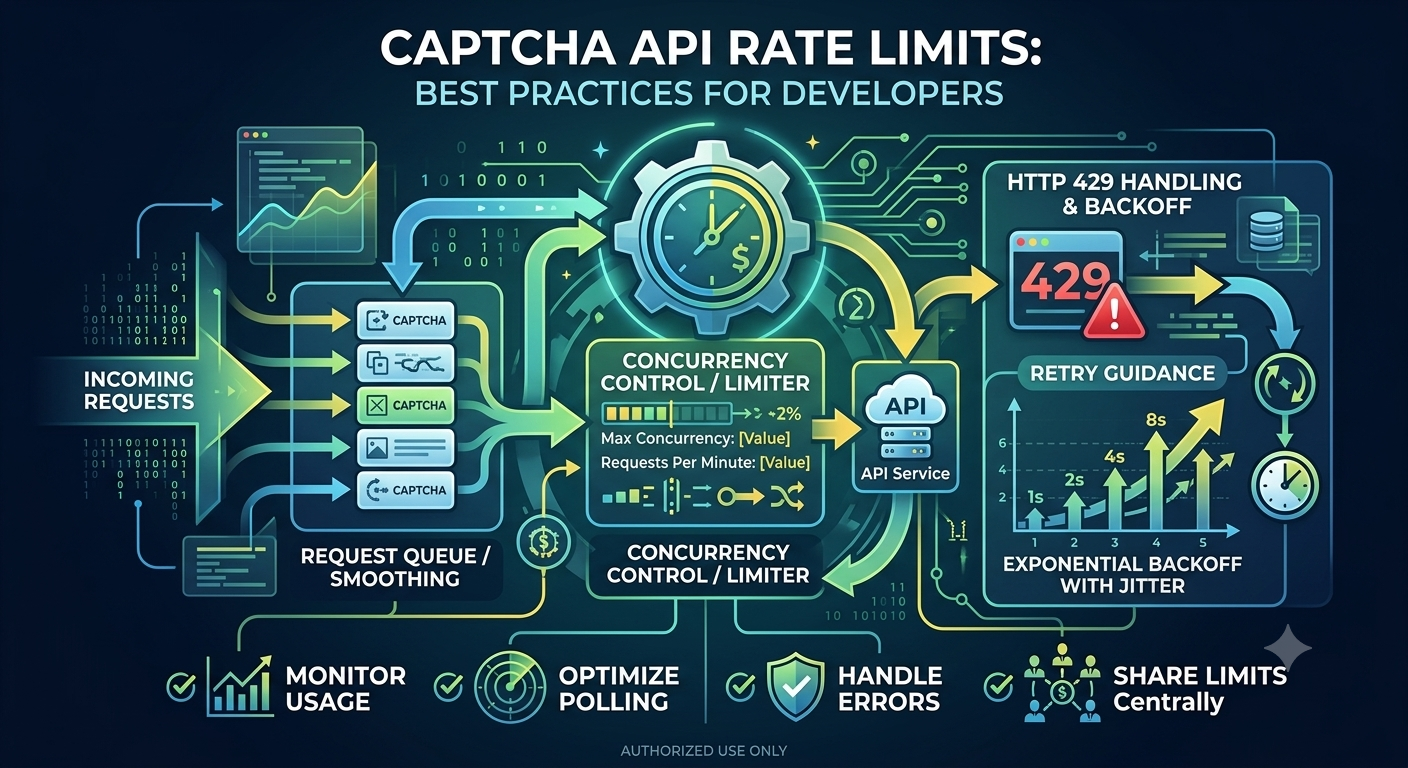
- Detect the HTTP 429 response.
- Read the
Retry-Afterheader if available. - Wait for the indicated period.
- Retry only when the operation is safe to repeat.
- Limit the number of retries.
- Record the event for monitoring.
- Reduce request volume if rate limiting continues.
If the server does not provide retry guidance, use a bounded backoff strategy based on the provider's documentation.
PHP Example: Detecting HTTP 429
The following example shows how to inspect a response after executing a cURL request.
<?php

$httpStatus = curl_getinfo($ch, CURLINFO_HTTP_CODE);

if ($httpStatus === 429) {
    // Record the rate-limit event.
    error_log('API rate limit reached.');

    // Apply the retry policy documented by your provider.
    throw new RuntimeException(
        'Too many requests. Retry according to the API guidance.'
    );
}
This snippet assumes that $ch refers to an existing cURL handle and that the request has already been executed. It demonstrates detection only; it does not implement a complete retry policy.
Node.js Example: Detecting HTTP 429
With modern Node.js, you can inspect the HTTP status and response headers using fetch():
async function requestApi(url, options = {}) {
  const response = await fetch(url, options);

  if (response.status === 429) {
    const retryAfter = response.headers.get("Retry-After");

    throw new Error(
      retryAfter
        ? `Rate limited. Retry guidance: ${retryAfter}`
        : "Rate limited. Follow the provider's retry policy."
    );
  }

  if (!response.ok) {
    throw new Error(`API request failed: HTTP ${response.status}`);
  }

  return response.json();
}
The function reports the rate-limit condition instead of automatically retrying. This is deliberate: the correct delay and whether a request can safely be repeated depend on the API and operation.
What Is Exponential Backoff?
Exponential backoff is a retry strategy that increases the waiting period after repeated failures.
Instead of retrying at fixed intervals, the client waits progressively longer after each unsuccessful attempt.
A simplified strategy might use delays such as:
- First retry: 1 second.
- Second retry: 2 seconds.
- Third retry: 4 seconds.
- Fourth retry: 8 seconds.
These values are illustrative. Your actual limits should be based on the provider's instructions and your application's requirements.
Why Add Jitter?
If many clients retry at the same time, they can create another burst of traffic when the waiting period ends. Jitter adds a random component to the delay so that retries are distributed over time.
A common pattern is full jitter:
[ \text{delay} = \operatorname{random}(0, \min(\text{cap}, \text{base} \times 2^{n})) ]
Where:
baseis the initial backoff interval.nis the retry attempt number.capis the maximum permitted delay.random()chooses a delay between zero and the calculated maximum.
If the server provides a Retry-After value, your client should respect that instruction and avoid retrying earlier than permitted.
Node.js Example: Bounded Backoff
The following example demonstrates a basic retry strategy for an operation that is safe to repeat. It uses illustrative settings and should be adapted to the provider's rate limits.
const sleep = (ms) =>
  new Promise((resolve) => setTimeout(resolve, ms));

async function withRetry(operation, maxAttempts = 5) {
  for (let attempt = 0; attempt < maxAttempts; attempt++) {
    try {
      return await operation();
    } catch (error) {
      const finalAttempt = attempt === maxAttempts - 1;

      if (finalAttempt) {
        throw error;
      }

      const exponentialLimit = Math.min(
        30000,
        1000 * (2 ** attempt)
      );

      const jitter = Math.random() * exponentialLimit;

      await sleep(jitter);
    }
  }
}
This helper retries any thrown error, so it is intentionally generic rather than production-ready. In a real API client, retry only explicitly eligible failures, such as certain transient network errors or rate-limit responses. Do not blindly retry invalid requests, authentication failures, or non-idempotent task-creation requests.
If you use this helper for an HTTP 429 response, incorporate the provider's Retry-After instruction into the retry policy.
Control Concurrency Instead of Sending Requests in Bursts
Concurrency is the number of operations running at the same time.
An application may stay within a requests-per-minute limit but still overload its own resources by launching too many requests simultaneously.
For example, a worker may read hundreds of tasks from a queue and send every request at once. This can lead to connection pressure, rate-limit errors, increased memory usage, and inconsistent task processing.
Use a Concurrency Limit
A better design restricts how many operations run simultaneously.
For instance, a worker might process a small number of tasks at a time, wait for completion, and then process more. The correct limit depends on the provider's rules, task duration, and application capacity.
Useful techniques include:
- Worker queues.
- Semaphore-based concurrency limits.
- Controlled request pools.
- Per-account request budgets.
- Backpressure when the queue grows too quickly.
For distributed applications, coordinate rate limits across workers. A limit applied independently by every worker may still exceed the provider's overall account limit.
Optimize Polling for Asynchronous Tasks
Some APIs return a task identifier before processing finishes. The application must then check task status or receive a supported callback.
Polling can become a significant source of unnecessary API traffic if implemented inefficiently.
Common Polling Mistakes
- Checking the status continuously without a delay.
- Polling every task at the same very short interval.
- Continuing to poll after a task reaches a final state.
- Polling indefinitely when a task has failed or expired.
- Retrying a failed status request without a maximum attempt count.
Better Polling Practices
- Follow the polling interval specified by the provider.
- Use a deadline or maximum number of attempts.
- Stop polling when the task reaches a documented final state.
- Handle temporary status-request failures separately from task failures.
- Use webhooks if the provider supports them and they suit your architecture.
- Monitor the number of status checks per completed task.
If a task is expected to take time, a controlled interval or bounded backoff is generally more efficient than continuously requesting the status.
Monitor API Usage and Rate-Limit Events
Rate-limit management becomes easier when your application records how it uses the API.
Useful metrics include:
- Total requests over time.
- Requests grouped by endpoint.
- HTTP 429 frequency.
- Average and percentile response latency.
- Number of concurrent requests.
- Task completion and failure rates.
- Number of polling requests per task.
- Retry count and retry success rate.
- Remaining quota or usage information, if the provider exposes it.
Use Rate-Limit Headers When Available
Some APIs return headers that describe request limits or remaining capacity. Header names and semantics vary by provider.
Your application should use these values only when the API documents them. Do not assume that every service provides the same rate-limit headers.
Monitoring these signals can help you detect traffic spikes and adjust concurrency before failures become widespread.
Build a Rate-Limit Strategy for Your Application
A reliable rate-limit strategy should consider both the API provider's restrictions and your application's workload.
Step 1: Read the Provider Documentation
Identify the limits for request frequency, concurrency, quotas, and endpoint-specific operations.
Step 2: Estimate Request Volume
Estimate how many requests your application will send during normal and peak workloads. Include task creation, status polling, retries, and other supporting calls.
Step 3: Add a Request Queue
A queue helps smooth sudden bursts by allowing workers to process requests at a controlled pace.
Step 4: Apply Concurrency Controls
Limit the number of active requests or tasks to a level compatible with the documented API restrictions.
Step 5: Implement Safe Retries
Use bounded retries for eligible failures, exponential backoff with jitter where appropriate, and Retry-After when provided.
Step 6: Monitor and Adjust
Review rate-limit events and request patterns. Reduce unnecessary polling or excess concurrency before increasing traffic.
Step 7: Test Failure Scenarios
Use a staging environment or mock responses to verify how your client behaves when it receives HTTP 429, timeouts, or temporary server errors.
Common Rate-Limit Mistakes to Avoid
| Mistake | Why it causes problems | Better approach |
|---|---|---|
| Retrying immediately | Creates another burst of requests | Use documented retry guidance |
Ignoring Retry-After |
Retries before the suggested time | Respect the header when provided |
| Unlimited concurrency | Overloads the client or exceeds limits | Use a queue or concurrency cap |
| Excessive polling | Consumes request capacity unnecessarily | Use controlled intervals or webhooks |
| Retrying every error | Repeats permanent failures and may duplicate tasks | Retry only eligible errors |
| Ignoring shared workers | Multiple workers may exceed a common limit | Coordinate rate limits centrally |
| Logging no metrics | Makes traffic problems difficult to diagnose | Monitor status codes, volume, and retries |
Frequently Asked Questions
What is a CAPTCHA API rate limit?
A CAPTCHA API rate limit restricts how frequently a client can send requests or perform certain operations within a defined period. Depending on the provider, limits may apply to request frequency, concurrent tasks, account quotas, or specific endpoints.
What does HTTP 429 mean for an API request?
HTTP 429 means the client has exceeded a rate limit. The client should reduce its request frequency and follow the provider's retry instructions. If a Retry-After header is present, use it to determine when to retry.
What is the difference between rate limiting and throttling?
Rate limiting defines the allowed request frequency or usage threshold. Throttling is the process of slowing down, delaying, or rejecting traffic when that threshold or another resource constraint is reached. The exact terminology varies across providers.
Should I retry every HTTP 429 response?
Not necessarily. Retry only when appropriate for the operation, follow the provider's retry guidance, and impose a maximum number of attempts or a deadline. Avoid repeatedly retrying task-creation requests when doing so could create duplicates.
How does exponential backoff help?
Exponential backoff increases the delay between successive retries. It reduces repeated request pressure during temporary failures. Adding jitter helps prevent many clients from retrying simultaneously.
Can excessive polling cause rate-limit errors?
Yes. Repeatedly checking task status at very short intervals can consume request capacity quickly. Follow the documented polling interval, stop when the task reaches a final state, and use webhooks where supported.
How can I reduce API request volume?
Avoid unnecessary requests, cache eligible responses when permitted, control concurrency, optimize polling, and queue work during traffic spikes. Do not cache or reuse sensitive task results in ways that violate the provider's security requirements.
Does AllCaptcha use the same rate limits for every account?
Do not assume that every account or operation has the same limits. Check the current official AllCaptcha documentation or account information for applicable request limits, quotas, and retry instructions.
Conclusion
Managing CAPTCHA API rate limits is essential for building reliable integrations. Understanding HTTP 429 responses, controlling concurrency, optimizing polling, implementing bounded retries, and monitoring request volume can help reduce unnecessary failures.
The most effective strategy begins with the provider's documented limits. Build a request queue, respect retry instructions, avoid duplicate operations, and test failure scenarios before deploying your application.
For more developer resources, explore AllCaptcha's related guides on REST API fundamentals, Node.js integration, PHP integration, and API error codes.
SEO Metadata
SEO Title: CAPTCHA API Rate Limits: Best Practices for Developers
Focus Keyword: captcha api rate limits
URL Slug: captcha-api-rate-limits
Meta Description: Learn how to manage CAPTCHA API rate limits, handle HTTP 429 errors, use exponential backoff, control concurrency, optimize polling, and monitor API usage.
Secondary Keywords:
- CAPTCHA API rate limiting
- HTTP 429 API error
- API rate limit handling
- exponential backoff with jitter
- API concurrency limits
- asynchronous API polling
- API retry strategy
- API usage monitoring
Suggested H1: CAPTCHA API Rate Limits: Best Practices for Developers
Suggested Internal Links:
- CAPTCHA API Error Codes: Common Errors and How to Fix Them
- CAPTCHA Solver API Tutorial: How REST APIs Work
- How to Integrate a CAPTCHA Solver API with Node.js
- How to Integrate a CAPTCHA Solver API with PHP
- How Much Does a CAPTCHA Solver API Cost? 2026 Pricing Guide
Suggested Image Alt Text: Diagram illustrating CAPTCHA API rate-limit management with request queues, concurrency control, HTTP 429 handling, and exponential backoff.
Recommended Schema: Article. Use FAQPage structured data only when appropriate for your implementation and when the structured questions and answers match the visible content on the page.