CAPTCHA API Security Best Practices: How to Protect API Keys and Requests
API security is an essential part of building reliable applications. When integrating a CAPTCHA API, developers must protect authentication credentials, validate requests, manage sensitive data, and prevent unauthorized access to their applications and services.
A poorly secured integration can expose API keys, leak sensitive information through logs, or allow unauthorized users to consume API resources. Even when the API provider maintains strong security controls, the application connecting to that service remains responsible for protecting its own credentials and data.
In this guide, you will learn how to secure a CAPTCHA API integration using practical techniques for API key management, environment variables, access controls, request validation, logging, error handling, and deployment security.
The examples use generic API patterns. Always follow your provider's official documentation for supported authentication methods, endpoint requirements, and security features.
Table of Contents
- Why CAPTCHA API Security Matters
- Protect API Keys and Authentication Credentials
- Store Secrets Securely with Environment Variables
- Never Expose API Keys in Frontend Code
- Validate Requests and API Responses
- Use HTTPS and Secure Network Communication
- Implement Access Controls and Rate Limits
- Handle Errors Without Leaking Sensitive Data
- Secure API Logging and Monitoring
- Protect CAPTCHA Tokens and Session Data
- Secure Your CI/CD Pipeline
- CAPTCHA API Security Checklist
- Common Security Mistakes to Avoid
- Frequently Asked Questions
1. Why CAPTCHA API Security Matters
A CAPTCHA API integration connects an application to an external service. Depending on the integration, the application may transmit authentication credentials, task parameters, request identifiers, or other operational data.
If these components are not protected properly, attackers or unauthorized users may be able to misuse exposed credentials, generate unexpected usage, or access information that should remain private.
Common security risks include:
- API keys committed to public source-code repositories.
- Credentials exposed in browser JavaScript.
- Secrets included in application logs.
- Requests accepted without appropriate authentication.
- Excessive API usage caused by unrestricted application access.
- Sensitive data retained longer than necessary.
- Production credentials shared across development environments.
- API errors that reveal internal configuration details.
Strong API security requires more than keeping a key private. It involves protecting the entire integration, from configuration and network communication to request handling, monitoring, and deployment.
The shared-responsibility principle
An API provider may protect its infrastructure, authentication systems, and service endpoints. Your application must still protect its own credentials, user data, server configuration, and access controls.
Understanding this division of responsibility helps developers identify which security controls belong in their own code and which must be verified through the provider's documentation.
2. Protect API Keys and Authentication Credentials
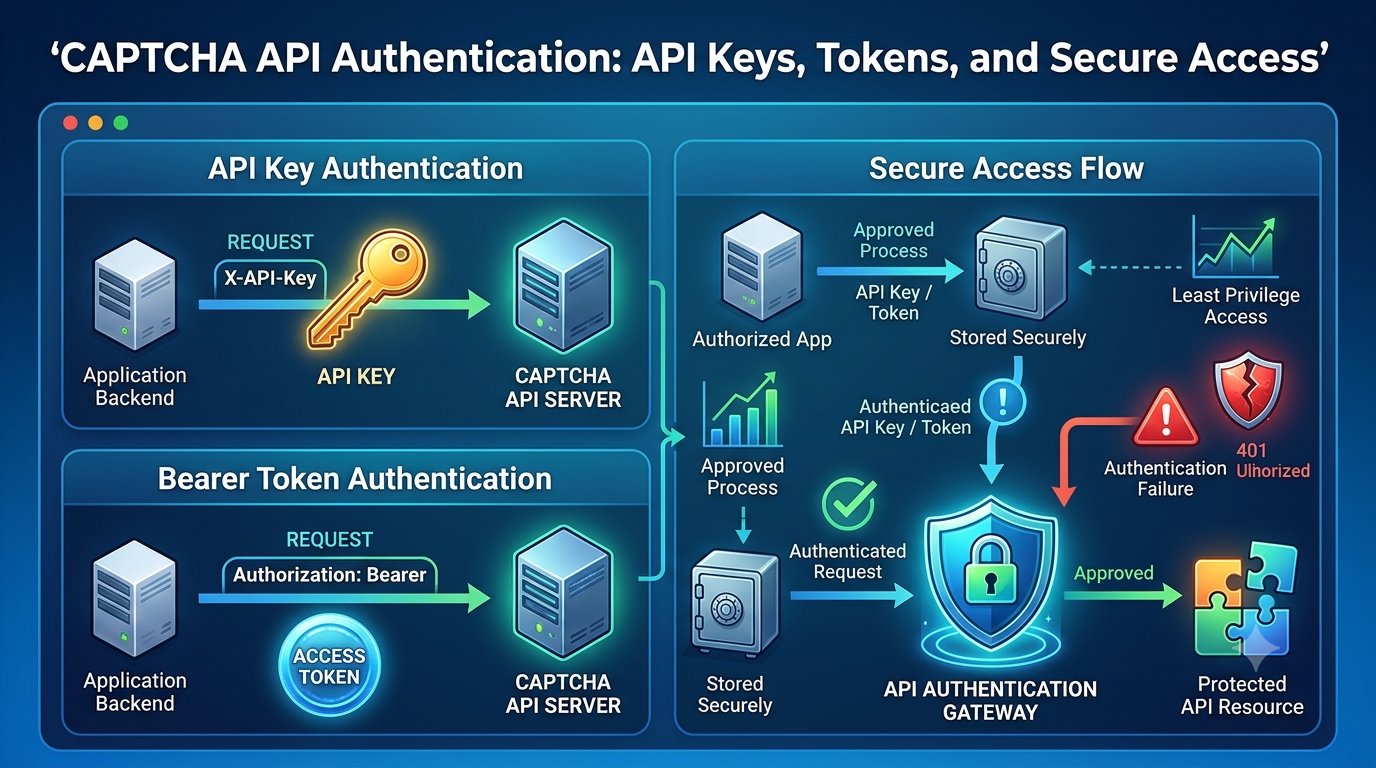
API keys and similar credentials identify or authorize an application to access a service. If an attacker obtains a credential with active permissions, they may be able to use it without the application's knowledge.
Keep API keys out of source code
Avoid hardcoding secrets directly into application files.
Insecure example:
const apiKey = "your-real-api-key-here";
This approach can expose the key when code is committed to a repository, shared with colleagues, copied into a support ticket, or included in a published package.
Better approach:
const apiKey = process.env.CAPTCHA_API_KEY;

if (!apiKey) {
  throw new Error("CAPTCHA_API_KEY is not configured");
}
This example reads a credential from the process environment instead of embedding it in the source code.
Environment variables are useful, but they are not automatically secure. Access to the environment, deployment configuration, process inspection, and diagnostic output must also be controlled.
Rotate credentials when necessary
If an API key is exposed or suspected of being compromised:
- Revoke or rotate the affected credential through the provider's supported process.
- Update the secret in the relevant environments.
- Verify that the application uses the replacement credential.
- Check logs and usage metrics for suspicious activity.
- Remove the exposed secret from accessible locations where possible.
- Review how the exposure occurred and prevent recurrence.
Deleting a key from the latest commit is not always sufficient. A secret may remain in Git history, build artifacts, logs, backups, or copied files.
Apply least privilege
If the provider supports credentials with different permissions or scopes, grant only the access required by the application.
For example, a development integration should not automatically receive every permission available to a production credential.
Use separate credentials for development, staging, and production when supported. This reduces the impact of a compromise in one environment.
3. Store Secrets Securely with Environment Variables
Environment variables are a common way to inject configuration into an application without hardcoding secrets into its source files.
For local development, a .env file may be convenient. However, it should be treated as a sensitive file.
Example configuration
A local environment file might contain:
CAPTCHA_API_KEY=replace-with-your-development-key
CAPTCHA_API_BASE_URL=https://api.example.invalid
The endpoint above is an intentionally nonfunctional placeholder, not an AllCaptcha URL.
Add the local environment file to .gitignore:
.env
.env.*
!.env.example
Check that the ignore rules match your project's naming conventions and do not accidentally exclude or include files you need to manage.
A safe .env.example can document required variable names without containing real credentials:
CAPTCHA_API_KEY=
CAPTCHA_API_BASE_URL=
Use a secrets manager in production
For production systems, consider a managed secrets service or your deployment platform's protected secret store.
Examples include cloud secret-management services and dedicated enterprise secrets managers.
A suitable secrets-management approach should support:
- Restricted access.
- Controlled secret distribution.
- Credential rotation.
- Auditing where available.
- Separation between environments.
- Secure injection into application processes.
Avoid placing secrets in container images, public build artifacts, client-side bundles, or configuration files that are broadly readable.
4. Never Expose API Keys in Frontend Code
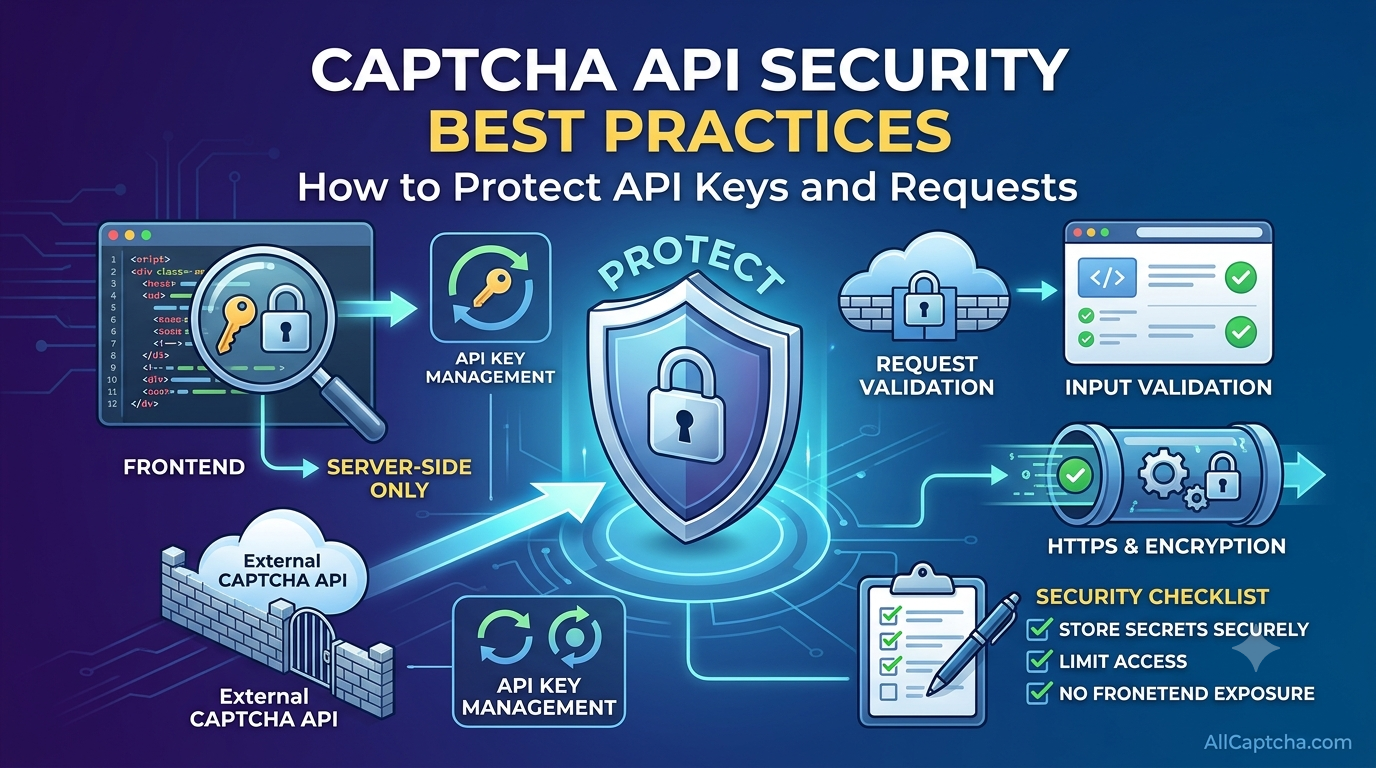
One of the most important API security rules is to keep private credentials on the server.
JavaScript delivered to a browser can be inspected by users. Hiding a key inside a minified bundle, HTML attribute, or frontend environment variable does not make it secret.
Use a backend proxy pattern
A safer architecture is:
- The frontend sends a request to your own backend.
- The backend authenticates the user and validates the requested operation.
- The backend calls the external API using a server-side credential.
- The backend validates and filters the response.
- The frontend receives only the information it needs.
<text></text>
This pattern helps protect the API credential and gives your application a central place to enforce authorization, usage limits, and input validation.
Example architecture
Browser or Frontend
        |
        | Authenticated application request
        v
Your Backend
        |
        | Server-side credential
        v
External CAPTCHA API
        |
        v
Your Backend validates the response
        |
        v
Frontend receives permitted data
This is a general architecture example. Use the provider's documented integration model and do not assume that every CAPTCHA-related API requires the same request flow.
Validate the caller's permissions
Moving a key to the backend does not automatically secure an endpoint.
Your backend should verify that the caller is authorized to perform the requested action. Otherwise, an attacker may abuse your backend as an unrestricted gateway to the external service.
Apply authentication, authorization, input validation, and suitable usage limits to your own application endpoints.
5. Validate Requests and API Responses
Input validation helps prevent malformed data from reaching downstream services and reduces unexpected behavior in your application.
Validate incoming requests
Before sending a request to a CAPTCHA API, check:
- Required fields are present.
- Values use the expected data types.
- Strings have reasonable length limits.
- URLs follow the application's expected rules.
- Unsupported values are rejected.
- The caller is permitted to request the operation.
Use allowlists and documented schemas where appropriate rather than accepting arbitrary input.
Validation rules must reflect the actual API contract. Do not invent required fields or assume that a generic example matches AllCaptcha's supported parameters.
Validate external API responses
Do not trust every response simply because it comes from an external service.
Check the HTTP status code, content type, JSON structure, and documented application-level status fields before using returned data.
For example:
function validateResponse(data) {
  if (
    data === null ||
    typeof data !== "object" ||
    Array.isArray(data)
  ) {
    throw new Error("Unexpected response format");
  }

  // Add field-level checks based on the actual API schema.
  return data;
}
This example performs only a basic structural check. Production code should validate the specific fields and types documented by the provider.
Prevent unsafe downstream use
Treat external data as input when passing it to other components.
For example, avoid inserting untrusted strings directly into HTML. Use appropriate output encoding and safe rendering methods. Use parameterized queries when interacting with databases.
Security should be maintained across the complete data flow, not only at the API boundary.
6. Use HTTPS and Secure Network Communication
HTTPS protects data in transit between communicating systems by providing encryption and server authentication through TLS.
When calling a remote API:
- Use the HTTPS endpoint documented by the provider.
- Keep TLS certificate verification enabled.
- Use a supported and maintained HTTP client.
- Keep operating-system and runtime security updates current.
- Avoid transmitting credentials in URL query parameters unless the provider explicitly requires and secures that mechanism.
- Review proxy and outbound network settings.
Do not disable TLS verification to fix connection errors
Disabling certificate verification can expose traffic to interception and make it difficult to confirm the identity of the remote service.
If a TLS error occurs, investigate the certificate chain, system trust store, hostname configuration, proxy behavior, and runtime version.
Correct the underlying issue instead of removing the security control.
Restrict outbound access when practical
Depending on your infrastructure, outbound network rules may help limit which external services an application can contact.
Use documented hostnames and supported network controls. Avoid hardcoding IP addresses unless the provider explicitly documents stable addresses and the approach is compatible with its infrastructure.
7. Implement Access Controls and Rate Limits
An authenticated API request can still be abused if the application allows unlimited operations.
Access controls and rate limiting help reduce unauthorized usage, accidental request bursts, and the impact of compromised accounts.
Authenticate and authorize users
If your application exposes a CAPTCHA-related operation to end users, check whether each caller is permitted to invoke it.
Do not rely solely on a frontend button being hidden or disabled. Authorization must be enforced by the backend.
Apply appropriate usage limits
Consider limits based on factors such as:
- Authenticated account.
- User or organization.
- Application endpoint.
- Operation type.
- Time window.
- Available service quota.
Choose limits based on legitimate application requirements and any restrictions documented by the API provider.
Handle HTTP 429 responses responsibly
HTTP 429 commonly indicates that a request has exceeded a rate limit.
When this occurs:
- Check the provider's documented usage limits.
- Inspect any
Retry-Afterheader if present. - Reduce request frequency when appropriate.
- Use bounded retries with backoff for eligible operations.
- Monitor repeated rate-limit responses.
- Avoid retry loops that create additional traffic.
Rate limiting should be implemented in your own application where appropriate, even when the external provider also enforces limits.
8. Handle Errors Without Leaking Sensitive Data
Error messages are useful for developers, but detailed internal information should not be exposed to unauthorized users.
A secure application separates internal diagnostics from public-facing error responses.
Avoid returning internal details
Do not send the following information to end users:
- API keys or authentication headers.
- Full request or response payloads containing sensitive data.
- Internal server paths.
- Stack traces from production systems.
- Secret-management configuration.
- Detailed network or infrastructure information that is not necessary for the user.
Use safe error responses
An external-facing response might look like this:
{
  "error": "service_temporarily_unavailable",
  "message": "Please try again later."
}
This is an illustrative response for your own application, not a documented AllCaptcha error format.
Internally, record a correlation ID and a sanitized error category so that developers can investigate the failure without revealing sensitive implementation details.
Classify errors correctly
Different errors require different actions.
| Error Category | Security Consideration | Recommended Response |
|---|---|---|
| Authentication failure | May indicate a configuration problem or unauthorized use | Verify credentials and inspect access logs |
| Invalid input | May indicate a client bug or malformed request | Validate input and return a safe error |
| Rate limiting | May indicate excessive traffic or abuse | Apply request controls and documented retry behavior |
| Network failure | May be transient or infrastructure-related | Log safe diagnostics and retry only when appropriate |
| Server error | May originate from an external dependency | Avoid exposing internal details and monitor frequency |
| Unexpected response | May indicate a schema change or integration defect | Validate the response and fail safely |
9. Secure API Logging and Monitoring
Logging and monitoring help detect suspicious activity, investigate failures, and understand usage patterns.
However, logging can also create a security risk if it captures secrets or sensitive payloads.
What should you log?
Useful fields include:
- Timestamp.
- Operation name.
- Application environment.
- Application version.
- HTTP status code.
- Request duration.
- Sanitized error category.
- Correlation ID.
- Retry count.
Depending on the API and your data-protection requirements, other operational metadata may also be appropriate.
What should you never log?
Avoid logging:
- API keys.
- Authorization headers.
- Passwords.
- Session cookies.
- Private access tokens.
- Sensitive CAPTCHA-related tokens.
- Unnecessary personal information.
- Complete request bodies containing secrets or confidential data.
If debugging requires request inspection, use redaction, synthetic data, and restricted access to diagnostic systems.
Monitor unusual activity
Consider alerting on:
- Unexpected spikes in request volume.
- Repeated authentication failures.
- Unusual rate-limit activity.
- Unexpected increases in API costs or usage.
- Requests from environments that should not be active.
- Sudden changes in error rates.
An individual metric does not necessarily prove an attack. Investigate trends and correlate multiple signals before concluding that activity is malicious.
10. Protect CAPTCHA Tokens and Session Data
Some CAPTCHA integrations involve tokens or verification results that must be handled according to the provider's security model.
The exact properties of these values depend on the CAPTCHA technology and integration.
Follow the documented verification flow
For systems that use a verification token:
- Obtain the token through the documented client-side or application flow.
- Send it to the appropriate backend component.
- Verify it using the provider's documented server-side mechanism.
- Check the returned verification result and any required contextual fields.
- Apply the application's own authorization rules.
A token's presence alone should not be treated as proof that an action is authorized. Your application must follow the appropriate verification and business-logic requirements.
Avoid unnecessary token retention
Do not store CAPTCHA tokens or related session data longer than necessary.
Avoid placing tokens in analytics events, browser URLs, public logs, or error reports. Apply appropriate access controls and retention rules to any security-related data that must be retained.
Keep security decisions on the server
When server-side verification is required by the chosen integration, do not rely on a client-side success message alone.
The backend should make the final authorization decision based on the documented verification result and the application's own rules.
11. Secure Your CI/CD Pipeline
Build and deployment pipelines often have access to production credentials, which makes them an important part of API security.
A compromised pipeline or an incorrectly configured workflow can expose secrets even when the application code is well written.
Use protected pipeline secrets
Store deployment credentials in your CI/CD platform's protected secret store.
Avoid writing secrets directly into workflow files, build scripts, command-line arguments that may be recorded, or generated artifacts.
Restrict which branches, environments, workflows, and users can access production secrets.
Separate development and production credentials
Use different credentials for development, staging, and production when supported.
Development workflows should not automatically have access to production secrets. Require appropriate approvals and access controls for sensitive deployments.
Scan for exposed secrets
Consider adding automated secret scanning to your development process.
Useful controls include:
- Repository secret scanning.
- Pre-commit checks.
- Dependency and vulnerability scanning.
- Restricted deployment permissions.
- Review of build artifacts.
- Credential rotation procedures.
Secret scanning is a useful safeguard, but it does not replace careful secret handling or credential rotation after exposure.
Avoid secrets in CI logs
Do not print environment variables or entire configuration objects during debugging.
Some CI/CD systems attempt to mask known secrets, but masking is not a guarantee that every transformed, encoded, or partially displayed value will be hidden.
12. CAPTCHA API Security Checklist
Use this checklist when reviewing an existing integration or preparing a new deployment.
Credentials and secrets
- API keys are not hardcoded in source code.
- Secrets are stored in an appropriate secret-management system.
- Local environment files are excluded from version control.
- Credentials are separated by environment where supported.
- Exposed credentials can be revoked or rotated.
- Access to secrets follows the principle of least privilege.
Application and network
- Private API keys remain on the server.
- Backend endpoints authenticate and authorize callers.
- Inputs are validated against the documented contract.
- HTTPS and TLS certificate verification are enabled.
- Outbound network access is controlled where practical.
- Request limits are appropriate for the application.
Responses and observability
- HTTP status codes and application-level errors are handled.
- External responses are validated before use.
- Public error messages do not expose internal details.
- Logs exclude credentials and sensitive tokens.
- Alerts detect unusual usage and authentication failures.
- Logs and metrics have appropriate access and retention controls.
Development and deployment
- CI/CD secrets are protected.
- Production credentials are restricted to authorized workflows.
- Secret scanning is used where practical.
- Dependencies and runtime versions are maintained.
- Security checks are included in release reviews.
- Credential rotation and incident-response procedures are documented.
13. Common Security Mistakes to Avoid
Mistake 1: Embedding private keys in frontend JavaScript
Browser code is visible to users. Keep private API credentials on the backend.
Mistake 2: Assuming environment variables are automatically secure
Environment variables prevent hardcoding but can still leak through process access, debug output, deployment settings, or logs. Control access to them.
Mistake 3: Disabling TLS verification
This weakens network security. Investigate certificate and connectivity problems instead.
Mistake 4: Logging complete API requests
Request bodies and headers may contain credentials, tokens, or confidential information. Log sanitized metadata instead.
Mistake 5: Retrying every failed request
Uncontrolled retries can increase traffic, cause rate limiting, and repeat operations unexpectedly. Use bounded retries and follow the provider's guidance.
Mistake 6: Trusting every successful HTTP response
An HTTP success status does not necessarily mean that the application-level operation succeeded. Validate the documented response schema and result.
Mistake 7: Giving every environment the same permissions
A compromised development environment should not automatically expose production resources. Separate credentials and access permissions wherever possible.
Mistake 8: Assuming the API provider handles all security responsibilities
Provider-side controls do not replace secure application design. Protect your own credentials, users, backend endpoints, logs, and deployment pipeline.
14. Frequently Asked Questions
How do I secure a CAPTCHA API key?
Store the key in a protected secret-management system or an appropriately secured server environment. Avoid hardcoding it, exposing it in frontend code, or logging it. Restrict access and rotate the credential if it is exposed.
Can I put a CAPTCHA API key in frontend JavaScript?
Private API keys should not be placed in browser JavaScript because users can inspect the code and network requests. Use a backend service to protect the credential and enforce authorization.
Are environment variables enough to protect API keys?
Not by themselves. Environment variables reduce the risk of hardcoding secrets, but access to runtime configuration, deployment systems, logs, and process environments must also be restricted.
Should I use HTTPS for CAPTCHA API requests?
Use the HTTPS endpoint documented by the provider and keep TLS certificate verification enabled. HTTPS helps protect data in transit and verifies the remote server's identity.
What should I do if my API key is leaked?
Revoke or rotate the credential through the provider's supported process, update affected environments, review usage for suspicious activity, and remove the exposed secret from accessible locations where possible. Investigate the cause and improve secret-handling controls.
How can I prevent unauthorized use of my backend API?
Authenticate callers, enforce server-side authorization, validate input, apply usage limits, and monitor unusual activity. Keeping the external API key on the server is important, but the backend endpoint itself must also be protected.
Should CAPTCHA tokens be stored in application logs?
Avoid logging CAPTCHA tokens or other security-sensitive values unless there is a documented and necessary reason with suitable protection. Prefer sanitized metadata and minimize retention.
Does AllCaptcha support scoped API keys or IP allowlisting?
Check the current official AllCaptcha documentation or contact its support team to confirm which credential-management and access-control features are available. Do not assume that a particular security feature is supported unless it is documented.
Conclusion
Securing a CAPTCHA API integration requires a layered approach. Protect API credentials, keep private keys on the server, validate incoming requests and external responses, use HTTPS, enforce access controls, and handle errors without revealing sensitive information.
Logging and monitoring are also important, but they must be designed to avoid collecting secrets unnecessarily. Secure CI/CD pipelines and a clear credential-rotation process help maintain these protections throughout the application's lifecycle.
Use the security checklist in this guide to review your implementation, and confirm endpoint requirements and provider-specific security features in the official API documentation.
A well-secured integration protects more than an API key. It helps safeguard the application, its users, its operational data, and the resources it depends on.
SEO Metadata
SEO Title: CAPTCHA API Security Best Practices: Protect API Keys and Requests
Meta Description: Learn CAPTCHA API security best practices, including API key protection, secret management, HTTPS, request validation, access controls, and secure logging.
Focus Keyword: CAPTCHA API security
Secondary Keywords:
- CAPTCHA API security best practices
- protect CAPTCHA API key
- API key management
- secure API integration
- API authentication security
- environment variables for API keys
- API request validation
- secure API logging
- API access control
Suggested URL Slug: captcha-api-security-best-practices
Suggested H1: CAPTCHA API Security Best Practices: How to Protect API Keys and Requests
Internal Linking Suggestions
Add contextual links to related AllCaptcha articles using their actual published URLs:
- How to Debug CAPTCHA API Integration Issues: A Step-by-Step Guide — link from the error-handling and troubleshooting sections.
- CAPTCHA API Rate Limits: Best Practices for Developers — link from the access-control and rate-limiting sections.
- How to Monitor CAPTCHA API Performance and Reliability — link from the logging and monitoring sections.
- CAPTCHA Token Verification: How It Works and Common Mistakes — link from the token and server-side verification sections.
Suggested Image Alt Text
Developer protecting CAPTCHA API credentials in a secure application configurationSecure CAPTCHA API architecture with a backend protecting private API keysCAPTCHA API security checklist covering authentication, HTTPS, and secret management
Recommended Schema Markup
Consider using Article and BreadcrumbList structured data when appropriate for your website. Ensure that all structured data accurately represents the visible page content. FAQ schema does not guarantee enhanced search results.