CAPTCHA API Usage Optimization: How to Reduce Unnecessary Requests and Costs
Using a CAPTCHA API can simplify application workflows, improve automation efficiency, and reduce the amount of manual work required by developers. However, inefficient API usage can increase operating costs, create unnecessary network traffic, and negatively affect application performance.
Many developers focus on choosing an API provider and integrating the service into their applications. They may overlook another important factor: how efficiently their applications use API resources.
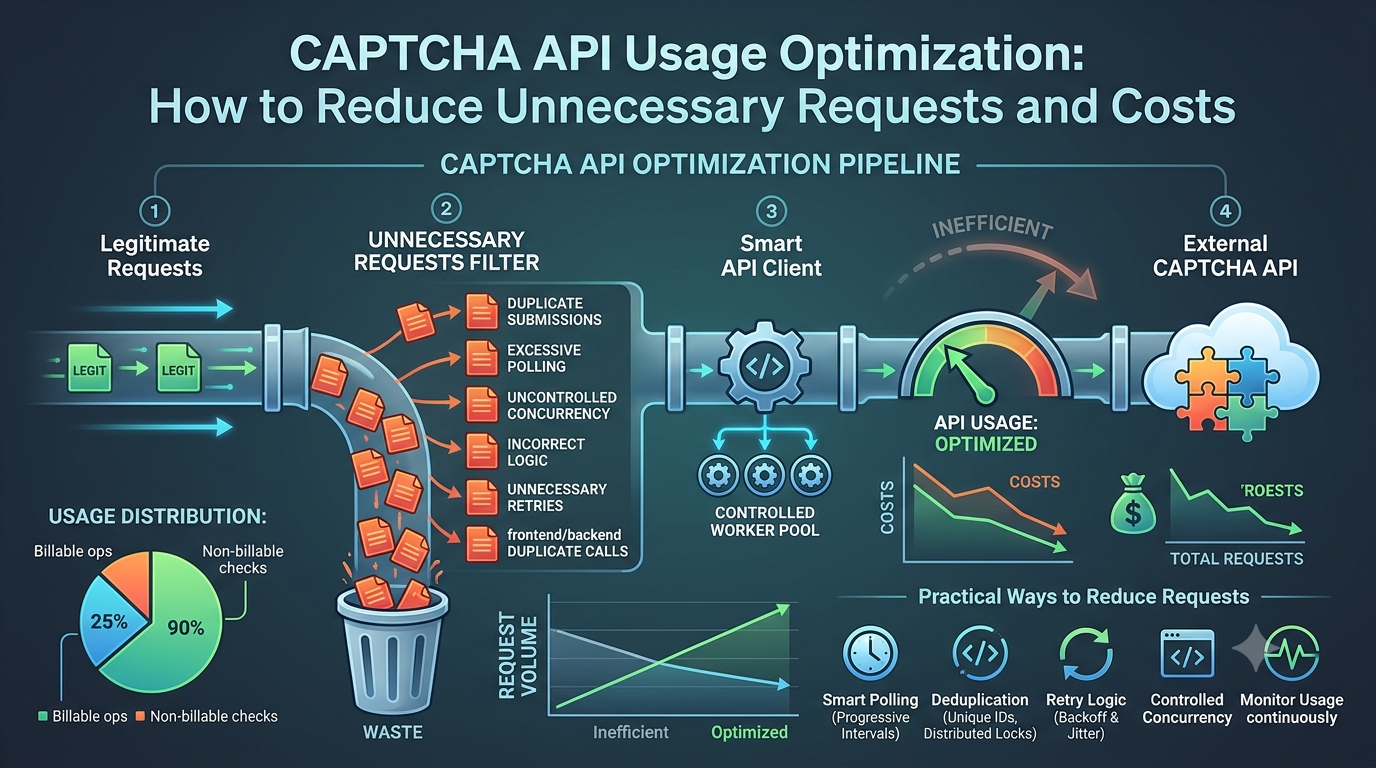
Unnecessary requests, excessive polling, duplicate task submissions, poorly configured retries, and uncontrolled concurrency can all increase API consumption.
In this guide, you will learn how to optimize CAPTCHA API usage, reduce unnecessary requests, control resource consumption, and build more cost-efficient integrations.
Whether you use Python, PHP, Node.js, Java, or another programming language, these practical strategies can help you improve API efficiency without sacrificing reliability or security.
What Is CAPTCHA API Usage Optimization?
CAPTCHA API usage optimization is the process of improving how an application sends requests to an external CAPTCHA-related service.
The goal is to complete legitimate application operations while avoiding unnecessary API calls and inefficient resource consumption.
Common optimization areas include:
- Preventing duplicate requests.
- Reducing unnecessary status checks.
- Optimizing asynchronous polling.
- Implementing appropriate retry strategies.
- Controlling request concurrency.
- Managing API quotas and rate limits.
- Monitoring usage patterns.
- Improving error handling.
- Avoiding unnecessary processing.
For example, an application that checks the status of the same task every 100 milliseconds may generate many requests while the underlying task is still processing.
A more efficient polling strategy can reduce request volume without compromising the application's ability to retrieve the final result.
Why Should Developers Optimize CAPTCHA API Usage?
API optimization provides several benefits for applications that depend on external services.
1. Reduce API Consumption Costs
Some API providers charge based on successful operations, task volume, subscriptions, or other usage-based models.
Unnecessary requests may consume resources without providing additional value.
The exact billing impact depends on the provider's pricing rules. Developers should distinguish between billable operations, status checks, failed requests, and other request categories according to the official pricing documentation.
2. Improve Application Performance
Every unnecessary HTTP request consumes network resources and may introduce additional processing overhead.
Reducing redundant requests can help applications respond more efficiently.
3. Avoid Rate-Limit Problems
API providers may enforce limits on requests per second, requests per minute, concurrent tasks, or other usage dimensions.
Poor request management can cause applications to exceed those limits.
Efficient API usage helps reduce unnecessary traffic and makes capacity planning easier.
4. Improve Reliability
Repeated requests, uncontrolled retries, and excessive concurrency can make an application less stable.
A properly optimized API client handles temporary failures, prevents duplicate operations where possible, and manages workloads predictably.
5. Make Applications Easier to Scale
An application that uses external APIs efficiently can handle increasing workloads with more predictable resource consumption.
This is especially important for applications with many users or automated background processes.
10 Common Causes of Unnecessary CAPTCHA API Requests
Before optimizing an integration, identify the sources of unnecessary requests.
1. Excessive Polling
Polling occurs when an application repeatedly sends requests to check the status of an asynchronous operation.
For example, an application might check the same task every 200 milliseconds.
If a task takes several seconds to complete, most of those requests may provide no new information.
Solution: Use a reasonable polling interval based on provider documentation and observed task completion times.
2. Duplicate Task Submissions
Duplicate requests may occur when:
- A user clicks a button multiple times.
- A frontend sends the same request twice.
- A network timeout occurs after the server has accepted a request.
- A retry mechanism resubmits an operation without checking its previous state.
Solution: Use request deduplication and provider-supported idempotency mechanisms where available.
3. Unnecessary Retries
Some applications retry every failed request automatically.
However, not all failures are temporary.
For example, repeatedly submitting an invalid request or using incorrect credentials will not normally resolve the underlying problem.
Solution: Classify errors before retrying. Retry only temporary failures when doing so is safe.
4. Incorrect Polling Logic
An application may continue checking a task after it has already completed or failed.
This creates unnecessary traffic.
Solution: Stop polling immediately when the task reaches a documented terminal state.
5. Uncontrolled Concurrency
Sending too many requests simultaneously can create resource pressure and trigger rate limits.
Solution: Set a maximum number of concurrent operations and use a queue to manage excess workloads.
6. Repeating the Same API Operation
An application may request the same information multiple times even when it has not changed.
Solution: Cache non-sensitive information when the provider permits it and when doing so does not violate freshness or security requirements.
7. Frontend and Backend Duplicate Calls
A common integration mistake occurs when both frontend and backend components independently trigger the same operation.
Solution: Assign clear responsibility for API communication, preferably through a controlled backend service when credentials or sensitive operations are involved.
8. Aggressive Automatic Refresh
Some applications refresh API data at very short intervals, even when users do not need real-time updates.
Solution: Adjust refresh frequency according to the actual user experience requirements.
9. Poor Timeout Configuration
An excessively short timeout can cause an application to retry requests that are still being processed.
This can create duplicate operations and additional traffic.
Solution: Set timeouts based on measured response times and documented API behavior.
10. Missing Usage Monitoring
Without monitoring, developers may not realize that a background process is generating excessive requests.
Solution: Track request volume, retries, polling frequency, error rates, and task completion times.
8 Practical Ways to Reduce CAPTCHA API Requests
The following techniques can help developers build more efficient API integrations.
1. Optimize Asynchronous Polling
Asynchronous APIs often separate task submission from result retrieval.
A typical workflow looks like this:
- Submit a task.
- Receive a task identifier.
- Wait for processing.
- Check the task status.
- Retrieve the final result when available.
The polling strategy determines how frequently your application checks the task.
Inefficient Polling Example
async function checkTask(taskId) {
    while (true) {
        const result = await getTaskStatus(taskId);

        if (result.status === "completed") {
            return result;
        }

        await new Promise(resolve =>
            setTimeout(resolve, 200)
        );
    }
}
This simplified example checks every 200 milliseconds and has no maximum deadline or explicit failure handling.
It may generate excessive requests.
More Efficient Polling Example
async function checkTask(taskId) {
    const intervals = [
        1000,
        2000,
        3000,
        5000
    ];

    const deadline = Date.now() + 60000;

    let attempt = 0;

    while (Date.now() < deadline) {
        const result = await getTaskStatus(taskId);

        if (result.status === "completed") {
            return result;
        }

        if (result.status === "failed") {
            throw new Error("Task failed");
        }

        const delay = intervals[
            Math.min(attempt, intervals.length - 1)
        ];

        await new Promise(resolve =>
            setTimeout(resolve, delay)
        );

        attempt++;
    }

    throw new Error("Task deadline exceeded");
}
This example demonstrates progressive polling intervals and a maximum deadline.
The status values, polling rules, and task retrieval function must be adapted to the provider's actual documentation. The example is not an AllCaptcha API specification.
Important: Do not use polling intervals that conflict with provider requirements. If the provider supports webhooks or another notification mechanism, evaluate that documented option as an alternative to frequent polling.
2. Prevent Duplicate Requests
Duplicate requests can increase API consumption and create inconsistent application behavior.
One solution is to prevent multiple submissions while an operation is already being processed.
For example:
let requestInProgress = false;

async function submitTask() {
    if (requestInProgress) {
        return;
    }

    requestInProgress = true;

    try {
        return await createTask();
    } finally {
        requestInProgress = false;
    }
}
This simple example prevents overlapping calls within one JavaScript execution context.
However, it does not prevent duplicates across multiple browser tabs, application servers, or distributed workers.
For production applications, consider:
- Database-backed request tracking.
- Unique operation identifiers.
- Distributed locks when appropriate.
- Provider-supported idempotency keys.
- Duplicate submission detection.
Do not assume that an API supports idempotency keys unless its documentation explicitly confirms this feature.
3. Implement Smart Retry Logic
Retries are useful when temporary network or server failures occur.
However, automatic retries should be limited and carefully controlled.
A good retry strategy should:
- Retry only appropriate temporary failures.
- Use exponential backoff.
- Add random jitter.
- Limit the number of attempts.
- Respect
Retry-Afterwhen applicable. - Avoid repeating non-idempotent operations without duplicate protection.
Example Retry Strategy in Node.js
function sleep(ms) {
    return new Promise(resolve =>
        setTimeout(resolve, ms)
    );
}

async function requestWithRetry(
    requestFunction,
    maxAttempts = 3
) {
    for (let attempt = 0; attempt < maxAttempts; attempt++) {
        try {
            return await requestFunction();
        } catch (error) {
            const finalAttempt =
                attempt === maxAttempts - 1;

            if (finalAttempt || !error.retryable) {
                throw error;
            }

            const baseDelay = 1000 * (2 ** attempt);
            const jitter = Math.random() * 500;

            await sleep(baseDelay + jitter);
        }
    }
}
The retryable property in this example is an application-defined classification, not a standard property automatically provided by every HTTP library.
Before retrying a request that creates a task, confirm that the operation can safely be repeated or use an officially supported duplicate-prevention mechanism.
4. Use Controlled Concurrency
Concurrency allows an application to process multiple independent operations simultaneously.
However, too many concurrent requests can increase resource consumption and trigger rate limits.
A controlled worker pool helps maintain predictable API usage.
Example: Basic Concurrency Control
async function processWithLimit(
    items,
    limit,
    handler
) {
    const results = [];
    let nextIndex = 0;

    async function worker() {
        while (nextIndex < items.length) {
            const currentIndex = nextIndex++;

            results[currentIndex] =
                await handler(items[currentIndex]);
        }
    }

    const workers = Array.from(
        { length: Math.min(limit, items.length) },
        () => worker()
    );

    await Promise.all(workers);

    return results;
}
Usage:
const tasks = [
    "task-1",
    "task-2",
    "task-3",
    "task-4",
    "task-5"
];

const results = await processWithLimit(
    tasks,
    2,
    async task => {
        return await processTask(task);
    }
);
This example limits concurrency within one invocation.
It does not enforce a global rate limit across multiple application instances, nor does it provide a distributed queue.
For larger applications, use a shared queue or distributed concurrency-control system.
5. Cache Information When Appropriate
Caching can reduce repeated requests for information that does not change frequently.
For example, an application might cache:
- Public configuration data.
- Static application settings.
- Non-sensitive metadata.
- Reference information that the provider permits caching.
However, caching must be used carefully.
Do not cache sensitive or short-lived values in ways that compromise security or correctness.
For example, CAPTCHA tokens, authentication credentials, and task results should only be stored or reused according to their security requirements and the provider's documented rules.
Example: Simple In-Memory Cache
const cache = new Map();

async function getCachedValue(key, fetchFunction) {
    if (cache.has(key)) {
        return cache.get(key);
    }

    const value = await fetchFunction();

    cache.set(key, value);

    return value;
}
This is a basic demonstration, not a complete production cache.
A production implementation should consider expiration, memory limits, invalidation, concurrent requests, and whether the data is safe to cache.
6. Avoid Unnecessary Status Checks
Some applications check task status even when they already have enough information to continue.
For example, a task may already be marked as completed in the application's database.
Before making another external request, check whether the latest verified status is already available locally.
A useful approach is:
- Store the task identifier.
- Record each verified status update.
- Avoid repeated checks when the task is already complete.
- Poll again only when the task remains in a non-terminal state.
- Stop after completion, failure, cancellation, or expiration.
The exact terminal states must come from the provider's documentation.
7. Set Appropriate Timeouts
Timeouts prevent applications from waiting indefinitely.
However, a timeout that is too short may create unnecessary retries.
A good timeout strategy considers:
- Connection timeout.
- HTTP response timeout.
- Overall workflow deadline.
- Expected task processing duration.
For asynchronous APIs, the HTTP request timeout and task completion deadline should be treated separately.
Do not assume that a slow initial request means the task should be submitted again.
First determine whether the original operation may already have been accepted.
8. Monitor API Usage Continuously
Optimization should be based on actual measurements rather than assumptions.
Track the following metrics:
| Metric | Why It Matters |
|---|---|
| Total requests | Shows overall API traffic |
| Requests per operation | Identifies inefficient workflows |
| Duplicate submissions | Reveals repeated operations |
| Polling requests | Helps optimize asynchronous checks |
| Retry count | Identifies unstable request handling |
| HTTP 429 responses | Indicates rate-limit pressure |
| Timeout rate | Reveals slow or unreliable operations |
| Task completion time | Measures end-to-end workflow performance |
| Cost per completed operation | Helps evaluate economic efficiency |
A particularly useful metric is the number of API requests required to complete one successful business operation.
For example, if one completed operation requires one task submission and four status checks, the application uses five HTTP requests for that workflow.
Reducing unnecessary status checks may lower request volume, although the financial impact depends on the provider's billing model.
How to Calculate CAPTCHA API Usage Costs
Understanding API consumption is essential when planning an application's operating budget.
However, not all providers charge in the same way.
Some may charge per successful task, while others may use subscriptions, credits, request volume, or a combination of pricing models.
Always confirm which activities are billable.
Basic Cost Calculation
For a simple usage-based pricing model:
Estimated cost = Billable operations × Price per operation
For example:
- Monthly billable operations: 20,000.
- Illustrative price per operation: $0.002.
Estimated monthly cost:
20,000 × $0.002 = $40.
This is a hypothetical calculation, not AllCaptcha pricing.
Example Monthly Usage Comparison
Consider a hypothetical application with 10,000 completed operations.
| Usage Pattern | Requests per Operation | Total Requests |
|---|---|---|
| Inefficient polling | 10 | 100,000 |
| Improved polling | 5 | 50,000 |
| Optimized polling | 3 | 30,000 |
The optimized workflow reduces the total number of HTTP requests by 70% compared with the inefficient example.
However, a reduction in HTTP requests does not necessarily translate into an equal reduction in costs. That depends on which request types the provider bills for.
Measure Cost Per Successful Operation
A useful business metric is:
Cost per successful operation = Total API cost / Number of successful operations
This metric helps developers compare different implementation strategies.
For a meaningful comparison, include all relevant costs and define what counts as a successful operation consistently.
How to Build a More Efficient CAPTCHA API Architecture
For larger applications, optimization should be part of the overall system architecture.
A basic architecture might look like this:
Application
    |
    v
API Integration Service
    |
    v
Request Validation
    |
    v
Duplicate Request Check
    |
    v
Task Queue
    |
    v
Controlled Worker Pool
    |
    v
External API
    |
    v
Result Processing
    |
    v
Application Database
Each component has a specific responsibility.
Request Validation
Validate incoming application data before making external API requests.
This prevents avoidable requests caused by malformed or incomplete input.
Duplicate Request Check
Identify whether the same operation has already been submitted.
Use reliable identifiers and appropriate persistence rather than relying only on in-memory variables.
Task Queue
A queue helps control workload and prevent sudden request spikes.
It also allows the application to process work asynchronously.
Controlled Worker Pool
Workers execute tasks while respecting configured concurrency and provider limits.
Result Processing
Store verified results and update the application state.
Avoid unnecessary repeated requests once a task has reached a terminal state.
Monitoring
Track requests, failures, processing times, and resource consumption across the entire workflow.
Common Mistakes When Optimizing CAPTCHA API Usage
Optimization can introduce new problems when developers focus only on reducing request volume.
Mistake 1: Reducing Polling Too Aggressively
Very long polling intervals may delay result retrieval and negatively affect the user experience.
Better approach: Choose intervals based on provider guidance and measured task completion times.
Mistake 2: Retrying Every Failed Request
Repeatedly retrying permanent errors creates unnecessary traffic.
Better approach: Classify errors and retry only appropriate temporary failures.
Mistake 3: Increasing Concurrency Without Limits
Uncontrolled concurrency may cause rate-limit errors and resource exhaustion.
Better approach: Use bounded workers and shared rate-limit controls.
Mistake 4: Caching Sensitive Information
Caching tokens, credentials, or task results without considering their security requirements can create vulnerabilities.
Better approach: Cache only appropriate data and follow the provider's security guidance.
Mistake 5: Assuming Fewer Requests Always Mean Lower Costs
A provider may charge based on completed operations rather than the number of HTTP requests.
Better approach: Review the official pricing model and distinguish billable operations from non-billable status checks.
Mistake 6: Ignoring Failed Operations
An application may generate a large number of failed requests because of invalid configuration or repeated validation errors.
Better approach: Track failure categories and fix root causes instead of repeatedly submitting the same invalid request.
Mistake 7: Optimizing Without Monitoring
Developers may reduce request volume but unintentionally increase completion time.
Better approach: Measure request volume, latency, success rate, and cost together.
CAPTCHA API Usage Optimization Checklist
Before deploying an optimized integration, review this checklist:
- Identify unnecessary API calls.
- Measure requests per completed operation.
- Review the provider's billing model.
- Optimize asynchronous polling intervals.
- Stop polling after terminal task states.
- Prevent duplicate submissions.
- Use idempotency mechanisms when officially supported.
- Classify errors before retrying.
- Implement exponential backoff with jitter.
- Control concurrent requests.
- Respect documented rate limits.
- Use caching only when appropriate.
- Configure reasonable timeouts.
- Monitor retries, errors, and request volume.
- Measure cost per successful operation.
- Test performance changes in an authorized environment.
Frequently Asked Questions
1. How can I reduce CAPTCHA API usage?
Start by identifying unnecessary requests, reducing excessive polling, preventing duplicate submissions, optimizing retries, and controlling concurrency.
Monitor the number of requests required to complete each operation.
2. Does every CAPTCHA API request cost money?
Not necessarily.
Pricing models differ between providers. Some charge per completed task, while others may use subscriptions, credits, or request-based pricing.
Check the official pricing documentation to understand which operations are billable.
3. How can I reduce API polling requests?
Use a reasonable polling interval, apply progressive waiting when appropriate, and stop checking immediately after a task reaches a terminal state.
Follow the provider's documented polling recommendations.
4. What is request deduplication?
Request deduplication is a technique that prevents an application from submitting the same logical operation multiple times.
It can use unique request identifiers, database records, distributed locks, or provider-supported idempotency mechanisms.
5. What is the difference between rate limiting and concurrency limiting?
Rate limiting controls how many requests can be sent during a specified period.
Concurrency limiting controls how many operations can be active simultaneously.
Both are important for managing API usage.
6. Does caching reduce CAPTCHA API costs?
Caching may reduce requests for information that can safely and legitimately be reused.
However, it does not automatically reduce billing costs. The impact depends on which operations the provider charges for and whether caching is permitted.
7. Should I retry a CAPTCHA API request after a timeout?
Not automatically.
A timeout does not always mean the server failed to process the original request.
Check whether the operation may already have been accepted. Use an officially supported idempotency mechanism or another documented method to prevent duplicate operations.
8. How do I know if my CAPTCHA API integration is inefficient?
Track total requests, requests per completed operation, duplicate submissions, polling frequency, retry counts, timeout rates, and cost per successful operation.
Unexpected increases in these metrics may indicate inefficient API usage.
9. Can concurrency improve CAPTCHA API efficiency?
Controlled concurrency can improve throughput by processing independent operations simultaneously.
However, excessive concurrency can trigger rate limits and increase resource consumption.
Use a bounded worker pool and monitor system performance.
10. What is the most important metric for API cost optimization?
Cost per successful operation is a useful business metric because it connects API spending to actual completed work.
It should be evaluated alongside request volume, success rate, latency, and reliability.
Conclusion
Optimizing CAPTCHA API usage is an important part of building efficient and cost-effective applications.
Unnecessary polling, duplicate submissions, aggressive retries, and uncontrolled concurrency can increase network traffic and consume resources without improving application outcomes.
Developers can address these problems by implementing smarter polling, request deduplication, controlled concurrency, appropriate timeouts, and continuous usage monitoring.
However, reducing API requests should never come at the expense of correctness, security, or compliance. Always follow official provider documentation, respect usage restrictions, and test changes in authorized environments.
By measuring requests per successful operation and understanding the provider's billing model, developers can make better technical decisions and build more efficient CAPTCHA API integrations.
SEO Information
SEO Title: CAPTCHA API Usage Optimization: Reduce Requests and Costs
Meta Description: Learn how to optimize CAPTCHA API usage, reduce unnecessary requests, improve polling, prevent duplicate tasks, and control API costs.
Focus Keyword: CAPTCHA API usage optimization
Secondary Keywords:
- Reduce CAPTCHA API requests
- CAPTCHA API cost optimization
- CAPTCHA API usage
- API request optimization
- Reduce API consumption
- CAPTCHA API polling
- API rate limit management
- API cost reduction
- API request deduplication
URL Slug: captcha-api-usage-optimization
Suggested Featured Image: A developer reviewing an API usage dashboard with request-volume charts, cost indicators, polling metrics, and optimization diagrams.
Suggested Image Alt Text: CAPTCHA API usage optimization dashboard showing request volume, API costs, and performance metrics
Suggested Internal Links
Add contextual internal links to these related AllCaptcha articles:
- CAPTCHA API Rate Limits: Best Practices for Developers – Link from the sections about concurrency and rate-limit management.
- How to Monitor CAPTCHA API Performance and Reliability – Link from the monitoring and performance metrics sections.
- How to Scale CAPTCHA API Integrations for High-Traffic Applications – Link from the architecture and controlled concurrency sections.
- How to Build a Reliable CAPTCHA API Client with Retries, Timeouts, and Error Handling – Link from the retry and timeout sections.
Suggested Schema Markup
Article– For the main educational article.BreadcrumbList– To describe the article's position in the website structure.FAQPage– Consider only when appropriate under Google's current structured-data guidelines. Structured data does not guarantee enhanced search visibility.