CAPTCHA API vs CAPTCHA Verification API: Key Differences Explained
CAPTCHA technology plays an important role in protecting websites and applications from automated abuse. Whether you are building a registration form, securing a login page, testing an automation workflow, or integrating a third-party service, understanding the different types of CAPTCHA APIs can help you choose the right solution.
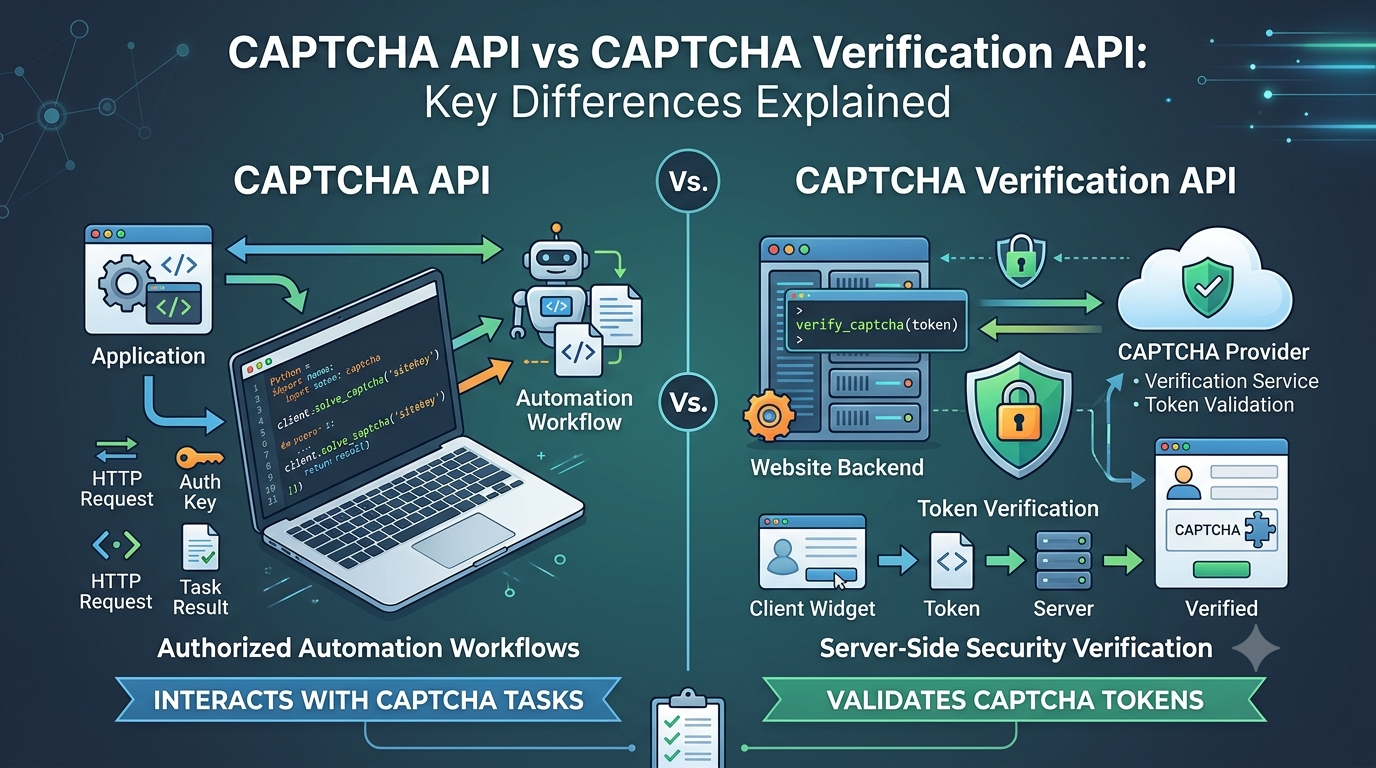
Two terms that developers often encounter are CAPTCHA API and CAPTCHA Verification API. Although they sound similar, they can refer to different functions. A CAPTCHA API may provide tools for interacting with CAPTCHA challenges in an authorized automation workflow, while a CAPTCHA verification API is typically used by website owners to validate CAPTCHA tokens on their servers.
Choosing the wrong approach can create security vulnerabilities, unnecessary development work, and unreliable application behavior.
In this guide, we will explain how these APIs differ, how their workflows operate, when each approach makes sense, and what developers should consider before integrating one into an application.
What Is a CAPTCHA API?
A CAPTCHA API is an interface that allows software to interact programmatically with CAPTCHA-related functionality. The exact purpose depends on the provider and the service being integrated.
In general, the term can describe services used to process CAPTCHA challenges in authorized workflows, tools that support CAPTCHA-related automation, or interfaces that help developers integrate CAPTCHA functionality into their applications.
For example, a development team might use an external service while testing an automation workflow in an environment where the team has permission to perform the test.
Typical characteristics may include:
- HTTP requests and structured responses.
- API authentication.
- Task submission and result retrieval.
- Error handling and timeout management.
- Integration with programming languages such as Python, JavaScript, PHP, or Java.
These features vary by provider. Developers should always consult the official documentation to confirm supported CAPTCHA types, authentication requirements, request formats, and response fields.
How a CAPTCHA API workflow may operate
A task-based API integration may follow this general sequence:
- The application prepares a request containing the required task information.
- The application sends the request to the service.
- The service processes the task.
- The application retrieves or receives the result.
- The application handles success, failure, timeout, or other response conditions.
This is a generic workflow, not a specification for any particular provider. Actual request parameters and response formats depend on the service being used.
What Is a CAPTCHA Verification API?
A CAPTCHA Verification API is generally an interface that allows a website's backend to validate a CAPTCHA token issued through a CAPTCHA provider's client-side integration.
It is primarily a security mechanism for website owners and application developers.
When a visitor completes a CAPTCHA challenge or an approved risk assessment, the client-side component may receive a token. The browser then sends that token to the application's backend, which verifies it with the CAPTCHA provider using the provider's official server-side verification mechanism.
The backend uses the verification result to decide whether to continue processing the requested action.
For example, a registration endpoint might require successful CAPTCHA verification before creating a new account.
How CAPTCHA token verification works
A typical verification workflow looks like this:
- Render the CAPTCHA: The website loads the CAPTCHA provider's approved client-side integration.
- Obtain a token: The client receives a token after the provider's required interaction or assessment.
- Submit the form: The browser sends the token alongside the user's form data to the application backend.
- Verify the token: The backend sends a verification request to the provider using the appropriate server-side credentials.
- Evaluate the result: The backend checks whether verification succeeded and, where applicable, validates relevant contextual fields.
- Continue or reject: The application processes the request only if its security requirements are satisfied.
The exact token lifetime, verification fields, and response semantics depend on the CAPTCHA provider.
Important: A token's presence in a browser request does not prove that it is valid. The backend must verify it using the official provider mechanism.
CAPTCHA API vs CAPTCHA Verification API: Key Differences
The main difference is their intended purpose.
A CAPTCHA API used for authorized automation workflows helps software interact with CAPTCHA-related tasks. A CAPTCHA Verification API helps an application confirm that a submitted token satisfies the CAPTCHA provider's verification requirements.
| Comparison | CAPTCHA API | CAPTCHA Verification API |
|---|---|---|
| Primary purpose | Depends on the service; may support CAPTCHA-related processing or authorized automation | Validate CAPTCHA tokens |
| Typical user | Developers building permitted automation or integrations | Website owners and application developers |
| Main input | Provider-specific task information | A CAPTCHA token and any required verification fields |
| Main output | A task result or service-specific response | A verification result and possibly additional assessment data |
| Common integration | An application communicating with an external service | A website backend communicating with its CAPTCHA provider |
| Security responsibility | Follow service rules and applicable authorization requirements | Enforce server-side validation before protected actions |
| Replaces server-side token verification? | Not by default | It is the mechanism used to perform verification |
| Provider-specific behavior | Varies by service | Varies by CAPTCHA provider |
The term CAPTCHA API is broad, so the table describes common usage rather than a universal technical standard. Always check how a provider defines its API.
Understanding the Difference Through Examples
Consider two different development scenarios.
Scenario 1: Protecting a registration form
A company operates a website and wants to reduce automated account registrations.
The company integrates a CAPTCHA widget into its registration form. When the user submits the form, the browser sends the CAPTCHA token to the backend.
The backend verifies the token through the CAPTCHA provider's official verification mechanism. If verification fails, the application rejects the registration request or asks the user to try again.
In this situation, server-side CAPTCHA verification is the relevant security control.
The application should not simply trust a token because it came from its own frontend. Client-side code can be modified, and requests can be sent directly to backend endpoints.
Scenario 2: Testing an authorized automation workflow
A development team maintains a web application and needs to test how its automation workflow behaves when CAPTCHA-related processing succeeds, fails, or times out.
The team can use provider-approved test configurations, mocked responses, or an authorized third-party service where appropriate.
The test should verify that the application handles each possible outcome correctly, including rejected requests and unavailable services.
In this scenario, a CAPTCHA-related API may be part of the test workflow, but it does not automatically replace the application's security verification logic.
These scenarios serve different purposes: one protects a production application, while the other evaluates software behavior in a controlled environment.
CAPTCHA Verification API vs CAPTCHA Solving API
Another important distinction is between a verification API and a solving API.
The terms are sometimes used interchangeably in casual discussions, but they describe different functions.
A CAPTCHA solving API generally refers to a service that processes a CAPTCHA challenge and returns a result according to its documented capabilities. A CAPTCHA verification API is used by the website or application to validate a token with the CAPTCHA provider.
The difference matters because a result from an external processing service is not automatically proof that a website's CAPTCHA provider has accepted a token.
For website owners, the correct security workflow is to validate the token through the provider's official server-side verification mechanism.
For automation developers, CAPTCHA-related services should only be used in workflows they are authorized to operate. They should not be used to circumvent security controls on third-party systems without permission.
How to Implement CAPTCHA Token Verification
The following example demonstrates the general structure of a backend verification workflow. It is illustrative pseudocode, not a working integration with a specific CAPTCHA provider.
async function handleProtectedAction(req, res) {
  const token = req.body?.captchaToken;

  if (typeof token !== "string" || token.length === 0) {
    return res.status(400).json({
      error: "CAPTCHA token is required"
    });
  }

  try {
    // Replace this placeholder with the CAPTCHA
    // provider's documented server-side verification call.
    const verification = await verifyWithProvider(token);

    if (!verification.success) {
      return res.status(403).json({
        error: "CAPTCHA verification failed"
      });
    }

    // Perform the protected action only after
    // successful verification and other required checks.
    return res.status(200).json({
      success: true
    });
  } catch (error) {
    // Log diagnostic information securely.
    // Do not expose credentials or sensitive provider data.
    return res.status(502).json({
      error: "CAPTCHA verification is temporarily unavailable"
    });
  }
}
The verifyWithProvider() function is a placeholder and must be implemented using the selected provider's official documentation.
A production implementation should also consider:
- Authentication and secret management.
- Token expiration and reuse restrictions, where applicable.
- Verification response validation.
- Expected hostname, action, or other contextual fields when supported.
- Request timeouts and safe failure behavior.
- Logging and monitoring without exposing secrets.
- Rate limiting and abuse prevention.
- Independent validation of form fields and authorization rules.
Do not assume that every CAPTCHA provider uses the same token format or verification response.
Common Mistakes When Choosing a CAPTCHA API
Selecting an API based only on its name can lead to implementation problems. The following mistakes are particularly important to avoid.
1. Assuming all CAPTCHA APIs perform the same function
Some services process CAPTCHA-related tasks, while others verify tokens issued by a specific provider. Review the documentation and identify the exact function you need before integrating a service.
2. Trusting client-side validation alone
Client-side validation improves the user experience but cannot replace server-side verification for protected actions.
A malicious client may bypass browser-side checks or submit requests directly to an endpoint. The backend must enforce the required security rules.
3. Treating an external task result as verification
A successful response from a third-party service does not necessarily mean the target website's CAPTCHA provider has accepted a token.
Use the correct verification mechanism for the system you own or are authorized to test.
4. Ignoring token expiration or reuse restrictions
Some CAPTCHA providers impose limits on how long a token remains valid or whether it can be used more than once.
Follow the selected provider's documented rules. Avoid reusing expired tokens or assuming that a previously accepted token remains valid indefinitely.
5. Exposing API credentials
Secret keys and private API credentials should remain on the server or in an approved secrets-management system.
Do not place private credentials in frontend JavaScript, public repositories, or client-visible configuration files.
6. Failing open when verification is unavailable
If a verification service times out, the application should not automatically treat the token as valid.
Define an explicit failure policy based on the risk of the protected action. For sensitive operations, rejecting or temporarily deferring the request is generally safer than proceeding without verification.
How to Choose the Right API for Your Project
Start by identifying the problem you need to solve.
| Your requirement | Recommended approach |
|---|---|
| Protect a login or registration form | Integrate a CAPTCHA provider and verify tokens server-side |
| Validate tokens received from a CAPTCHA widget | Use the provider's official verification API |
| Test how the backend handles successful and failed verification | Use mocks, provider-approved test configurations, or an authorized staging environment |
| Integrate CAPTCHA-related processing into an authorized automation workflow | Review a suitable service's documented capabilities and permitted use |
| Diagnose failed verification requests | Inspect server-side responses, configuration, timeouts, and provider documentation |
| Improve protection against automated abuse | Combine CAPTCHA verification with rate limits, authorization, monitoring, and other appropriate controls |
Before choosing a provider, evaluate its documentation, supported integrations, reliability, pricing, data handling, support options, and applicable terms.
Do not assume that an API supports a particular CAPTCHA type, programming language, test mode, or security feature until that capability has been confirmed in the provider's current documentation.
Best Practices for Secure CAPTCHA Integration
Regardless of the API you choose, a reliable implementation should follow a few core principles.
Verify on the server. Keep security decisions on the backend rather than relying on browser-side checks.
Use official documentation. Follow the provider's documented authentication method, request format, verification process, and error-handling guidance.
Protect secrets. Store private credentials in environment variables or a secrets manager, and restrict access to authorized services.
Validate the complete response. Check the fields required by the provider and your application's security policy, rather than relying on a single unverified value.
Handle failures deliberately. Define behavior for invalid tokens, expired tokens, rate limits, network errors, and unavailable verification services.
Test safely. Use mocked responses, approved test configurations, and staging environments to test success and failure scenarios without weakening production security.
Apply layered protection. CAPTCHA verification is only one security control. Depending on the application, you may also need rate limiting, account protections, input validation, fraud detection, and access controls.
Frequently Asked Questions
Is a CAPTCHA API the same as a CAPTCHA Verification API?
Not necessarily. CAPTCHA API is a broad term that can describe different CAPTCHA-related services. A CAPTCHA Verification API specifically refers to an interface used to validate CAPTCHA tokens or verification results according to a provider's process.
Do I need a CAPTCHA Verification API for my website?
If your website uses a CAPTCHA provider that requires server-side token verification, you should implement the provider's documented verification mechanism. The exact requirements depend on the provider and integration.
Can a CAPTCHA solving API replace server-side verification?
No, not by default. A result from an external processing service is not a substitute for the official verification process required by your CAPTCHA provider. Website owners should validate tokens through the appropriate server-side mechanism.
Should CAPTCHA tokens be verified in the browser or on the server?
For protected operations, verification should be enforced on the server. The browser can collect and submit a token, but the backend should verify it before processing the protected action.
What happens if CAPTCHA verification fails?
The application should follow its security policy. It may reject the request, ask the user to complete the challenge again, or temporarily defer the action if the verification service is unavailable. It should not treat an unverified token as valid.
Can I test CAPTCHA verification without using real challenges?
Often, developers can test the surrounding application logic using mocked verification responses or provider-approved test configurations. Check the provider's documentation for supported testing methods, and avoid assuming that a test mode exists.
What should I check when selecting a CAPTCHA API provider?
Review its documented functionality, supported CAPTCHA types, authentication model, integration requirements, reliability, pricing, data-handling practices, support options, and terms of service.
Conclusion
Understanding the difference between a CAPTCHA API and a CAPTCHA Verification API helps developers select the right tool for the right job.
A CAPTCHA API is a broad term for CAPTCHA-related interfaces and services. A CAPTCHA Verification API has a more specific role: validating tokens through the appropriate provider mechanism so a website can make an informed security decision.
For website owners, the essential principle is simple: never rely on the mere presence of a CAPTCHA token. Verify it on the server using the provider's documented process.
For developers testing authorized automation workflows, use appropriate APIs, mocks, and controlled environments while respecting the security controls and usage rules of the systems involved.
By understanding these distinctions, you can build more secure integrations, reduce implementation errors, and make better technical decisions when working with CAPTCHA technology.
SEO Metadata
- SEO Title: CAPTCHA API vs CAPTCHA Verification API: Key Differences
- Meta Description: Learn the difference between CAPTCHA APIs and CAPTCHA Verification APIs, how token verification works, and how to choose the right solution for your application.
- Focus Keyword: CAPTCHA API vs verification API
- Secondary Keywords: CAPTCHA Verification API, CAPTCHA API integration, CAPTCHA token verification, CAPTCHA solving API, server-side CAPTCHA validation, CAPTCHA security
- URL Slug:
captcha-api-vs-verification-api - Suggested H1: CAPTCHA API vs CAPTCHA Verification API: Key Differences Explained
Internal Linking Suggestions
Add contextual links to these related articles on your website, using the actual published URLs:
- CAPTCHA Token Verification: How It Works and Common Mistakes — link from the section explaining server-side verification.
- What Is Cloudflare Turnstile and How Does It Work? A Complete Guide — link from the discussion of CAPTCHA providers.
- CAPTCHA Solver API Tutorial: How REST APIs Work — link from the section about API requests and responses.
- CAPTCHA API Security Best Practices: How to Protect API Keys and Requests — link from the security best practices section.
Suggested Featured Image
- Image concept: A developer dashboard illustrating two distinct workflows: CAPTCHA API processing and server-side CAPTCHA token verification.
- Suggested image filename:
captcha-api-vs-verification-api.webp - Alt text: Comparison of CAPTCHA API processing and server-side CAPTCHA token verification.
- Recommended format: WebP.
- Suggested placement: Below the introduction, before the comparison table.
Structured Data Recommendations
Consider adding Article schema for the article's main content and BreadcrumbList schema if your website uses breadcrumb navigation. An FAQPage schema may be appropriate only when the FAQ content and implementation comply with current search engine guidelines. Structured data should accurately reflect the visible page content and must not be used to imply unsupported product capabilities.