How to Integrate a CAPTCHA Solver API with PHP: A Complete Guide
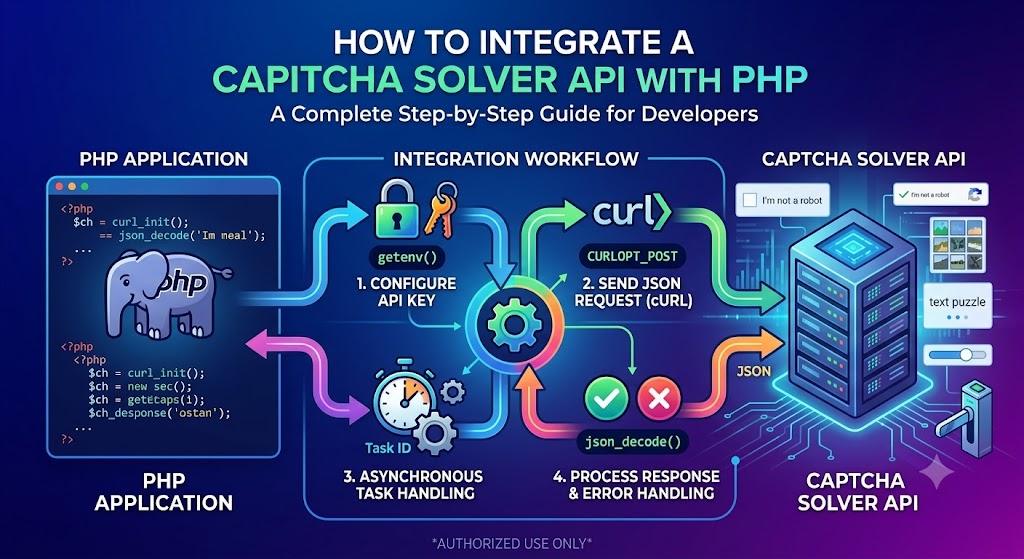
Integrating a CAPTCHA API with PHP allows developers to connect their applications to external services using HTTP requests. Whether you are building a PHP website, developing a backend service, or testing an application in a controlled environment, understanding API integration can help you write more reliable and maintainable code.
PHP provides several ways to communicate with REST APIs, including cURL and built-in functions for handling JSON. By combining these tools with secure credential management, timeout configuration, and structured error handling, you can build a PHP API client that is easier to maintain and troubleshoot.
In this guide, you will learn how to integrate a CAPTCHA Solver API with PHP, configure authentication, send JSON requests, process responses, handle errors, and test your implementation.
Important: All endpoints, authentication headers, request parameters, and response structures shown below are generic examples. They are not verified AllCaptcha API specifications. Before implementing the integration, consult the official documentation for the actual endpoint, authentication method, required parameters, supported operations, and response format. Use API services only in applications and environments you are authorized to test.
What Is a CAPTCHA Solver API?
A CAPTCHA Solver API is a programmatic interface that enables an application to communicate with a service that processes supported CAPTCHA-related tasks.
Depending on the provider, an API may accept a task, return a task identifier, provide a processing status, or return a result. Some services process requests synchronously, while others use an asynchronous workflow.
A typical API integration involves several components:
- API endpoint: The URL that receives a request.
- Authentication: Credentials used to identify the client.
- HTTP method: The method required for the operation.
- Request body: The data sent to the API.
- Response body: The information returned by the service.
- Error handling: Logic for responding to failed requests or unsuccessful operations.
PHP can handle these components through cURL, JSON functions, and standard exception handling.
Why Use PHP for API Integration?
PHP remains widely used for server-side web development. It can connect external APIs to websites, backend applications, administrative tools, and other server-side workflows.
Benefits of using PHP include:
- Server-side credential protection: API credentials can remain on the server instead of being exposed to visitors.
- Built-in JSON functions: PHP can encode request data and decode API responses.
- HTTP support through cURL: Developers can configure request headers, timeouts, and HTTP methods.
- Broad hosting compatibility: PHP applications can run on many shared hosting platforms and dedicated servers.
- Integration with existing websites: API clients can be added to established PHP projects without rebuilding the entire application.
The best implementation depends on the API provider, your PHP version, and your application's architecture.
Prerequisites
Before starting, make sure you have:
- PHP 8.x or another version supported by your project and dependencies.
- The PHP cURL extension enabled.
- Basic knowledge of PHP functions, arrays, and exceptions.
- An API account and credentials if the provider requires authentication.
- Access to the provider's official API documentation.
- A staging environment or another authorized testing environment.
Check your PHP version with:
php -v
To check whether the cURL extension is enabled, run:
php -m
Look for curl in the list of installed extensions.
If cURL is unavailable, enable or install the extension using the instructions appropriate for your operating system and PHP environment.
Step 1: Configure Your API Credentials
Avoid hardcoding API keys directly into PHP files. Credentials may be exposed if files are accidentally published, copied into a public repository, or included in debugging output.
A better approach is to store credentials in environment variables or a managed secrets service.
For example, in a local development environment, you might configure:
CAPTCHA_API_KEY=your_api_key_here
CAPTCHA_API_URL=https://api.example.com/replace-with-documented-endpoint
The URL above is a placeholder, not a verified AllCaptcha endpoint.
Your PHP application can read the environment variables:
<?php

$apiKey = getenv('CAPTCHA_API_KEY');
$apiUrl = getenv('CAPTCHA_API_URL');

if (!$apiKey) {
    throw new RuntimeException(
        'CAPTCHA_API_KEY is not configured.'
    );
}

if (!$apiUrl) {
    throw new RuntimeException(
        'CAPTCHA_API_URL is not configured.'
    );
}
Configure these values through your server, hosting control panel, deployment environment, or secrets manager.
Do not assume that a .env file is automatically loaded by PHP. If your project uses a library such as phpdotenv, follow its installation and configuration instructions.
For production applications, use HTTPS and keep API credentials out of public directories and client-side code.
Step 2: Send a JSON Request Using PHP cURL
cURL is a common option for sending HTTP requests from PHP.
The general workflow is:
- Initialize a cURL session.
- Set the destination URL.
- Configure the HTTP method and request headers.
- Encode the request data as JSON.
- Execute the request.
- Check the HTTP status and response body.
- Release the cURL resources.
The following example demonstrates the general pattern.
Note: The endpoint, authentication header, and payload are illustrative. Replace them with the exact values required by your API provider.
<?php

$apiKey = getenv('CAPTCHA_API_KEY');
$apiUrl = getenv('CAPTCHA_API_URL');

if (!$apiKey || !$apiUrl) {
    throw new RuntimeException(
        'API credentials or URL are missing.'
    );
}

$payload = [
    // Replace with parameters documented by your provider.
    'example' => 'replace-with-supported-parameter',
];

$jsonPayload = json_encode($payload);

if ($jsonPayload === false) {
    throw new RuntimeException(
        'Failed to encode the request as JSON.'
    );
}

$ch = curl_init($apiUrl);

if ($ch === false) {
    throw new RuntimeException(
        'Unable to initialize cURL.'
    );
}

curl_setopt_array($ch, [
    CURLOPT_POST => true,
    CURLOPT_POSTFIELDS => $jsonPayload,
    CURLOPT_HTTPHEADER => [
        'Content-Type: application/json',
        'Accept: application/json',
        'Authorization: Bearer ' . $apiKey,
    ],
    CURLOPT_RETURNTRANSFER => true,
    CURLOPT_CONNECTTIMEOUT => 5,
    CURLOPT_TIMEOUT => 20,
]);

$responseBody = curl_exec($ch);
$curlError = curl_error($ch);
$httpStatus = curl_getinfo($ch, CURLINFO_HTTP_CODE);

curl_close($ch);

if ($responseBody === false) {
    throw new RuntimeException(
        'HTTP request failed: ' . $curlError
    );
}

if ($httpStatus < 200 || $httpStatus >= 300) {
    throw new RuntimeException(
        'API returned HTTP status ' . $httpStatus
    );
}

$responseData = json_decode($responseBody, true);

if (json_last_error() !== JSON_ERROR_NONE) {
    throw new RuntimeException(
        'Invalid JSON response: ' . json_last_error_msg()
    );
}

echo "API response received successfully.\n";
print_r($responseData);
This code demonstrates JSON encoding, HTTP requests, timeouts, and response parsing. It does not submit a valid task to a specific CAPTCHA service until you supply the correct documented endpoint and payload.
Also note that some APIs use a different authentication scheme, such as a custom API-key header. Change the header according to the provider's official documentation.
Step 3: Understand the API Response
After receiving a response, your application should determine whether the request succeeded and whether the underlying operation has finished.
An API may return a final result immediately, or it may return a task identifier for later status checks.
For example, a hypothetical asynchronous response could look like this:
{
  "taskId": "demo-task-123",
  "status": "processing"
}
This is an illustrative JSON object, not a confirmed AllCaptcha response.
Your PHP application should only read fields that the provider documents. Do not assume that every API uses taskId, status, or the same set of status values.
Decode JSON Responses in PHP
PHP's json_decode() function can convert a JSON response into a PHP array when its second argument is true.
For example:
<?php

$responseBody = '{"status":"processing"}';

$data = json_decode($responseBody, true);

if (json_last_error() !== JSON_ERROR_NONE) {
    throw new RuntimeException(
        'Could not decode JSON: ' . json_last_error_msg()
    );
}

$status = $data['status'] ?? null;

if ($status === null) {
    throw new RuntimeException(
        'Expected status field was missing.'
    );
}

echo 'Current status: ' . $status;
This example uses a fictional response to demonstrate JSON parsing. In a real integration, validate the expected response schema against the provider's documentation.
Step 4: Handle Asynchronous Tasks
Some APIs process tasks asynchronously rather than returning a final result in the first response.
A common task-based workflow looks like this:
- Submit a task to a documented endpoint.
- Receive a task identifier.
- Request the task's status using the documented method.
- Wait if the task is still processing.
- Retrieve or process the final result.
- Handle failures, expiration, or timeout conditions.
Not all APIs follow this design. Some return results directly or support webhooks.
Implement Bounded Polling in PHP
Polling means checking a task's status periodically until it finishes or a configured limit is reached.
The following example demonstrates a bounded polling loop. The getTaskStatus() function is a placeholder that you must implement using the actual provider's documented status endpoint and authentication format.
<?php

function waitForTask(
    callable $getTaskStatus,
    string $taskId,
    int $maxAttempts = 10,
    int $intervalSeconds = 2
): array {
    for ($attempt = 0; $attempt < $maxAttempts; $attempt++) {
        $task = $getTaskStatus($taskId);

        $status = $task['status'] ?? null;

        if ($status === 'completed') {
            return $task;
        }

        if ($status === 'failed') {
            throw new RuntimeException(
                'Task processing failed.'
            );
        }

        if ($attempt < $maxAttempts - 1) {
            sleep($intervalSeconds);
        }
    }

    throw new RuntimeException(
        'Task did not finish within the polling limit.'
    );
}
The completed and failed values are examples only. Replace them with the actual status values supported by the API.
For production use, also consider a total time deadline, transient network errors, rate limits, and a documented retry strategy. If the provider supports webhooks, consider whether they would be more efficient than repeated status requests.
Step 5: Add Better Error Handling
An API request can fail even when your PHP syntax is correct.
Common causes include invalid credentials, malformed JSON, missing parameters, rate limits, connectivity problems, and temporary server errors.
Your integration should distinguish between:
- cURL transport errors.
- Non-success HTTP status codes.
- Invalid JSON responses.
- Application-level errors included in a valid JSON response.
- Tasks that are still processing.
- Tasks that reach a documented failure state.
Common HTTP Status Codes
| Status code | General meaning | Recommended action |
|---|---|---|
| 400 | Invalid request | Validate the request body and required parameters |
| 401 | Authentication failure | Check credentials and authentication format |
| 403 | Request not permitted | Review permissions and account restrictions |
| 404 | Endpoint or resource not found | Verify the URL and resource identifier |
| 429 | Rate limit exceeded | Reduce request frequency and follow retry guidance |
| 500–599 | Server-side failure | Retry cautiously when appropriate |
These are general HTTP conventions. A provider may return additional application-specific error codes or use different recovery rules.
Do Not Retry Every Error
Retries can help with temporary network failures, but they can also create duplicate operations if a request succeeded on the server and the response was lost.
A sensible strategy should:
- Correct invalid parameters before trying again.
- Fix authentication issues rather than repeatedly resending the same request.
- Respect
Retry-Afterheaders when present. - Use bounded exponential backoff with jitter for appropriate transient errors.
- Avoid automatically resubmitting task-creation requests without considering duplicate-task risks.
- Set a maximum number of retries or an overall deadline.
Step 6: Organize Your PHP API Client
For a larger application, avoid copying the same cURL logic into multiple controllers or scripts.
Instead, create a reusable client class or service.
For example, the following simplified class separates HTTP communication from the rest of your application:
<?php

class GenericApiClient
{
    private string $apiUrl;
    private string $apiKey;

    public function __construct(
        string $apiUrl,
        string $apiKey
    ) {
        $this->apiUrl = $apiUrl;
        $this->apiKey = $apiKey;
    }

    public function postJson(array $payload): array
    {
        $jsonPayload = json_encode($payload);

        if ($jsonPayload === false) {
            throw new RuntimeException(
                'Unable to encode JSON payload.'
            );
        }

        $ch = curl_init($this->apiUrl);

        if ($ch === false) {
            throw new RuntimeException(
                'Unable to initialize cURL.'
            );
        }

        curl_setopt_array($ch, [
            CURLOPT_POST => true,
            CURLOPT_POSTFIELDS => $jsonPayload,
            CURLOPT_HTTPHEADER => [
                'Content-Type: application/json',
                'Accept: application/json',
                'Authorization: Bearer ' . $this->apiKey,
            ],
            CURLOPT_RETURNTRANSFER => true,
            CURLOPT_CONNECTTIMEOUT => 5,
            CURLOPT_TIMEOUT => 20,
        ]);

        $body = curl_exec($ch);
        $curlError = curl_error($ch);
        $status = curl_getinfo($ch, CURLINFO_HTTP_CODE);

        curl_close($ch);

        if ($body === false) {
            throw new RuntimeException(
                'Network request failed: ' . $curlError
            );
        }

        if ($status < 200 || $status >= 300) {
            throw new RuntimeException(
                'API request failed with HTTP ' . $status
            );
        }

        $data = json_decode($body, true);

        if (json_last_error() !== JSON_ERROR_NONE) {
            throw new RuntimeException(
                'Invalid JSON: ' . json_last_error_msg()
            );
        }

        if (!is_array($data)) {
            throw new RuntimeException(
                'Unexpected response format.'
            );
        }

        return $data;
    }
}
This is a generic starting point, not a complete provider-specific client. Before using it, adapt the endpoint, authentication scheme, payload, and response validation to the API you are integrating.
For production systems, you should also consider structured logging, safe error reporting, retry policies, and appropriate validation of the response schema.
Step 7: Test the Integration Before Deployment
Testing helps identify configuration errors before they affect users or production workloads.
Use a staging environment, a mock server, or an official API test mode when available.
Your checklist should include:
- Confirming the API URL and HTTP method.
- Verifying that the required credentials are loaded.
- Testing a valid request using documented parameters.
- Testing invalid or missing parameters.
- Checking how malformed JSON is handled.
- Simulating connection timeouts.
- Verifying rate-limit handling.
- Confirming that asynchronous tasks are processed correctly.
- Checking that secrets do not appear in logs.
- Ensuring that errors are reported without exposing sensitive information.
For security-sensitive workflows, use test keys and mock responses rather than bypassing CAPTCHA controls on live third-party systems.
Best Practices for PHP CAPTCHA API Integration
1. Keep API Credentials Private
Store keys in environment variables or a secrets manager. Never expose private credentials through HTML, JavaScript, public repositories, or error pages.
2. Use HTTPS
Use the HTTPS endpoint documented by your provider. Do not disable TLS certificate verification to work around connection errors.
3. Set Connection and Request Timeouts
A connection timeout limits how long PHP waits to establish a connection. A total request timeout limits the overall time spent waiting for the response.
Choose values based on the operation and the provider's documented behavior.
4. Validate Input and Output
Validate request parameters before sending them. After receiving a response, check the HTTP status, JSON validity, and expected data structure.
5. Avoid Excessive Polling
Follow the provider's recommended status-check interval. Avoid busy loops that repeatedly query the API without a delay.
6. Protect Logs and Error Messages
Log useful diagnostic details, such as HTTP status and request duration, but do not log credentials or sensitive payloads. Return generic error messages to end users while keeping safe diagnostic information on the server.
7. Monitor Usage and Reliability
Track API request volume, response times, error rates, and usage limits. Monitoring can help identify integration bugs and unexpected traffic.
8. Use Authorized Testing Workflows
For applications that use CAPTCHA to protect login, registration, payment, or other sensitive operations, prefer provider-supported testing tools, mock responses, and staging environments.
Frequently Asked Questions
Can I integrate a CAPTCHA Solver API with PHP?
Yes. PHP can communicate with HTTP APIs using cURL and process JSON responses with built-in functions. The implementation details depend on the provider's endpoints, authentication method, and supported operations.
Is cURL required for PHP API integration?
No. cURL is a common choice, but other HTTP clients and libraries are available. cURL is useful when you need control over request headers, timeouts, HTTP methods, and response handling.
How do I fix a cURL error in PHP?
Check the error message, network connectivity, DNS resolution, endpoint URL, TLS certificate configuration, and server firewall rules. Avoid disabling certificate verification as a workaround.
How do I store a CAPTCHA API key in PHP?
Use environment variables or a managed secrets service. If your application uses a .env file, ensure it is stored outside public access where practical and is loaded by a properly configured library or deployment process.
Why does the API return a task ID?
Some APIs use asynchronous processing. A task identifier allows the application to request status updates or retrieve a result later. Other APIs may return a final result immediately.
What should I do if the API returns HTTP 429?
Reduce request frequency, limit concurrency, and follow the provider's rate-limit instructions. Respect the Retry-After header when provided and avoid rapid repeated retries.
Can I use the same PHP API client for different providers?
You can reuse general HTTP handling patterns, but different providers may require different authentication headers, payload formats, endpoints, and response parsing. Keep provider-specific details configurable or implement separate client classes where necessary.
Are the code examples ready to use with AllCaptcha?
They demonstrate general PHP and REST API techniques. The example endpoints, bearer authentication header, payload fields, and task status names have not been verified against AllCaptcha's current API documentation. Replace them with the provider's documented specifications before using the code.
Conclusion
Integrating a CAPTCHA API with PHP requires a clear understanding of HTTP requests, authentication, JSON encoding, response parsing, and error handling.
PHP cURL provides a flexible way to communicate with external services, while reusable client classes help keep application code organized. Secure credential storage, appropriate timeouts, careful retry logic, and controlled polling can make an integration more reliable.
Start by confirming your provider's official API documentation, implement a small test client, and validate both successful and unsuccessful requests in an authorized environment before deploying your integration.
For more developer resources, explore AllCaptcha's related guides on Node.js API integration, REST API fundamentals, API error codes, and API rate limits.
SEO Metadata
SEO Title: How to Integrate a CAPTCHA Solver API with PHP
Focus Keyword: captcha solver api php
URL Slug: captcha-solver-api-php
Meta Description: Learn how to integrate a CAPTCHA Solver API with PHP using cURL, secure API keys, JSON requests, timeouts, asynchronous tasks, and error handling.
Secondary Keywords:
- PHP CAPTCHA API integration
- CAPTCHA API PHP tutorial
- PHP REST API integration
- PHP cURL API request
- PHP JSON API response
- CAPTCHA API authentication
- PHP API error handling
- asynchronous API requests in PHP
Suggested H1: How to Integrate a CAPTCHA Solver API with PHP: A Complete Guide
Suggested Internal Links:
- How to Integrate a CAPTCHA Solver API with Node.js
- CAPTCHA Solver API Tutorial: How REST APIs Work
- How to Integrate a CAPTCHA Solver API with Python
- CAPTCHA API Error Codes: Common Errors and How to Fix Them
- CAPTCHA API Rate Limits: Best Practices for Developers
Suggested Image Alt Text: PHP CAPTCHA API integration workflow showing cURL requests, API authentication, JSON responses, and error handling.
Recommended Schema: Article. Add FAQPage structured data only if the implementation is appropriate for your website and matches the questions and answers visibly published on the page.