How to Integrate a CAPTCHA Solver API with Python: A Complete Guide
CAPTCHAs are commonly used to distinguish real users from automated traffic. For developers building automated testing tools, RPA workflows, or other authorized automation systems, CAPTCHA challenges can interrupt an otherwise automated process.
A CAPTCHA Solver API can provide a programmatic way to submit a supported CAPTCHA challenge and retrieve the result through an API. In this guide, we will explain how to integrate a CAPTCHA Solver API with Python, how the typical API workflow works, and how to handle common errors.
Important: CAPTCHA-solving services should only be used on websites and systems where you have permission to automate or test the workflow. Do not use automation to bypass security controls, access accounts without authorization, or violate a website's terms of service.
What Is a CAPTCHA Solver API?
A CAPTCHA Solver API is an API that allows an application to submit a CAPTCHA-solving task and retrieve the result programmatically.
Instead of manually interacting with a CAPTCHA, a developer can integrate the API into an authorized automation workflow.
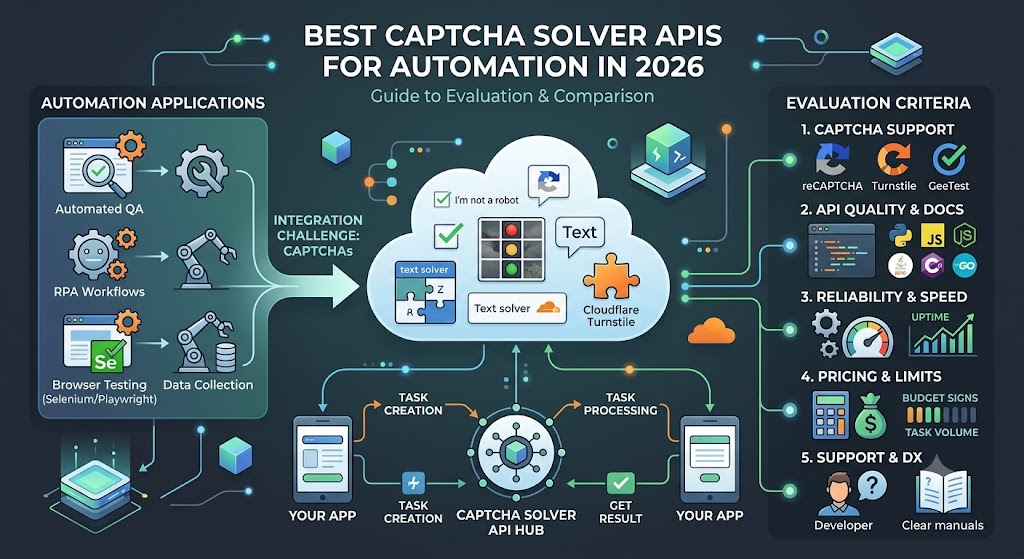
A typical workflow looks like this:
Python Application
       ↓
Create CAPTCHA Task
       ↓
CAPTCHA Solver API
       ↓
Task Processing
       ↓
Get Task Result
       ↓
Python Application
The exact request parameters depend on the CAPTCHA type and API provider.
Why Use a CAPTCHA Solver API with Python?
Python is widely used for automation, testing, data processing, and API integrations.
Combining Python with a CAPTCHA Solver API can make it easier to:
- Build automated testing workflows
- Integrate CAPTCHA handling into RPA applications
- Process API responses automatically
- Monitor task status
- Handle errors programmatically
- Integrate CAPTCHA services with existing Python applications
Python also provides several useful libraries for working with HTTP APIs, including requests.
How CAPTCHA Solver APIs Usually Work
Most CAPTCHA-solving APIs use an asynchronous task-based architecture.
The process usually contains two main API requests:
Step 1: Create a Task
Your Python application sends information about the CAPTCHA challenge to the API.
The API returns a task ID.
For example:
{
    "taskId": "123456789"
}
Step 2: Get the Task Result
Your application then checks the task status using the task ID.
A successful response may contain the result required by the authorized automation workflow.
The process can be represented as:
Create Task
     ↓
Receive Task ID
     ↓
Wait for Processing
     ↓
Request Task Result
     ↓
Receive Result
Because CAPTCHA processing may not be completed immediately, your application should handle the waiting and polling process carefully.
Prerequisites
Before starting, you will typically need:
- Python 3.x
- An AllCaptcha API account
- An API key
- The
requestsPython package - An authorized website or testing environment
- Basic knowledge of Python and REST APIs
Install the requests package with:
pip install requests
You can then import it into your Python application:
import requests
import time
Step 1: Store Your API Key Securely
Avoid placing API keys directly inside source code, especially when the project will be uploaded to GitHub or another public repository.
A simple approach is to use an environment variable.
For example:
import os

API_KEY = os.getenv("ALLCAPTCHA_API_KEY")

if not API_KEY:
    raise ValueError("ALLCAPTCHA_API_KEY is not configured")
On Windows PowerShell:
$env:ALLCAPTCHA_API_KEY="YOUR_API_KEY"
On Linux or macOS:
export ALLCAPTCHA_API_KEY="YOUR_API_KEY"
This approach helps prevent accidentally exposing your API credentials.
Step 2: Create a CAPTCHA Task
The next step is to send a task request to the CAPTCHA Solver API.
The exact endpoint and task parameters depend on the CAPTCHA type you are integrating.
A generic Python structure looks like this:
import os
import requests

API_KEY = os.getenv("ALLCAPTCHA_API_KEY")

url = "YOUR_ALLCAPTCHA_TASK_ENDPOINT"

payload = {
    "clientKey": API_KEY,
    "task": {
        # CAPTCHA-specific parameters
    }
}

response = requests.post(
    url,
    json=payload,
    timeout=30
)

data = response.json()

print(data)
For production applications, you should always check the HTTP status code and API response before continuing.
For example:
if response.status_code != 200:
    raise RuntimeError(
        f"API request failed: {response.status_code}"
    )
Step 3: Get the Task ID
If the task is accepted, the API should return a task identifier.
For example:
task_id = data.get("taskId")

if not task_id:
    raise RuntimeError(
        f"Task creation failed: {data}"
    )

print("Task ID:", task_id)
The task ID is important because you will use it to check the processing status.
Step 4: Check the Task Result
After creating a task, your application needs to retrieve its result.
A basic polling function can look like this:
import time
import requests

def get_task_result(task_id):
    payload = {
        "clientKey": API_KEY,
        "taskId": task_id
    }

    while True:
        response = requests.post(
            "YOUR_ALLCAPTCHA_RESULT_ENDPOINT",
            json=payload,
            timeout=30
        )

        response.raise_for_status()

        data = response.json()

        status = data.get("status")

        if status == "ready":
            return data

        if status in ["processing", "pending"]:
            time.sleep(2)
            continue

        raise RuntimeError(
            f"Task failed: {data}"
        )
The important idea is that your application should not send requests continuously without a delay.
A short polling interval helps reduce unnecessary API requests.
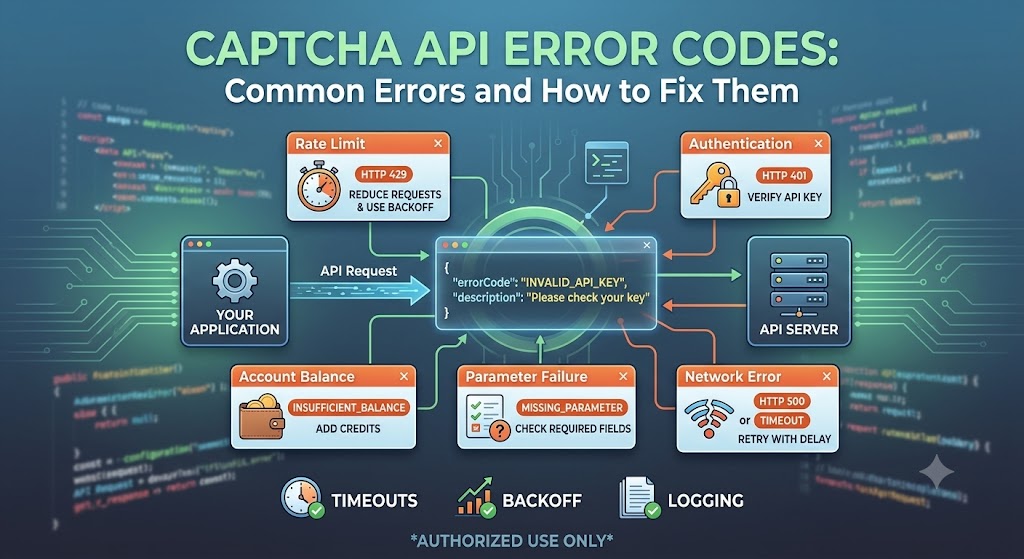
Step 5: Handle API Errors
Error handling is an important part of any API integration.
Your application should be prepared for situations such as:
- Invalid API key
- Insufficient balance
- Invalid CAPTCHA parameters
- Invalid website information
- Unsupported CAPTCHA type
- Task timeout
- Temporary API errors
- Network errors
- Rate limits
For example:
try:
    response = requests.post(
        url,
        json=payload,
        timeout=30
    )

    response.raise_for_status()

except requests.Timeout:
    print("The API request timed out.")

except requests.RequestException as error:
    print(f"API request failed: {error}")
You should also inspect the API's documented error codes rather than assuming every failed request has the same cause.
Complete Python Integration Structure
Once the individual components are working, you can combine them into a reusable Python class.
For example:
import os
import time
import requests


class AllCaptchaClient:

    def __init__(self):
        self.api_key = os.getenv("ALLCAPTCHA_API_KEY")

        if not self.api_key:
            raise ValueError(
                "ALLCAPTCHA_API_KEY is not configured"
            )

        self.session = requests.Session()

    def create_task(self, task):
        payload = {
            "clientKey": self.api_key,
            "task": task
        }

        response = self.session.post(
            "YOUR_ALLCAPTCHA_TASK_ENDPOINT",
            json=payload,
            timeout=30
        )

        response.raise_for_status()

        data = response.json()

        if "taskId" not in data:
            raise RuntimeError(
                f"Unable to create task: {data}"
            )

        return data["taskId"]

    def get_result(self, task_id):
        payload = {
            "clientKey": self.api_key,
            "taskId": task_id
        }

        while True:

            response = self.session.post(
                "YOUR_ALLCAPTCHA_RESULT_ENDPOINT",
                json=payload,
                timeout=30
            )

            response.raise_for_status()

            data = response.json()

            if data.get("status") == "ready":
                return data

            if data.get("status") in [
                "processing",
                "pending"
            ]:
                time.sleep(2)
                continue

            raise RuntimeError(
                f"CAPTCHA task failed: {data}"
            )
This structure separates task creation from result retrieval and makes the API client easier to reuse.
Best Practices for Python CAPTCHA API Integration
1. Never hard-code API credentials
Use environment variables or a secure secrets manager.
2. Use request timeouts
Do not allow network requests to hang indefinitely.
requests.post(
    url,
    json=payload,
    timeout=30
)
3. Implement retry logic carefully
Temporary network problems can happen.
However, avoid aggressive retry loops that generate unnecessary API traffic.
4. Respect API rate limits
Check the provider's documentation for rate limits and recommended polling intervals.
5. Log useful information
For production applications, logging task IDs, response status, and error codes can make troubleshooting much easier.
Never log API keys or other sensitive credentials.
6. Validate API responses
Do not assume every HTTP 200 response means that the task succeeded.
Always inspect the response body and status fields.
CAPTCHA Solver API vs Manual CAPTCHA Handling
For authorized automation and testing, an API can be easier to integrate than a manual workflow.
| Method | Automation | Integration | Scalability |
|---|---|---|---|
| Manual solving | Low | Low | Low |
| Browser-based interaction | Medium | Medium | Medium |
| CAPTCHA Solver API | High | High | High |
An API-based approach is particularly useful when CAPTCHA handling needs to become one component of a larger automated system.
Common Python Integration Problems
Invalid API Key
Check that your environment variable contains the correct API key.
print(bool(API_KEY))
Do not print the actual API key in production logs.
Task ID Is Missing
If the API does not return a task ID, inspect the complete response for an error message.
print(data)
Task Takes Too Long
Do not poll the API continuously.
Use a reasonable delay:
time.sleep(2)
You can also implement a maximum timeout for the entire task.
JSON Parsing Error
If the server does not return valid JSON, inspect the HTTP response before calling:
response.json()
For example:
print(response.status_code)
print(response.text)
When Should You Use a CAPTCHA Solver API?
A CAPTCHA Solver API may be useful when you are building:
- Automated QA testing
- Authorized RPA workflows
- Internal automation tools
- Browser automation for systems you control
- Testing environments
- Applications that need programmatic CAPTCHA integration
Always verify that your automation is permitted by the website owner and applicable terms of service.
Frequently Asked Questions
What is a CAPTCHA Solver API?
A CAPTCHA Solver API is a programmatic service that allows applications to submit supported CAPTCHA-solving tasks and retrieve their results through an API.
Can I use Python with a CAPTCHA Solver API?
Yes. Python can communicate with REST APIs using libraries such as requests, making it suitable for integrating CAPTCHA-solving services into authorized automation workflows.
How does a CAPTCHA API work?
A common workflow is to create a task, receive a task ID, wait for processing, and then request the result using that task ID.
How should I store my CAPTCHA API key?
Use environment variables or a secure secrets-management system instead of placing API credentials directly in your source code.
How long does a CAPTCHA task take?
Processing time can vary depending on the CAPTCHA type, service availability, and current workload. Your application should therefore use asynchronous task handling and reasonable polling intervals.
Does AllCaptcha support Python?
AllCaptcha can be integrated with Python through HTTP API requests. The exact implementation depends on the CAPTCHA type and API endpoint you are using.
Conclusion
Integrating a CAPTCHA Solver API with Python does not require a complicated architecture. The basic workflow is straightforward:
1. Get your API credentials
2. Create a CAPTCHA task
3. Receive the task ID
4. Check the task status
5. Retrieve the result
6. Handle errors and timeouts
For developers building authorized automation, testing, and RPA workflows, this approach can provide a flexible way to integrate CAPTCHA handling into existing Python applications.
Before implementing a CAPTCHA API, always review the provider's API documentation, supported CAPTCHA types, pricing, limits, and usage requirements.
For the latest API endpoints, supported CAPTCHA types, and integration details, refer to the official AllCaptcha documentation.