How to Scale CAPTCHA API Integrations for High-Traffic Applications
As applications grow, their API traffic can increase from a few requests per minute to thousands or more. A CAPTCHA API integration that works well at low traffic levels may become difficult to manage when request volume, concurrency, and infrastructure demands increase.
Without a scalable architecture, developers may encounter slow responses, rate-limit errors, excessive retries, growing queues, and unpredictable operating costs.
Scaling a CAPTCHA API integration is not simply a matter of sending more requests simultaneously. It requires careful capacity planning, concurrency management, queue design, error handling, monitoring, and compliance with the API provider's documented limits.
In this guide, you will learn how to design a scalable CAPTCHA API integration for high-traffic applications. We will explore request queues, worker pools, concurrency controls, backpressure, connection management, retry strategies, and monitoring techniques.
The examples use generic API patterns and illustrative configurations. Always verify the actual endpoints, supported operations, usage limits, and recommended request behavior in your API provider's official documentation.
Table of Contents
- What Does Scaling a CAPTCHA API Integration Mean?
- Identify Performance Bottlenecks
- Calculate Expected API Capacity
- Design a Scalable API Architecture
- Use Queues and Worker Pools
- Control Concurrency and Request Volume
- Implement Backpressure
- Optimize HTTP Connections
- Handle Rate Limits and Retries
- Monitor Performance at Scale
- Example: A Simple Node.js Worker Pool
- Common Scaling Mistakes
- CAPTCHA API Scaling Checklist
- Frequently Asked Questions
1. What Does Scaling a CAPTCHA API Integration Mean?
Scaling means adapting an integration to handle increased demand while maintaining acceptable performance, reliability, and cost.
For a CAPTCHA API integration, this may involve handling more incoming application requests, managing more concurrent API operations, processing asynchronous tasks, or supporting additional application instances.
A scalable system should be able to accommodate changing workloads without overwhelming the application, violating provider limits, or allowing failed requests to accumulate indefinitely.
Common scaling challenges
Increased request volume: More application users or workflows create more API requests.
Concurrency pressure: Too many simultaneous operations can exhaust application resources or exceed documented service limits.
Latency increases: Queues, network delays, and external processing times can increase the total duration of an operation.
Rate limiting: A sudden traffic spike may cause the application to exceed the provider's permitted request rate.
Retry amplification: Repeated attempts during an outage can create even more traffic.
Resource exhaustion: Excessive connections, memory usage, open tasks, or queued requests can affect application stability.
Cost growth: Unnecessary requests, frequent polling, and duplicate operations can increase operating expenses.
The goal is to scale the complete workflow rather than maximizing the number of requests sent at once.
2. Identify Performance Bottlenecks
Before changing your architecture, measure where time and resources are being consumed.
A slow application does not necessarily mean that the external API is slow. Delays may originate in the application, queue, network, or downstream processing.
Measure the complete request lifecycle
A typical operation may include these stages:
- The application receives a request.
- The application validates the request.
- The operation enters a queue, if one is used.
- A worker sends an API request.
- The external service returns a response.
- The application validates and processes the result.
- The application returns a response or completes a background job.
Measure each stage separately where possible.
For example, if API latency remains stable but total operation time increases, the queue may be growing faster than workers can process it.
If queue time remains low but HTTP latency rises, investigate network behavior, external service performance, and request patterns.
Metrics to collect
| Metric | Why It Matters |
|---|---|
| Incoming request rate | Shows how quickly work enters the system |
| API request rate | Measures outgoing API traffic |
| Concurrent requests | Reveals pressure on connections and resources |
| Queue depth | Shows how much work is waiting |
| Queue wait time | Measures delay before processing begins |
| p50, p95, and p99 latency | Reveals typical and slow-tail performance |
| Error rate | Shows the frequency of failed operations |
| HTTP 429 frequency | Helps identify rate-limit pressure |
| Retry rate | Reveals transient failures and retry amplification |
| Worker utilization | Shows whether processing capacity is sufficient |
| Memory and CPU usage | Helps identify local resource constraints |
| End-to-end completion time | Measures the user-visible or workflow-level result |
Collect a baseline before making changes. This gives you a reference for determining whether an optimization actually improves performance.
3. Calculate Expected API Capacity
Capacity planning helps estimate how many workers or concurrent operations may be needed for a given workload.
A useful starting point is to measure the request arrival rate and average operation duration.
Estimate average concurrency
Little's Law provides a basic relationship between throughput, time, and the number of operations in a system:
[ L = \lambda W ]
Where:
- (L) is the average number of operations in the system.
- (\lambda) is the average arrival or completion rate, measured per second.
- (W) is the average time spent in the system, measured in seconds.
For example, if an application sends an average of 20 API requests per second and each request takes 0.5 seconds, the average number of in-flight requests would be approximately:
[ L = 20 \times 0.5 = 10 ]
This is an illustrative calculation, not a recommended concurrency level for a particular provider.
Real systems need additional capacity for traffic variability, failures, queueing, and tail latency. The formula also assumes a reasonably stable system and consistent measurement boundaries.
Account for provider limits
Even if your infrastructure can support hundreds of concurrent requests, the external service may impose lower request or concurrency limits.
Before increasing traffic, identify the limits documented for your account and operation.
Do not infer an allowed request rate from a short successful test. Confirm the provider's documented limits and any applicable account-specific restrictions.
Plan for bursts
Average traffic does not describe every workload.
For example, an application may receive a small number of requests most of the day but experience a large burst when a scheduled job begins.
Capacity planning should consider:
- Average request rate.
- Peak request rate.
- Burst duration.
- Typical and worst-case latency.
- Maximum permitted concurrency.
- Queue storage capacity.
- Retry behavior during failures.
- Recovery time after a traffic spike.
Design for realistic workload patterns rather than an arbitrary maximum request count.
4. Design a Scalable API Architecture
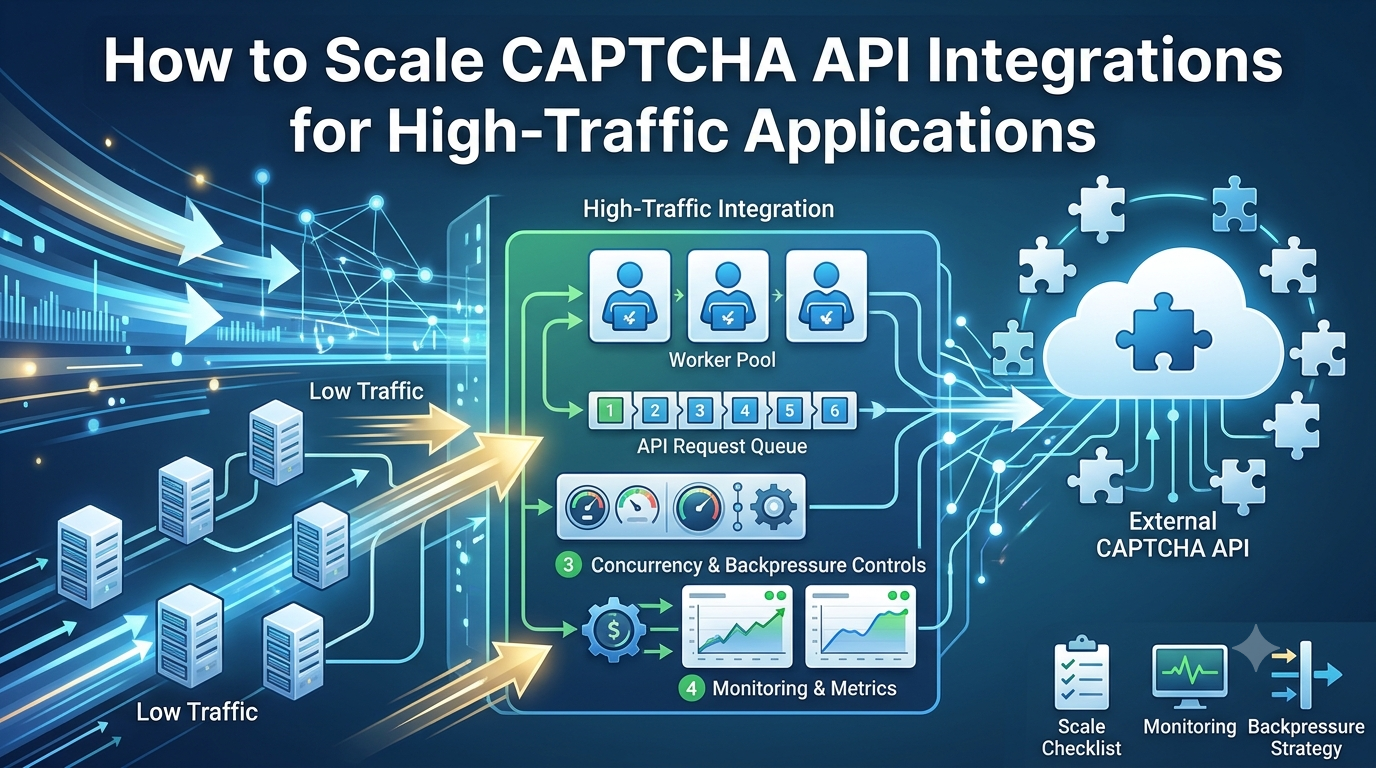
A well-designed architecture separates incoming requests from the workers that communicate with the external API.
This makes it easier to control concurrency, absorb temporary bursts, and prevent an overloaded dependency from exhausting the entire application.
A common architecture
Application Clients
        |
        v
Application Backend
        |
        v
Authentication and Validation
        |
        v
Queue or Job Scheduler
        |
        v
Controlled Worker Pool
        |
        v
External CAPTCHA API
        |
        v
Result Processing
        |
        v
Application Response or Job Status
This is a general architecture pattern, not a required AllCaptcha integration design.
Benefits of separating request intake and processing
Traffic smoothing: A queue can absorb short bursts when incoming work temporarily exceeds processing capacity.
Concurrency control: Workers can limit the number of simultaneous external requests.
Fault isolation: A temporary dependency failure does not necessarily block the entire request-handling layer.
Independent scaling: Application servers and workers can be scaled separately when the workload permits.
Better observability: Queue depth, wait time, worker utilization, and API latency can be measured independently.
Synchronous versus asynchronous processing
Not every application needs a queue.
Use synchronous requests when the operation is short, the application requires an immediate response, and traffic remains manageable.
Consider asynchronous processing when tasks can run in the background, traffic is bursty, or the application needs controlled retries and durable job tracking.
The choice depends on user experience, API behavior, and system requirements. A queue adds complexity and should not be introduced without a clear benefit.
5. Use Queues and Worker Pools
A queue separates the arrival of work from the rate at which workers process it.
When incoming traffic temporarily exceeds available capacity, the queue stores pending jobs rather than allowing every request to start immediately.
How a worker pool works
A worker pool contains a controlled number of workers. Each worker processes a job and then becomes available for another one.
For example:
- The application receives 500 jobs in a short burst.
- The queue stores pending jobs.
- A configured number of workers process jobs concurrently.
- Completed jobs are acknowledged or recorded.
- Remaining jobs wait until capacity becomes available.
The numbers in this example are illustrative. Actual queue sizes and worker counts should be based on measured workload, available resources, and provider limits.
Choose an appropriate queue
Common options include:
- Redis-backed job queues.
- RabbitMQ.
- Amazon Simple Queue Service (SQS).
- Google Cloud Tasks or equivalent managed queue services.
- Cloud-native event and messaging systems.
Choose based on durability, retry support, delivery semantics, monitoring, operational complexity, and integration with your existing infrastructure.
Make jobs safe to retry
Queue systems may deliver a job more than once, depending on their configuration and delivery semantics.
Design job processing to tolerate duplicate delivery where possible.
For example, store a unique internal job identifier and record completion state so that a repeated message does not unintentionally trigger duplicate business actions.
If the external API supports idempotency keys or another documented duplicate-prevention mechanism, follow its official guidance. Do not assume that submitting identical requests automatically makes an operation idempotent.
Set queue limits
An unlimited queue can hide an overloaded system until memory, storage, or processing delays become unacceptable.
Define limits for:
- Maximum queue depth.
- Maximum job age.
- Job expiration.
- Maximum retry attempts.
- Dead-letter handling.
- Alert thresholds.
When the system reaches capacity, it should follow a deliberate policy instead of accumulating work indefinitely.
6. Control Concurrency and Request Volume
Concurrency is the number of operations running at the same time.
Increasing concurrency can improve throughput when the system has spare capacity. However, excessive concurrency can exhaust local resources, overload downstream dependencies, and trigger rate limits.
Why uncontrolled concurrency is risky
Suppose every incoming application request starts a new external API request immediately.
If traffic increases suddenly, the application may create thousands of simultaneous operations. This can cause:
- Excessive memory consumption.
- Too many open connections.
- Increased latency.
- More timeouts.
- Rate-limit responses.
- Large retry bursts.
A concurrency limit places a boundary on the number of operations that may run simultaneously.
Concurrency versus requests per second
These are different measurements.
- Concurrency measures how many operations are in progress.
- Request rate measures how many requests are initiated over a time period.
A system can have low concurrency but high request volume if operations finish quickly. Conversely, slow operations can create high concurrency even at a moderate request rate.
A robust integration may need both a concurrency limit and a request-rate limiter.
Use adaptive limits carefully
Some systems adjust concurrency based on latency, error rates, and available capacity.
An adaptive controller may reduce traffic when failures increase and gradually raise it when conditions improve.
Such systems require reliable metrics, clear safety bounds, and testing. A simple fixed limit is often a better starting point than an overly complex adaptive design.
Always remain within the provider's documented usage limits.
7. Implement Backpressure
Backpressure is a mechanism for slowing or limiting incoming work when a downstream component cannot process it quickly enough.
Without backpressure, an overloaded worker pool may continue accepting jobs faster than it can complete them.
Common backpressure strategies
Bounded queues: Stop or limit new submissions when the queue reaches a defined size.
Admission control: Accept only work that the system has capacity to handle.
Request rejection: Return an appropriate response when the application cannot safely accept more work.
Producer throttling: Slow the component that creates jobs.
Load shedding: Drop or defer nonessential work when resources are under severe pressure.
Concurrency limits: Prevent the worker pool from starting too many operations at once.
Example overload policy
A background processing system might use the following policy:
- Accept jobs while queue depth remains within the configured limit.
- Issue a warning when queue wait time exceeds the expected range.
- Slow job creation if the queue continues growing.
- Reject or defer additional nonessential jobs when capacity is exhausted.
- Alert operators when the system remains overloaded.
- Resume normal intake when the backlog returns to a healthy level.
This prevents a temporary traffic spike from becoming a prolonged outage.
For user-facing applications, communicate temporary unavailability clearly and provide a retry path where appropriate. Avoid promising completion if the application cannot reliably process the job.
8. Optimize HTTP Connections
HTTP connection management can influence throughput, latency, and resource consumption.
Creating a new connection for every request may add unnecessary overhead. Reusing connections can reduce repeated connection setup costs, depending on the client and server configuration.
Use a maintained HTTP client
Choose a client that supports appropriate connection reuse, timeout handling, and modern TLS behavior.
For example, modern Node.js applications can use built-in fetch() or a maintained HTTP client library.
The correct configuration depends on the runtime, client implementation, and API provider.
Configure connection pools carefully
A connection pool can limit the number of open connections and reuse existing ones.
When tuning a pool, consider:
- Maximum connections.
- Idle connection behavior.
- Connection timeouts.
- Request timeouts.
- Keep-alive support.
- Proxy configuration.
- Expected concurrency.
A pool that is too small can become a bottleneck. A pool that is too large can consume unnecessary resources or create excessive downstream concurrency.
Do not assume that the optimal pool size equals the number of incoming users.
Avoid unnecessary payloads
Send only the fields required by the documented API operation.
Smaller payloads can reduce serialization overhead and network transfer, although the impact depends on the size of the data and the overall request lifecycle.
Do not remove required fields or change documented request semantics merely to reduce payload size.
9. Handle Rate Limits and Retries
Rate limits protect services from excessive traffic and help maintain predictable resource usage.
A scalable integration must treat rate limiting as a capacity constraint rather than as an error to bypass.
Respond to HTTP 429
When an API returns HTTP 429:
- Record the event and relevant request metadata.
- Check the provider's documented rate-limit policy.
- Inspect
Retry-Afterif the response includes it. - Reduce request frequency where appropriate.
- Apply bounded retries only when permitted.
- Monitor the rate-limit frequency over time.
Do not attempt to evade limits by cycling credentials, distributing traffic to avoid enforcement, or otherwise bypassing provider controls.
Use exponential backoff
Exponential backoff increases the delay between retry attempts.
A simplified formula is:
[ d_n = \min(d_{\max}, d_0 \times 2^n) ]
Where:
- (d_n) is the delay for retry attempt (n).
- (d_0) is the initial delay.
- (d_{\max}) is the maximum delay.
In practice, adding random jitter helps prevent many clients from retrying at the same time.
The formula is a general strategy, not a replacement for provider-specific retry instructions. A Retry-After header or documented policy may take precedence.
Retry only transient failures
Potentially retryable failures may include certain network errors or temporary server errors.
Permanent failures, such as invalid credentials or malformed requests, usually require correction rather than repetition.
Also consider whether the operation can be repeated safely. A retry after a timeout may occur even when the server already processed the original request.
Use documented idempotency mechanisms when available, and set a maximum retry count and overall deadline.
Avoid retry amplification
A retry storm occurs when many clients repeatedly retry failed requests, increasing traffic while the dependency is already unhealthy.
To reduce this risk:
- Use exponential backoff with jitter.
- Limit concurrent retries.
- Apply an overall retry budget.
- Pause or defer work when appropriate.
- Use circuit breakers where justified.
- Monitor retry volume and error rates.
Retries should help recover from temporary failures, not overwhelm the service.
10. Monitor Performance at Scale
Scaling decisions should be based on observed behavior rather than assumptions.
A monitoring dashboard helps you identify bottlenecks, determine when capacity is insufficient, and evaluate whether a change improves the system.
Monitor the following indicators
Throughput: Requests or completed jobs per second.
Latency: p50, p95, and p99 request durations.
Queue health: Queue depth, oldest job age, and average queue wait time.
Worker health: Active workers, utilization, crashes, and processing failures.
Error rates: HTTP errors, timeouts, validation errors, and application-level failures.
Rate-limit activity: Frequency of HTTP 429 responses and retry attempts.
Resource usage: CPU, memory, network utilization, and connection counts.
Cost indicators: Request volume, usage consumption, and infrastructure costs where measurable.
Use alerts based on impact
A queue that grows briefly may be normal during a traffic burst. A queue that grows continuously while completion rates decline is more concerning.
Alerts should combine duration, magnitude, and impact where appropriate.
For example, alert when queue age remains above an established threshold and the worker completion rate is insufficient to clear the backlog.
Similarly, investigate elevated p95 latency alongside rising timeout rates rather than treating every slow request as an incident.
Monitor end-to-end performance
The initial API response time may not represent the total operation duration.
For queued or asynchronous workflows, measure the full path from job creation to completion. This provides a more accurate view of application performance.
For related guidance, see How to Monitor CAPTCHA API Performance and Reliability.
11. Example: A Simple Node.js Worker Pool
The following example illustrates how to process an array of jobs with a fixed concurrency limit.
It demonstrates local worker concurrency only. It is not a complete production queue, rate limiter, or CAPTCHA API client, and it does not include provider-specific request logic.
async function processWithConcurrency(
  jobs,
  concurrency,
  processJob
) {
  if (!Number.isInteger(concurrency) || concurrency < 1) {
    throw new Error("Concurrency must be a positive integer");
  }

  const results = new Array(jobs.length);
  let nextIndex = 0;

  async function worker() {
    while (true) {
      const index = nextIndex++;

      if (index >= jobs.length) {
        return;
      }

      try {
        results[index] = {
          status: "fulfilled",
          value: await processJob(jobs[index])
        };
      } catch (error) {
        results[index] = {
          status: "rejected",
          reason: error instanceof Error
            ? error.message
            : "Unknown error"
        };
      }
    }
  }

  const workerCount = Math.min(concurrency, jobs.length);

  await Promise.all(
    Array.from({ length: workerCount }, () => worker())
  );

  return results;
}
Example usage
const jobs = [
  { id: "job-1" },
  { id: "job-2" },
  { id: "job-3" },
  { id: "job-4" }
];

async function processJob(job) {
  // Replace this with an authorized operation.
  // Add request timeouts, documented rate-limit handling,
  // and provider-specific response validation as needed.
  return { id: job.id, processed: true };
}

processWithConcurrency(jobs, 2, processJob)
  .then((results) => {
    console.log("Completed jobs:", results.length);
  })
  .catch((error) => {
    console.error("Worker pool failed:", error.message);
  });
With a concurrency setting of two, this function starts at most two processJob calls at a time within this invocation.
Important production limitations
This example is intentionally minimal.
It does not provide:
- A persistent queue.
- A request-per-second limiter.
- Cross-process concurrency coordination.
- Retry policies.
- A cancellation mechanism.
- Durable job state.
- Dead-letter handling.
- Graceful shutdown.
- Distributed tracing or metrics.
For a production application, use a queue or job-processing system appropriate to your infrastructure and implement the required safeguards.
Also note that an in-memory concurrency limit applies only to this function invocation. If ten application instances each run the same worker pool, the total concurrency may be much higher. Distributed limits may be necessary to coordinate traffic across instances.
12. Common Scaling Mistakes
Mistake 1: Increasing concurrency without measuring
More concurrent requests do not always mean more completed work. Excessive concurrency can increase failures and resource consumption.
Better approach: Measure latency, throughput, error rates, and resource usage before adjusting concurrency.
Mistake 2: Ignoring provider limits
A system may have spare local capacity but still exceed the external API's permitted usage.
Better approach: Build request-rate and concurrency controls around documented limits.
Mistake 3: Using an unlimited queue
An unlimited queue can hide overload until delays or storage consumption become unacceptable.
Better approach: Set queue capacity, job-age limits, and an explicit overload policy.
Mistake 4: Retrying every failed request
Unrestricted retries can multiply traffic and repeat operations unexpectedly.
Better approach: Classify failures, use bounded backoff, and verify whether retries are safe.
Mistake 5: Scaling only the application servers
Adding more application instances can increase outgoing API traffic without improving downstream capacity.
Better approach: Coordinate scaling across the request intake layer, queue, worker pool, and external API limits.
Mistake 6: Measuring only average latency
A healthy average can hide a small but important group of extremely slow operations.
Better approach: Track latency percentiles and end-to-end completion times.
Mistake 7: Forgetting duplicate job delivery
Queue systems may deliver a job more than once.
Better approach: Use durable job state and documented idempotency mechanisms where available.
Mistake 8: Running load tests without authorization
Uncontrolled testing against a live service can violate usage limits or affect other users.
Better approach: Use mocks, approved staging environments, and authorized load-test arrangements. Confirm the permitted test volume before conducting live tests.
13. CAPTCHA API Scaling Checklist
Use this checklist before deploying a high-traffic integration.
Capacity and architecture
- Measure average and peak request rates.
- Record baseline latency and error rates.
- Identify the main processing bottlenecks.
- Estimate required concurrency.
- Confirm documented provider limits.
- Decide whether synchronous processing or a queue is appropriate.
Queue and worker management
- Set a bounded queue capacity.
- Configure worker concurrency.
- Define maximum job age and overall deadlines.
- Handle duplicate job delivery safely.
- Implement a dead-letter or failed-job process where appropriate.
- Coordinate limits across application instances.
Reliability and rate limiting
- Apply request-rate controls where needed.
- Use finite timeouts.
- Retry only eligible failures.
- Implement backoff and jitter where appropriate.
- Respect documented rate limits and retry instructions.
- Prevent retry storms and uncontrolled queue growth.
Monitoring and operations
- Track throughput and latency percentiles.
- Monitor queue depth and oldest job age.
- Track timeouts, HTTP 429 responses, and retry frequency.
- Alert on sustained overload.
- Review resource usage and cost trends.
- Perform authorized load tests before major scaling changes.
14. Frequently Asked Questions
How do I scale a CAPTCHA API integration?
Start by measuring request volume, latency, errors, and concurrency. Then choose suitable controls such as bounded worker pools, queues, request-rate limiting, timeouts, and monitoring. Ensure that your design respects the provider's documented limits.
Should I use a queue for every CAPTCHA API integration?
No. A queue is useful when work can be processed asynchronously, traffic is bursty, or controlled retries are required. Simple low-volume integrations may work better with direct synchronous requests.
What is the difference between concurrency and request rate?
Concurrency measures the number of operations in progress at a given time. Request rate measures how many requests are initiated per unit of time. A scalable integration may need separate limits for both.
How can I prevent HTTP 429 errors?
Understand the provider's documented limits, control outgoing request volume, avoid unnecessary polling, and follow the documented behavior for rate-limit responses. Do not attempt to bypass provider restrictions.
How many workers should I run?
There is no universal worker count. Start with measured request duration and arrival rate, then test controlled configurations. Respect provider limits and monitor queue time, throughput, errors, and resource consumption.
How do I scale across multiple application instances?
Coordinate concurrency and request-rate controls across instances. A local limit in each process does not guarantee a global limit. Depending on your architecture, a centralized queue, distributed limiter, or shared job scheduler may be appropriate.
How can I prevent retries from overwhelming the API?
Use bounded retries, exponential backoff with jitter, an overall retry budget, and sensible concurrency controls. Stop retrying permanent errors and follow the provider's documented instructions.
How do I test a CAPTCHA API integration under high load?
Begin with load tests against mocks or a controlled staging environment. If a live provider test is necessary, obtain authorization, confirm permitted traffic levels, and use a gradual test plan with monitoring and stop conditions.
Conclusion
Scaling a CAPTCHA API integration requires more than increasing the number of simultaneous requests. It involves measuring the complete workflow, understanding provider limits, controlling concurrency, managing queues, applying backpressure, and designing safe retry behavior.
For applications with variable traffic, a queue and worker pool can help absorb bursts and provide better control over outgoing requests. For simpler integrations, a well-configured HTTP client and clear concurrency limits may be sufficient.
Start with measurements, make incremental changes, and verify the results through monitoring and authorized load testing. Avoid uncontrolled retries and never assume that additional local capacity permits unlimited requests to an external service.
A scalable integration should increase throughput while maintaining predictable latency, controlled resource usage, and reliable behavior under both normal and peak workloads.
SEO Metadata
SEO Title: How to Scale CAPTCHA API Integrations for High-Traffic Applications
Meta Description: Learn how to scale CAPTCHA API integrations with queues, worker pools, concurrency limits, backpressure, retries, and performance monitoring.
Focus Keyword: scale CAPTCHA API
Secondary Keywords:
- CAPTCHA API scalability
- high-traffic API integration
- CAPTCHA API concurrency
- API worker pool
- API request queue
- API rate limiting
- API backpressure
- API performance optimization
- scalable API architecture
Suggested URL Slug: scale-captcha-api-high-traffic
Suggested H1: How to Scale CAPTCHA API Integrations for High-Traffic Applications
Internal Linking Suggestions
Link this article to relevant AllCaptcha resources using their actual published URLs:
- CAPTCHA API Rate Limits: Best Practices for Developers — link from the rate-limiting and HTTP 429 sections.
- How to Monitor CAPTCHA API Performance and Reliability — link from the performance metrics and monitoring sections.
- How to Debug CAPTCHA API Integration Issues: A Step-by-Step Guide — link from the troubleshooting and error-handling sections.
- How to Integrate a CAPTCHA Solver API with Node.js: A Complete Guide — link from the worker-pool code example.
Suggested Image Alt Text
Scalable CAPTCHA API architecture with queues and worker poolsHigh-traffic API integration using concurrency limits and request queuesAPI monitoring dashboard showing throughput latency and error rates
Recommended Schema Markup
Consider using Article and BreadcrumbList structured data where appropriate. Ensure that the schema accurately represents the published page and its visible content. FAQ schema does not guarantee enhanced search results.