reCAPTCHA v2 vs reCAPTCHA v3: What Is the Difference?
Google reCAPTCHA is one of the most widely used security technologies for protecting websites from automated traffic, spam, and abusive activity.
If you are working with website development, QA testing, RPA, or browser automation, you may have encountered both reCAPTCHA v2 and reCAPTCHA v3.
Although they have the same general purpose, reCAPTCHA v2 and reCAPTCHA v3 work in very different ways.
In this guide, we will explain the main differences between reCAPTCHA v2 vs reCAPTCHA v3, how each version works, their advantages and disadvantages, and how developers can choose the right approach for their applications.
Important: CAPTCHA-related automation should only be performed on websites and systems where you have permission to test or automate. Do not use these techniques to bypass security controls or gain unauthorized access.
What Is Google reCAPTCHA?
Google reCAPTCHA is a security service designed to help websites distinguish legitimate users from automated requests.
Websites can use reCAPTCHA to protect:
- Login pages
- Registration forms
- Contact forms
- Comment sections
- Checkout pages
- Password reset forms
- Other sensitive actions
The goal is to reduce unwanted automated activity while allowing legitimate users to continue using the website.
There are several generations of reCAPTCHA, but reCAPTCHA v2 and reCAPTCHA v3 remain important concepts for developers.
What Is reCAPTCHA v2?
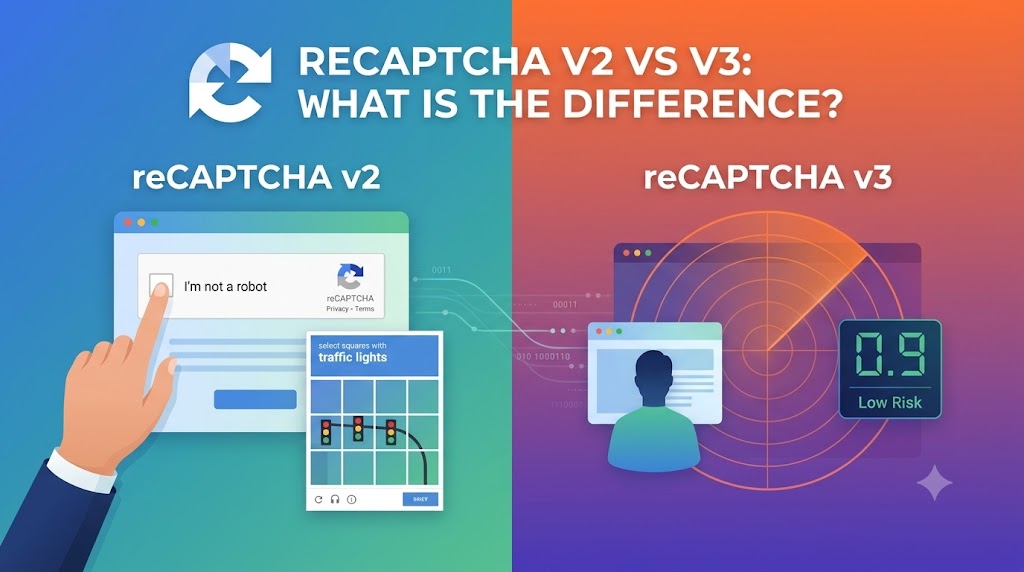
reCAPTCHA v2 is the traditional version of Google's reCAPTCHA system.
One of its most recognizable features is the:
"I'm not a robot"
checkbox.
When a user interacts with the checkbox, reCAPTCHA evaluates the interaction and may allow the user to continue immediately.
In some situations, the user may be presented with an additional visual challenge.
For example, the system may ask the user to identify specific objects within a group of images.
This creates a visible interaction between the user and the CAPTCHA system.
How Does reCAPTCHA v2 Work?
A simplified reCAPTCHA v2 workflow looks like this:
User opens website
        ↓
User interacts with reCAPTCHA
        ↓
reCAPTCHA evaluates interaction
        ↓
Additional challenge if required
        ↓
Verification
        ↓
Website processes the request
The exact behavior depends on Google's risk assessment and the configuration selected by the website.
Types of reCAPTCHA v2
reCAPTCHA v2 has been implemented in several forms.
Common examples include:
- Checkbox reCAPTCHA
- Invisible reCAPTCHA
- Android reCAPTCHA
The checkbox version is the most recognizable implementation.
What Is reCAPTCHA v3?
reCAPTCHA v3 takes a different approach.
Instead of asking users to solve a visible CAPTCHA challenge, reCAPTCHA v3 is designed to work in the background.
It generates a score representing the likelihood that an interaction is legitimate or automated.
The website can then use that score when deciding what action to take.
A simplified workflow looks like this:
User visits website
        ↓
reCAPTCHA evaluates interaction
        ↓
Risk score generated
        ↓
Website evaluates score
        ↓
Website decides what action to take
This means users typically do not have to click an "I'm not a robot" checkbox.
reCAPTCHA v2 vs v3: The Main Difference
The biggest difference between reCAPTCHA v2 and v3 is the way they evaluate users.
reCAPTCHA v2 generally relies on an explicit user interaction or challenge.
reCAPTCHA v3 uses a risk score to help websites determine whether an interaction appears legitimate.
Here is a simplified comparison:
| Feature | reCAPTCHA v2 | reCAPTCHA v3 |
|---|---|---|
| Visible challenge | Sometimes | Generally no |
| User interaction | Common | Minimal |
| Risk score | No | Yes |
| Background evaluation | Limited | Yes |
| User experience | More noticeable | More seamless |
| Developer control | Moderate | High |
| Site integration | Straightforward | Requires score-based logic |
reCAPTCHA v2 vs v3 User Experience
User experience is one of the biggest differences.
With reCAPTCHA v2, users may see a checkbox or an additional challenge.
For example:
☐ I'm not a robot
If additional verification is required, the user may have to complete another interaction.
With reCAPTCHA v3, users generally do not see a CAPTCHA challenge.
The evaluation happens in the background, allowing websites to maintain a smoother user experience.
For websites where conversion rate and usability are important, this difference can be significant.
How reCAPTCHA v3 Uses Scores
One of the most important concepts in reCAPTCHA v3 is the risk score.
The score generally ranges from:
0.0 → Higher risk
1.0 → Lower risk
A website can define how it wants to respond to different score levels.
For example, a website could implement logic similar to:
High score
    ↓
Allow action

Medium score
    ↓
Additional verification

Low score
    ↓
Review or block
The exact thresholds should be determined by the website owner based on testing and the characteristics of the application.
This gives developers more flexibility than a simple pass-or-fail CAPTCHA.
Advantages of reCAPTCHA v2
reCAPTCHA v2 has several advantages.
1. Easy to Understand
The checkbox model is familiar to users.
Most users immediately understand what they need to do.
2. Clear Verification
A website can explicitly ask a user to complete a verification step.
This can be useful for forms and actions where an additional security layer is desirable.
3. Straightforward Integration
For many applications, reCAPTCHA v2 can be relatively simple to implement.
4. Familiar User Experience
Because reCAPTCHA v2 has been widely deployed, users are already familiar with the interface.
Disadvantages of reCAPTCHA v2
Despite its advantages, reCAPTCHA v2 also has limitations.
Additional User Interaction
Users may need to click a checkbox or complete an image challenge.
Potential Friction
Additional challenges can interrupt the user's workflow.
Less Seamless UX
Compared with a background scoring system, visible CAPTCHA challenges can create more friction.
Advantages of reCAPTCHA v3
reCAPTCHA v3 provides several benefits for modern websites.
1. Minimal User Interaction
Users generally do not need to complete a visible CAPTCHA challenge.
2. Better User Experience
Because verification can happen in the background, the process can feel more natural.
3. Risk-Based Decisions
Developers can use the score to determine how their application should respond.
4. Flexible Security Policies
A website can combine the score with other signals and security controls.
For example:
High confidence
→ Continue

Medium confidence
→ Additional verification

Low confidence
→ Security review
Disadvantages of reCAPTCHA v3
reCAPTCHA v3 also introduces additional considerations.
Requires More Application Logic
Developers need to decide how scores should affect application behavior.
Simply installing reCAPTCHA v3 does not automatically define the security policy for every application.
Scores Need Monitoring
Website owners should monitor how scores behave in their particular environment.
A threshold that works well for one website may not work equally well for another.
No Simple Pass/Fail Interaction
Unlike a traditional checkbox, reCAPTCHA v3 provides a risk score that needs to be interpreted by the application.
Which Is Better: reCAPTCHA v2 or v3?
There is no universal answer.
The right choice depends on the website's security requirements and user experience goals.
Choose reCAPTCHA v2 if:
- You want a visible verification step
- Your application benefits from explicit user interaction
- You prefer a familiar CAPTCHA interface
- You want a relatively straightforward verification workflow
Choose reCAPTCHA v3 if:
- You want minimal user interaction
- You want risk-based decision making
- You are comfortable implementing score-based logic
- User experience is a major priority
- You want to evaluate activity across different actions
reCAPTCHA v2 vs v3 for Developers
From a development perspective, the two systems require different approaches.
With reCAPTCHA v2, the workflow generally revolves around a verification interaction.
With reCAPTCHA v3, developers need to think about:
- Actions
- Scores
- Thresholds
- Server-side verification
- Risk management
- Application-specific responses
A simplified architecture for v3 could look like:
User Action
     ↓
reCAPTCHA v3
     ↓
Risk Score
     ↓
Backend Verification
     ↓
Application Decision
This makes reCAPTCHA v3 particularly interesting for developers building more sophisticated risk-management systems.
reCAPTCHA v2 vs v3 for Automated Testing
Automated testing is another important consideration.
If you are testing a website that uses reCAPTCHA, you should use the testing mechanisms and configurations recommended by the platform whenever possible.
For applications you own or have explicit permission to test, a dedicated test environment is usually preferable to attempting to interact with production security challenges.
A good testing environment can include:
- Test CAPTCHA configurations
- Mock verification responses
- Dedicated test accounts
- Staging environments
- Automated integration tests
This allows developers to test application behavior without weakening production security.
Can reCAPTCHA v2 and v3 Be Used Together?
Yes, a website can use different verification mechanisms for different actions.
For example, a website could use background risk evaluation for low-risk actions and require stronger verification for sensitive actions.
A simplified architecture could be:
Low-risk action
      ↓
Risk evaluation
      ↓
Continue

Higher-risk action
      ↓
Additional verification
      ↓
Continue or reject
The appropriate architecture depends on the site's security requirements.
How Do CAPTCHA APIs Fit Into the Development Workflow?
Developers working on authorized automation or testing projects may also encounter CAPTCHA API services.
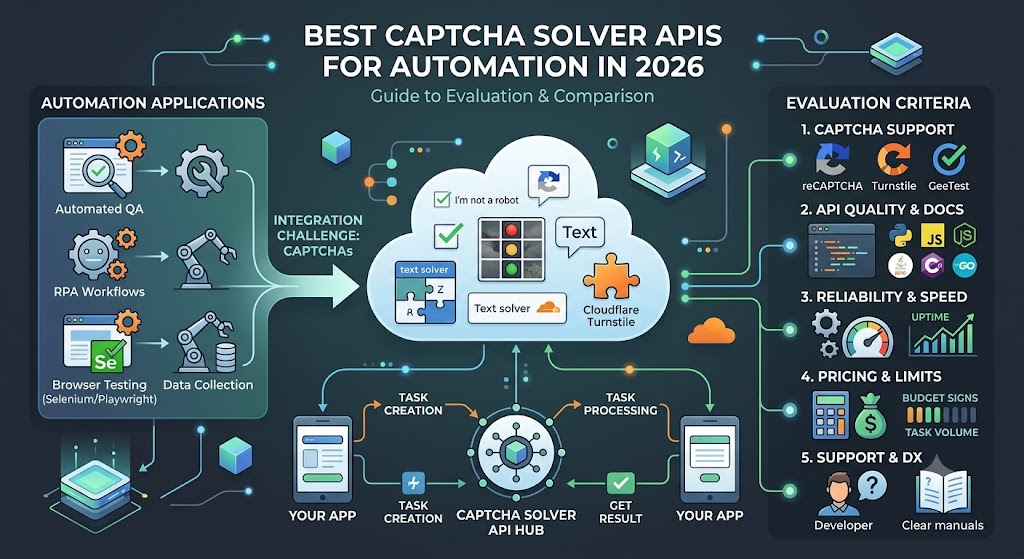
A CAPTCHA Solver API typically provides a programmatic interface for submitting supported CAPTCHA tasks and retrieving results.
A typical API architecture looks like:
Application
    ↓
Create Task API
    ↓
Task Processing
    ↓
Get Result API
    ↓
Application
For developers using Python, Node.js, PHP, or other programming languages, this can be integrated into a larger authorized automation workflow.
However, CAPTCHA-solving APIs should only be used where the automation is permitted.
reCAPTCHA v2 vs v3: Quick Comparison
| Category | reCAPTCHA v2 | reCAPTCHA v3 |
|---|---|---|
| Main approach | User verification | Risk scoring |
| Visible interaction | Usually | Usually no |
| Image challenge | Possible | No traditional challenge |
| Score | No | Yes |
| User friction | Higher | Lower |
| Implementation style | Verification-based | Risk-based |
| Best for | Explicit verification | Seamless risk evaluation |
| Developer responsibility | Verification handling | Score interpretation and policy |
Frequently Asked Questions
Is reCAPTCHA v2 better than v3?
Not necessarily. They are designed around different approaches. reCAPTCHA v2 provides more explicit user verification, while reCAPTCHA v3 focuses on risk scoring and minimal user interaction.
Is reCAPTCHA v3 invisible?
reCAPTCHA v3 is designed to operate without requiring users to complete a traditional visible CAPTCHA challenge. Websites can use the resulting score as part of their security decision.
Does reCAPTCHA v3 use a score?
Yes. reCAPTCHA v3 provides a risk score that websites can use as one input when deciding how to handle an action.
Which reCAPTCHA is better for user experience?
reCAPTCHA v3 generally provides a smoother user experience because users usually do not have to complete a visible CAPTCHA challenge.
Can developers use reCAPTCHA v2 and v3 together?
A website can implement different verification approaches for different actions depending on its security architecture and requirements.
Can I test reCAPTCHA automatically?
Yes, but testing should be performed in an authorized environment. For applications you control, using dedicated testing configurations, mocks, or staging environments is generally preferable to attempting to bypass production security mechanisms.
Final Thoughts
The key difference between reCAPTCHA v2 and reCAPTCHA v3 is their approach to verification.
reCAPTCHA v2 focuses on explicit user interaction and may present a visible challenge.
reCAPTCHA v3 focuses on background risk analysis and provides a score that websites can use to make security decisions.
For websites that prioritize a simple and familiar verification process, reCAPTCHA v2 can be a practical option.
For websites that want a more seamless user experience and are prepared to implement risk-based decision making, reCAPTCHA v3 may be a better fit.
Before choosing an implementation, developers should consider the type of application, user experience, security requirements, testing strategy, and maintenance requirements.
For developers working with authorized automation and API integrations, understanding the differences between CAPTCHA technologies is also important when designing reliable testing and RPA workflows.